
No per-employee, per-customer or per-centre charges
Pricing does not depend on how many employees, customers or centres you add.
See how →How EasyDairyERP is built and run: the stack, your own dedicated cloud server and S3 backups, security and approvals, Android, iOS and Windows apps, offline capture, analyser, IoT and GPS integration, exports and APIs, and monthly updates at no extra cost.
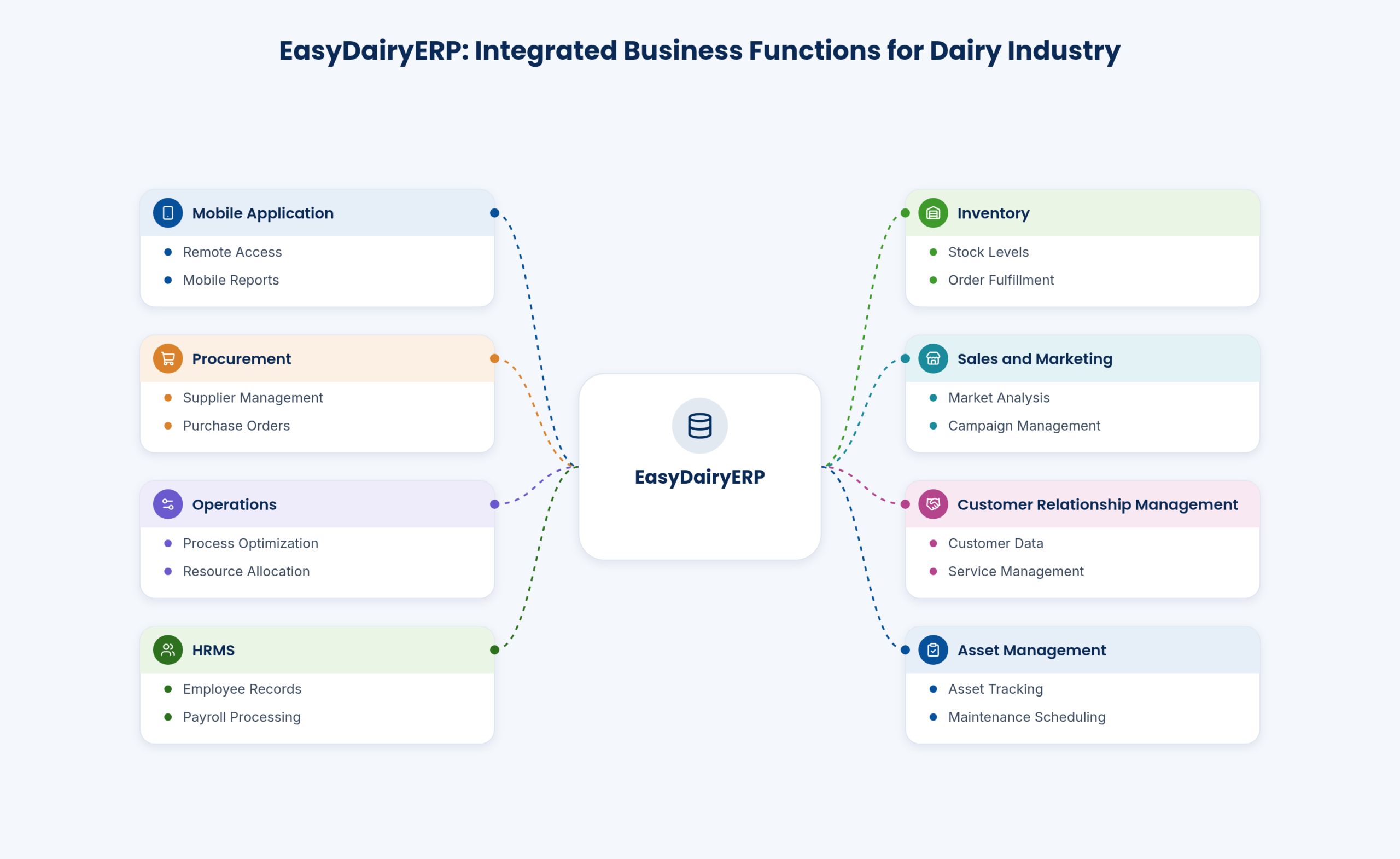
EasyDairyERP is one ERP built only for Indian dairies. It covers a dairy from the village collection centre to the customer’s invoice: procurement, chilling centres, production and quality, stores and purchase, sales and marketing, HRMS and payroll, assets, vehicles, CRM, requests, canteen and financial reporting. Every module works on the same data, so a litre that is tested at the village shows up in the farmer’s bill, the plant’s solids matching, the stores and the daily P&L without anyone re-typing it.
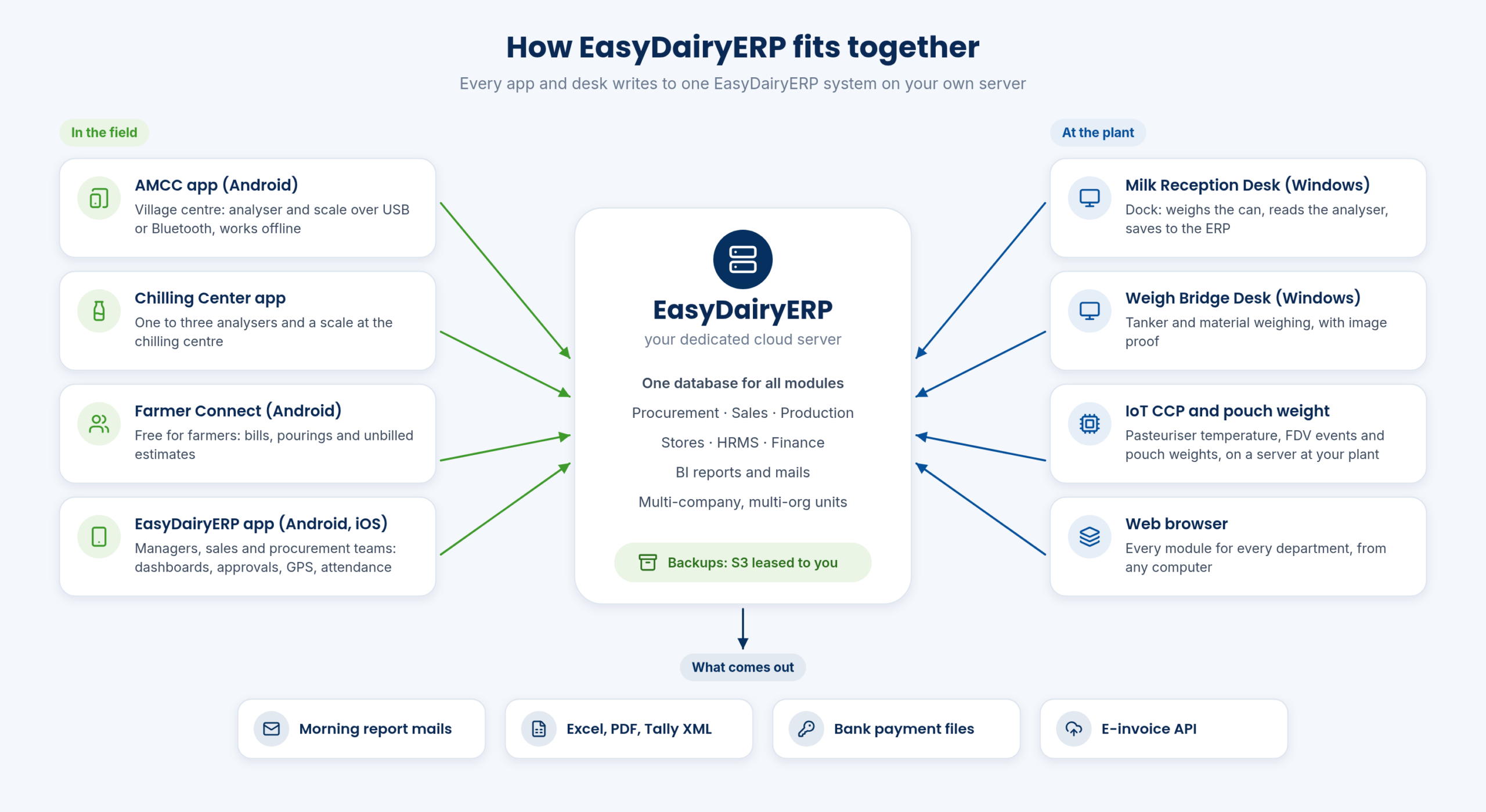
People reach the system in four ways. Office teams use the web application in a browser. Managers, procurement and sales teams and every employee use the EasyDairyERP app on Android or iOS. Field points use dedicated apps: the AMCC app at village centres, the Chilling Center app and the free Farmer Connect app. At the plant dock and the weighbridge, Windows desk software (Milk Reception Desk and Weigh Bridge Desk) reads the scales and analysers directly.
Machines feed the same system. Milk analysers and weighing scales connect over USB or Bluetooth, the pasteuriser’s CCP data and pouch weights come in through IoT hardware, and phones send GPS beats from the field. What comes out is just as connected: morning report mails, Excel and PDF downloads, Tally XML, bank payment files and the e-invoice API integration.
For the dairy this means one version of the truth. The MD, the procurement head, the sales head, the CFO, stores, maintenance and production all look at the same figures, and the old habit of reconciling one department’s spreadsheet against another’s falls away.
| Built for | Indian dairies, from village collection to customer invoice |
|---|---|
| Access | Web browser, Android, iOS, Windows desk software |
| Modules | Procurement, Production & Quality, Sales & Marketing, Stores/Inventory, HRMS, Assets, Vehicles, CRM, Requests, Canteen, Financial Reporting |
| Data | One database for all modules |
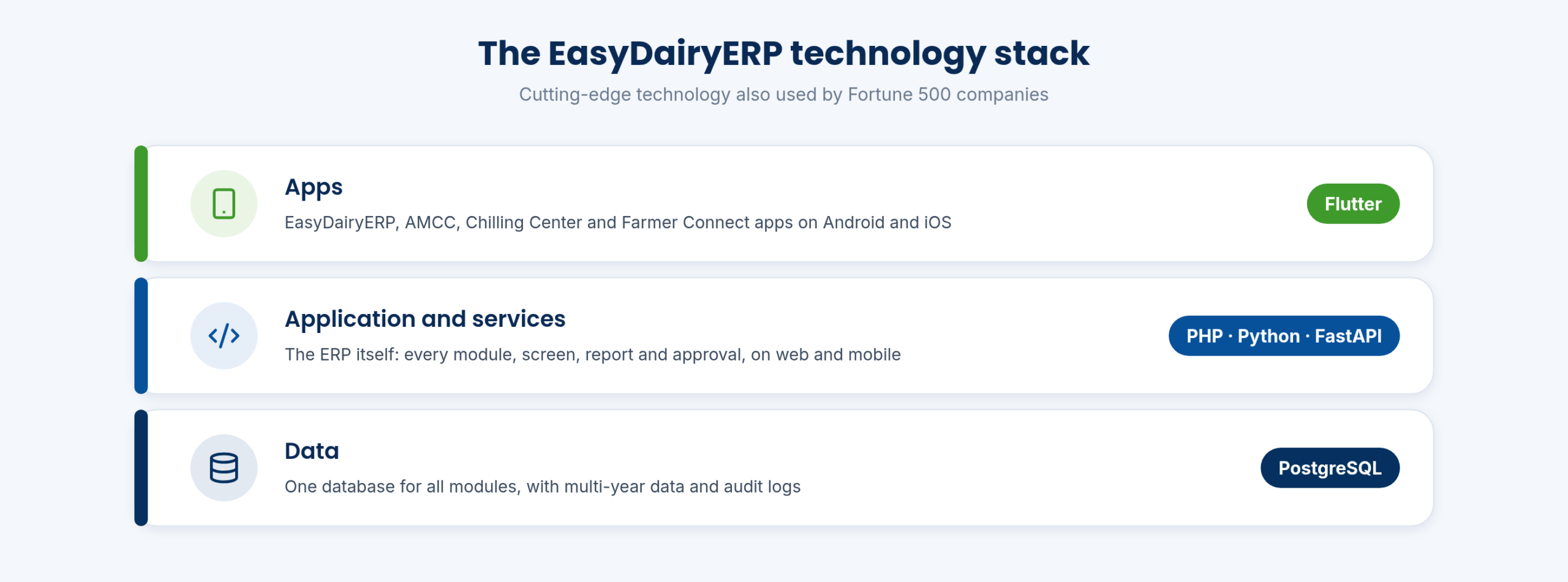
EasyDairyERP is built on PostgreSQL, PHP, FastAPI, Python and Flutter: cutting-edge technology also used by Fortune 500 companies. PostgreSQL holds the data for every module in one database. PHP, Python and FastAPI run the application and its services. The mobile apps are built with Flutter, which is how the EasyDairyERP app runs on both Android and iOS, and how it can keep location logging running as a foreground task for field staff.
PostgreSQL’s transactions keep data consistent even when many people are entering it at once: village centres uploading shifts, the dock saving tanker receipts and the sales team billing, all at the same moment. That matters in a dairy, where the same litre of milk is touched by procurement, production, stores, sales and finance.
The stack is also free of third-party licences: there are no additional licensing costs from overseas software companies on top of your plan. The team behind it has worked with PHP, Python, mobile applications, SQLite, .NET and database administration, with an in-house systems administration team covering Linux and Windows.
| Database | PostgreSQL |
|---|---|
| Application and services | PHP, Python, FastAPI |
| Mobile apps | Flutter (Android and iOS) |
| Licensing | Third-party licence free: no additional licensing costs from abroad companies |
EasyBIS (Easy Business Information Solutions) has built EasyDairyERP for Indian dairies since 2015. The technical people behind it worked on Fortune 500 companies’ order management systems, and the team’s background includes banking-domain systems, order processing and optimisation, and SAP ERP implementation. That is combined with more than 40 years of dairy domain expertise in the team.
The team includes an in-house systems administration team with full Linux and Windows expertise and strong database skills, so firewalls, databases and system security are handled by the same people who write the software. All code is kept in a central version control system, and the team’s logging system and custom tools make problems easier to solve during deployment.
Because the managers, including the founders, are ex-developers with business skills, they ask the right questions early. The result is software that uses the terms Indian dairies already use, puts all the data on one screen, and delivers the top business intelligence to the right people at the click of a button.
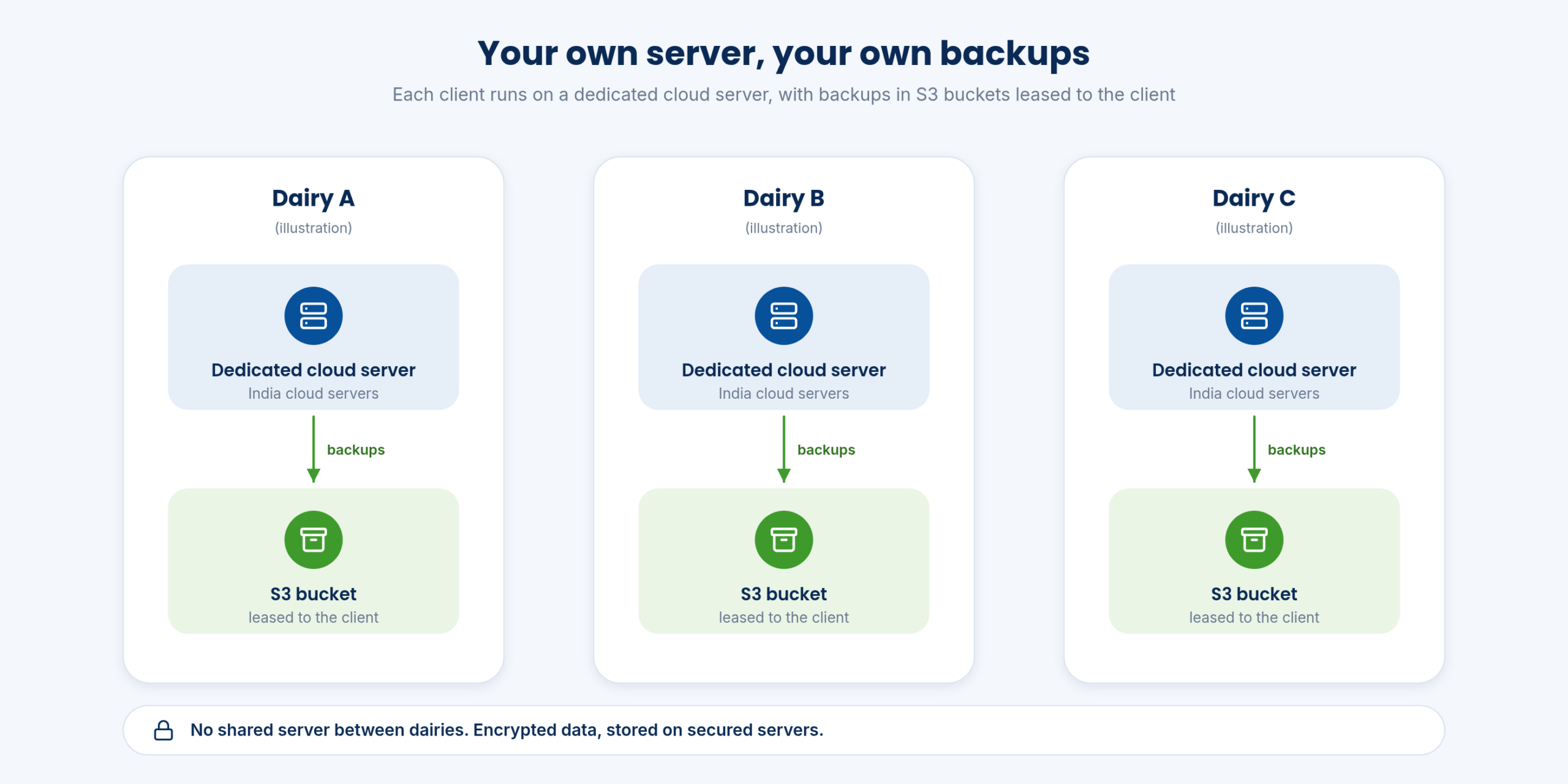
Every client runs EasyDairyERP on their own dedicated cloud server. Your data is not mixed with another dairy’s data on a shared machine, and the capacity of the server is there for your users, your village centres and your reports alone.
The servers are India cloud servers. The cloud plan includes yearly hardware updates, monthly statutory, GST and software version updates, core software and technology updates, encrypted data stored on secured servers, and 100% of the mobile functionality.
For the dairy, the server, its yearly hardware updates and its monthly software updates all come with the cloud plan, and the data sits on a server that belongs to its own installation.
| Server | Dedicated cloud server per client |
|---|---|
| Location | India cloud servers |
| Hardware | Yearly hardware updates |
| Software | Monthly statutory, GST and version updates; core software and technology updates |
| Mobile | 100% mobile functionality access |
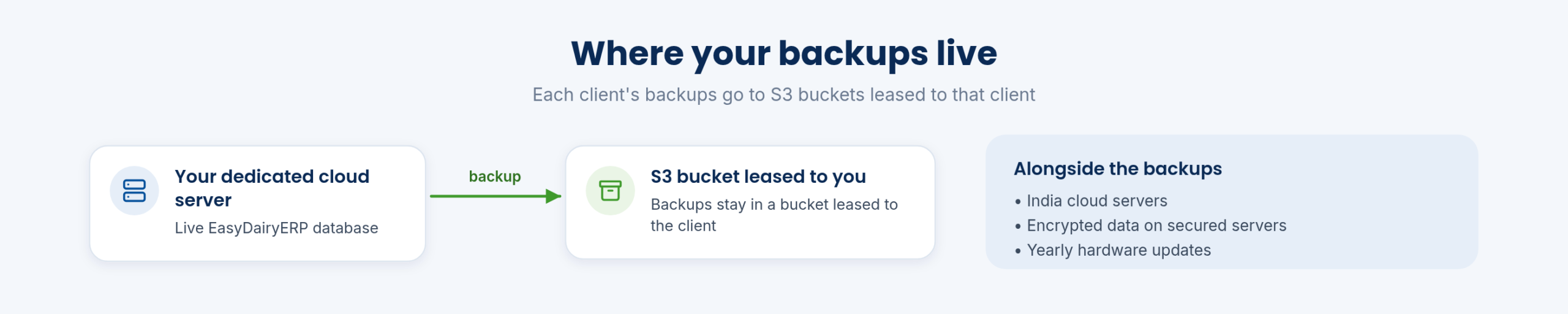
Backups of your EasyDairyERP database are kept in S3 buckets leased to the client. The backups sit in storage that is leased for your dairy, rather than in a common pool shared with other customers.
Together with the dedicated server, this gives each dairy a clear answer to the auditor’s question of where its data and its copies are kept. The copies of many years of procurement, sales, stores and finance data are kept in the dairy’s own backup storage.
| Backup storage | S3 buckets leased to the client |
|---|---|
| Scope | EasyDairyERP database |
EasyDairyERP keeps several years of data instantly accessible, with an audit log that meets statutory audit requirements. Old invoices, quotes, stock transfers and bills stay in the system for years, so a question about last year’s purchase or a farmer’s earlier bill can be answered from the screen rather than from a box file.
Documents are stored with the transactions: incoming delivery challans and invoices, bills, service records and contracts, and weighbridge images as proof for every material. Stores works almost like a mini accounts system, with document storage and retrieval.
Multi-year data also feeds analysis. Detailed customer and vendor analysis across years, year-on-year dashboards on the mobile app, and instant batch traceability for FSSAI audits all draw on the same history. The CFO and the auditor get the drill-down they need without a separate archive system.
| History | Multiple years of data with instant access |
|---|---|
| Audit | Audit log for statutory audit requirements |
| Documents | DC, invoices, bills, service records, contracts; weighbridge image proofs |
| Traceability | Instant batch traceability for FSSAI audits |
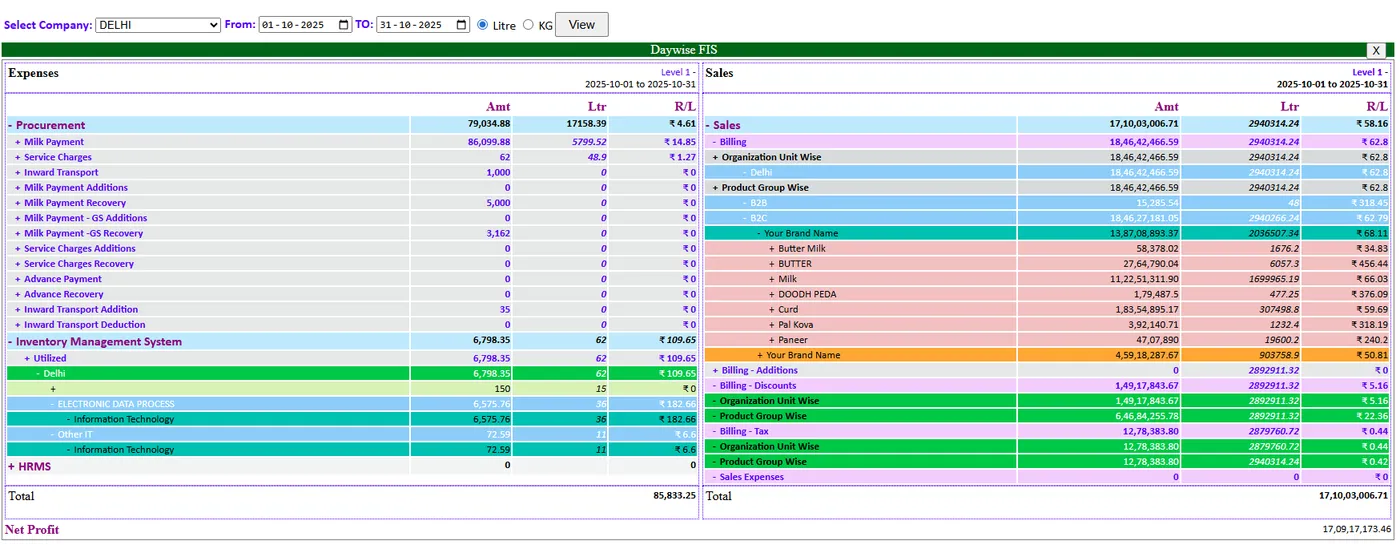
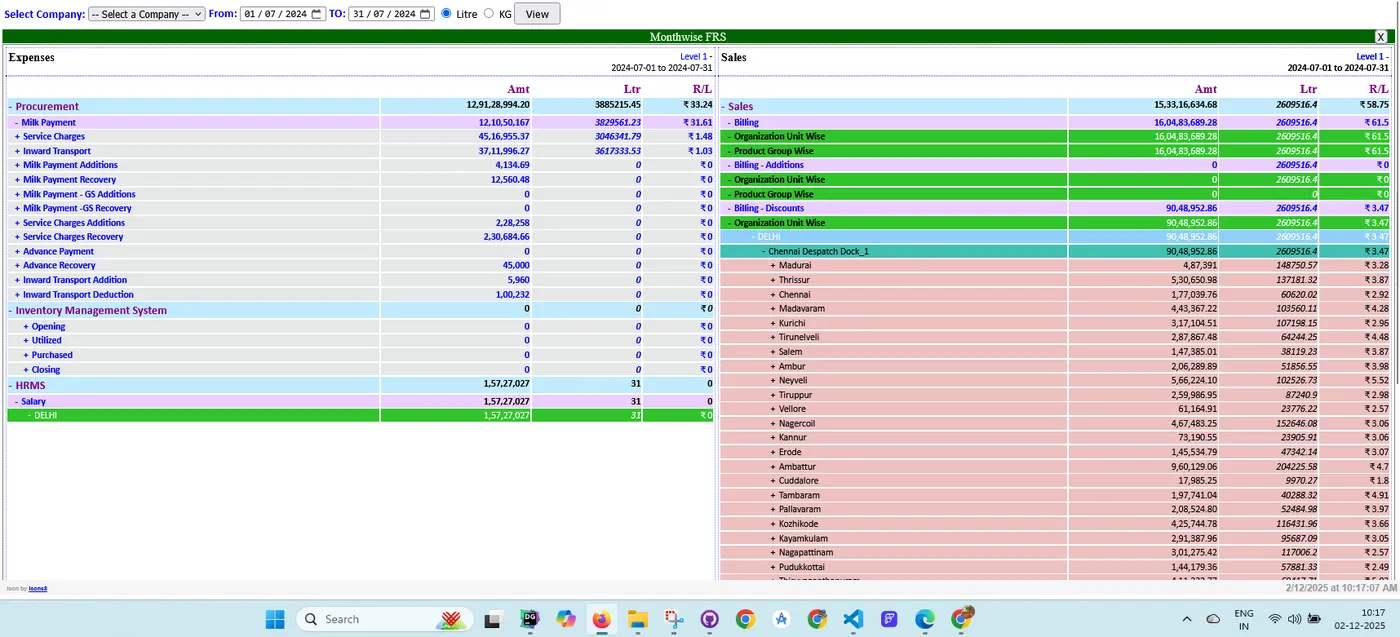
On the cloud plan, data is encrypted and stored on secured servers. The security architecture has been strengthened and is live, and security is handled in-house by a systems team with Linux and Windows expertise that looks after firewalls, databases and system security.
Every user signs in with their own credentials, and EasyDairyERP does not let users create accounts or sign in through third-party social media services such as Google or Facebook. Sensitive work, such as material requests, purchase orders, invoices and payments, goes through approval steps, so requests, orders and payments are approved before they go through.
Location tracking for employees is switched on by the company’s HR and runs with the phone’s explicit location permissions on Android and iOS. The privacy policy lists these permissions, so staff know exactly what is collected and why.
| Data | Encrypted, stored on secured servers |
|---|---|
| Sign-in | Individual user credentials; no social-media login |
| Controls | Approval workflows for requests, POs, invoices and payments |
| Location data | Enabled by HR, with OS location permissions |
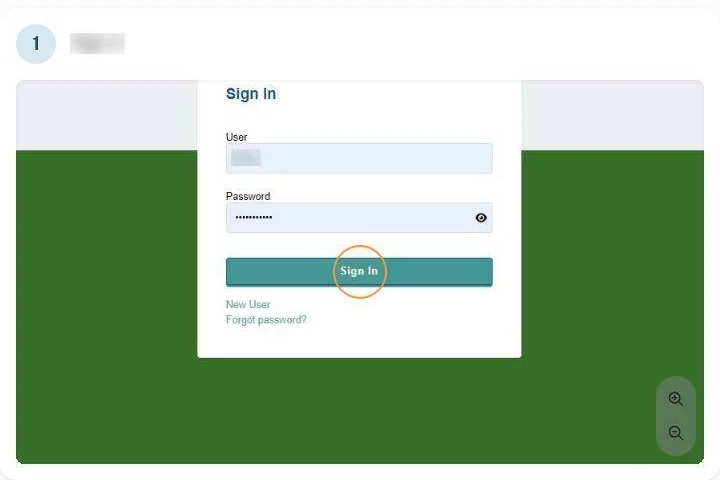
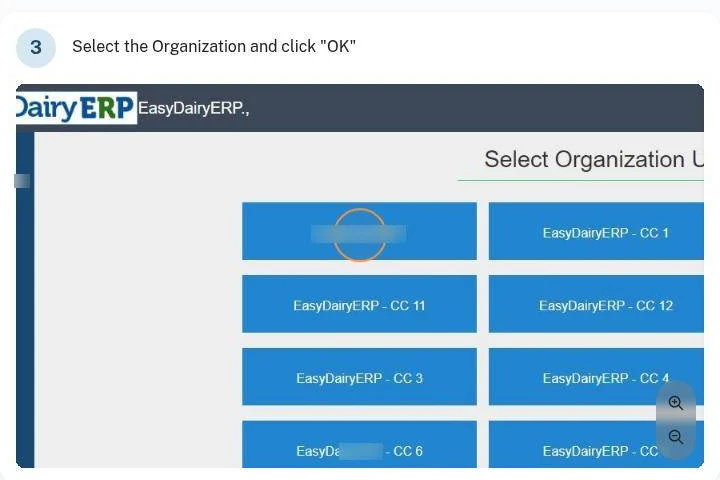
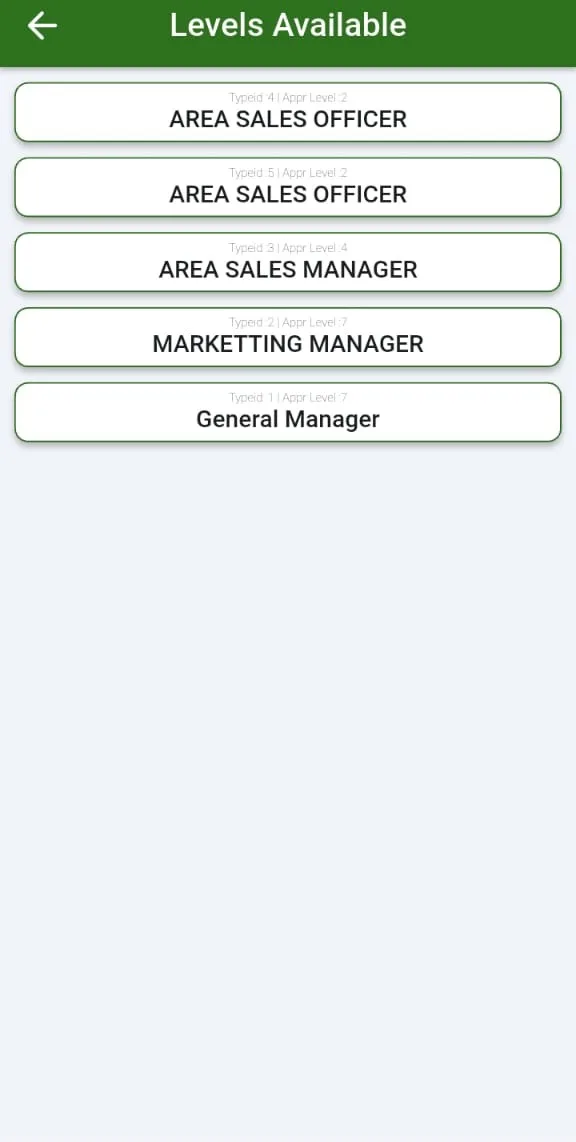
Each employee logs in with their own mail ID and password. On signing in, the user picks the organisation they are working in, and HRMS records each person’s department and employee type. The modules a person uses follow from that set-up: a stores user raises requests, a manager approves them, and accounts releases payments.
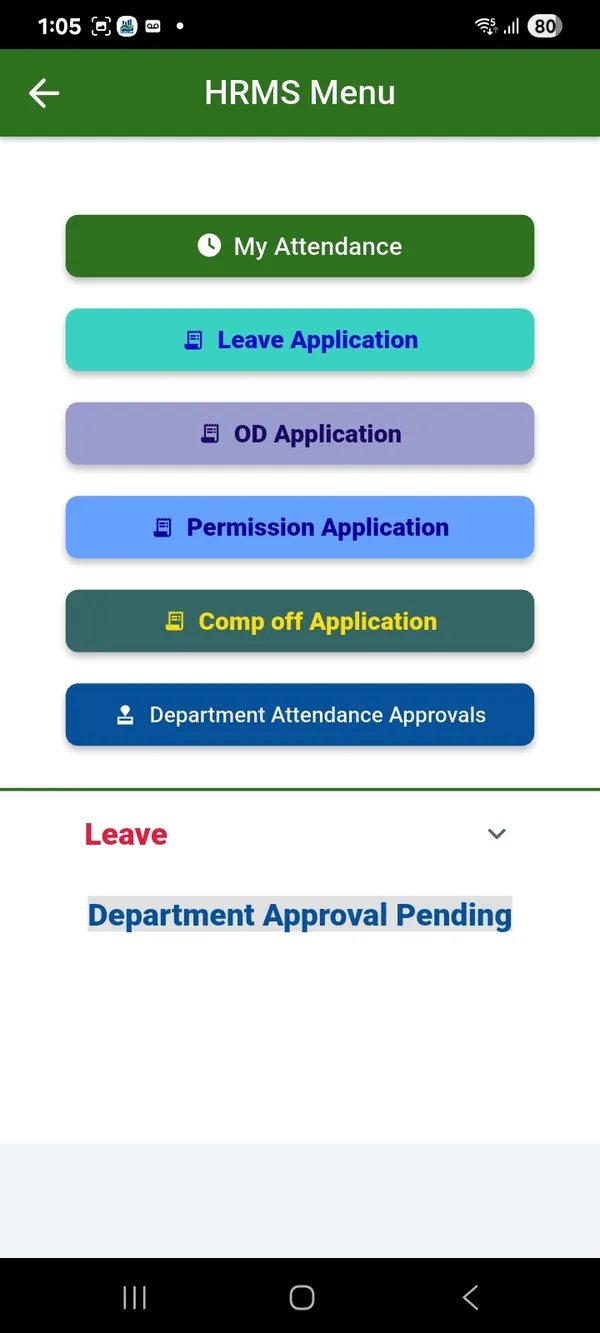
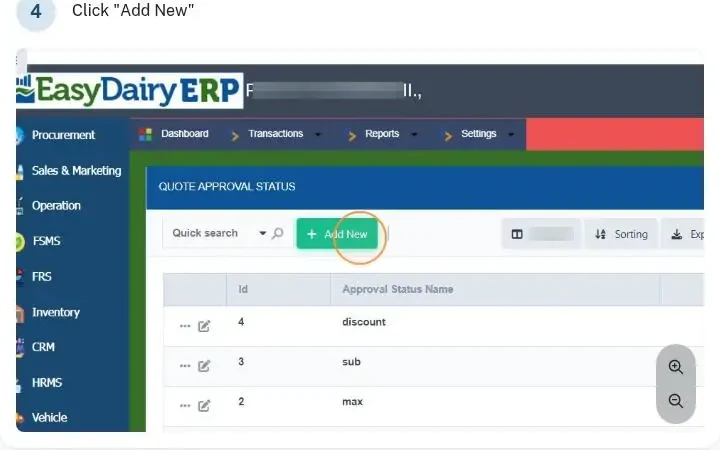
Approvals run on web and on mobile. From the EasyDairyERP app, managers approve leave, OD and permission requests, store requests, quotes, purchase orders and invoices, and see payment updates and status. Purchase order, sales order and quote types each carry their own approval statuses, which are set up in the system’s settings.
Credit limits are controlled with dynamic approvals in sales, supplier credit notes go through an approval workflow, and advance and invoice payments are generated only after approval, with automatic mail notifications after the final payment approval. The result is a clear trail of who asked, who approved and when.
| Login | Employee mail ID and password |
|---|---|
| Mobile approvals | Leave, OD, permission, store requests, quote, PO, invoice, payment status |
| Configured approvals | PO, sales order and quote types with approval statuses |
| Notifications | Automatic mail after final payment approval |
Every plan includes unlimited users. There are no per-employee, per-customer or per-centre charges, so a dairy can put every centre in-charge, every field officer, every storekeeper and every manager on the system without counting licences.
That is what makes the rest of the design work. More data entry points mean the ERP holds everything needed to run the business, and the management reports are only as good as the inputs behind them. Pricing depends on the litres of milk handled and the data stored, not on the number of people using it.
| Users | Unlimited |
|---|---|
| Charges | No per-employee, per-customer or per-centre charges |
| Pricing basis | Milk volume and data storage |
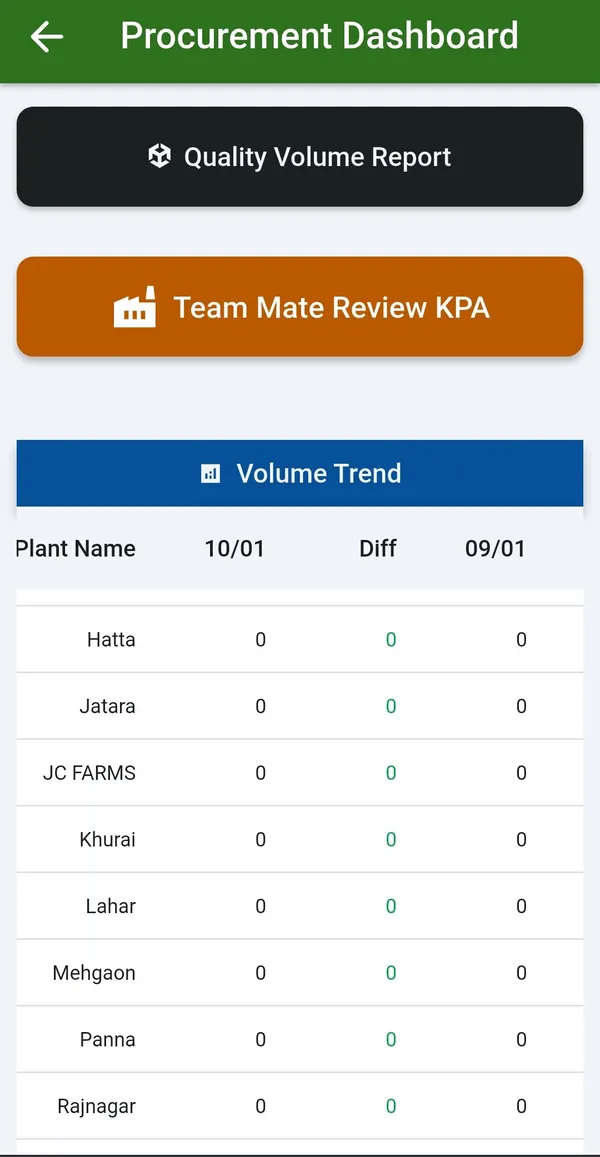
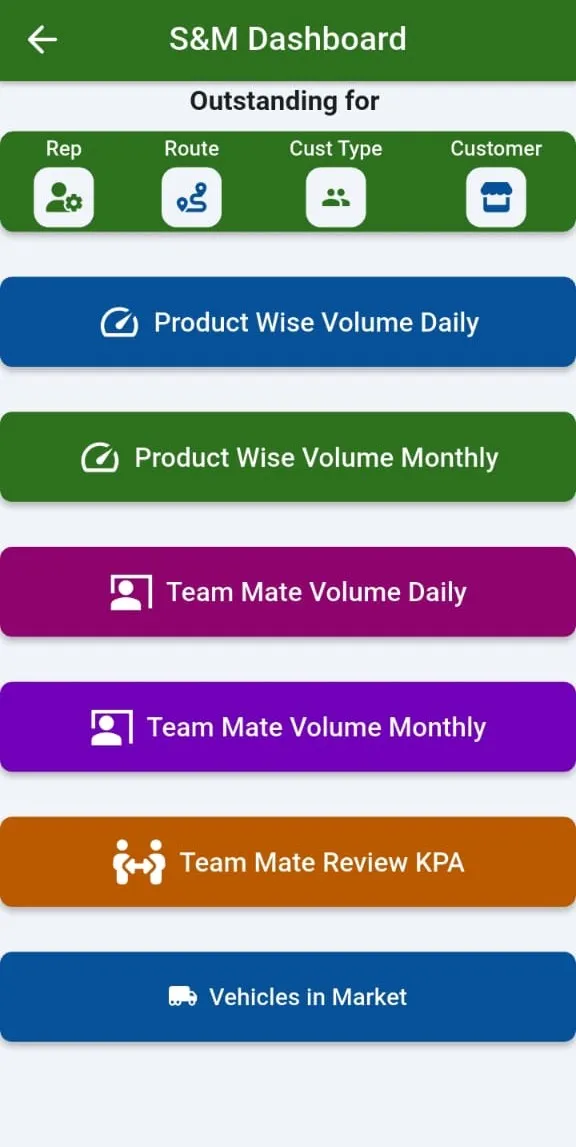
The main EasyDairyERP app runs on Android phones and on iPhone and iPad. It is the app for management, the procurement and sales teams, and every employee who needs stores or HRMS on their phone.
For procurement it shows centre-wise trends, day against range comparisons, centre data arrival, the GPS volume trend by centre, farmer supply history, vendor segmentation, TS matching, milk pouring time, plant comparison, the quality-volume matrix and the high-quality milk finder. For sales it shows route outstanding, product volume, team performance, customer outstanding, review meetings, GPS tracking, TA/DA claims, ordering and approvals.
Every employee can use it for attendance (punch-in with a selfie and odometer reading), tasks, leave, OD, permission and comp-off requests, store requests and stock and price checks. Distributors and dealers use it to place orders, see live order status, track the delivery vehicle and, with My Earnings, see what they earned from the dairy. The CCP viewer puts live pasteuriser data on the plant head’s phone.
| Platforms | Android; iOS (iPhone and iPad) |
|---|---|
| Users | Management, procurement, sales, all employees, distributors and dealers |
| Main areas | Dashboards, approvals, attendance and tasks, GPS, ordering, stores, HRMS, My Earnings, CCP viewer |
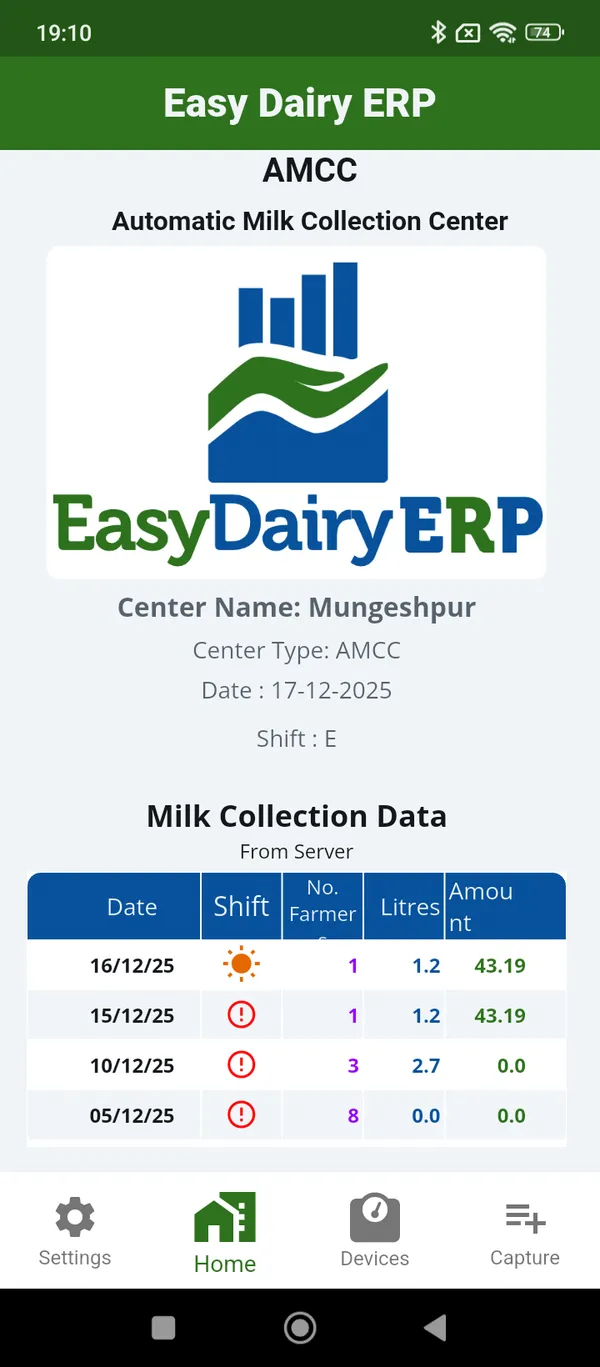
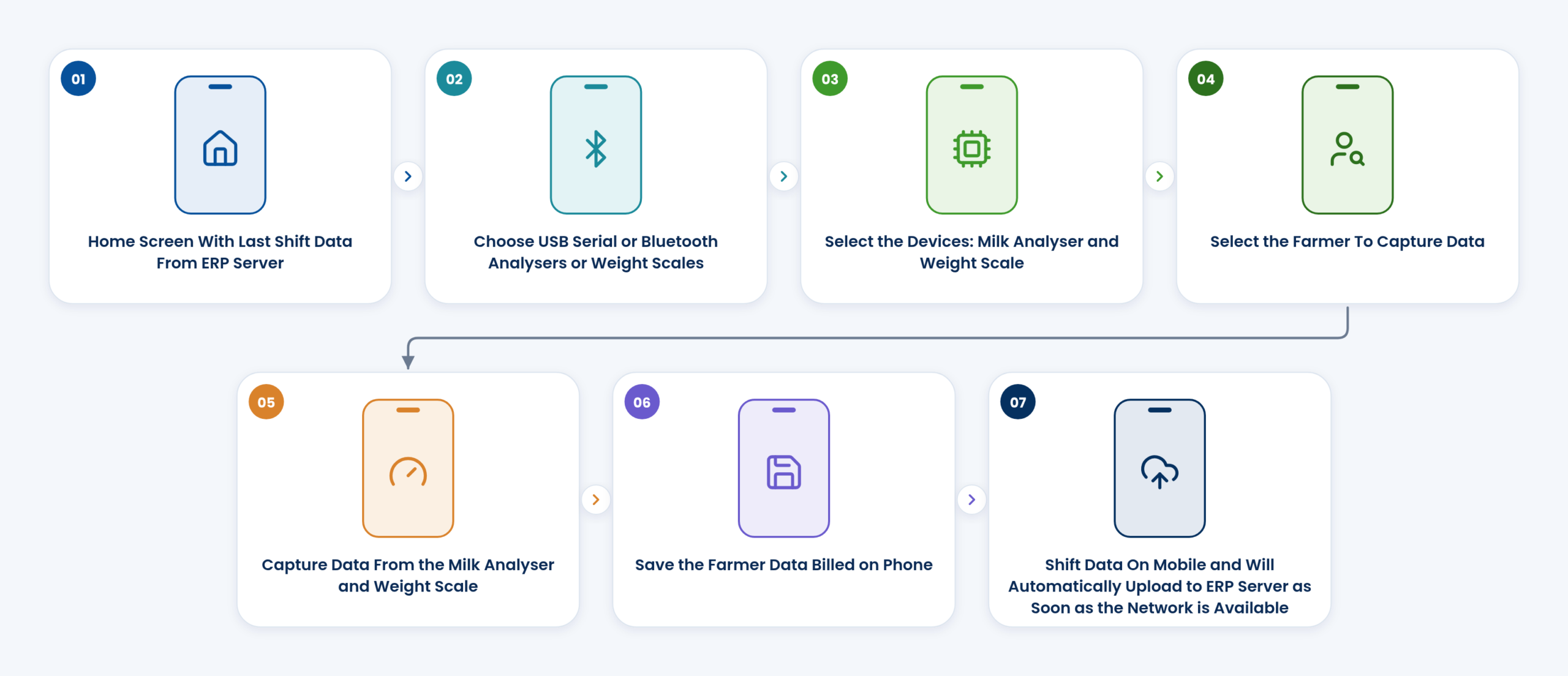
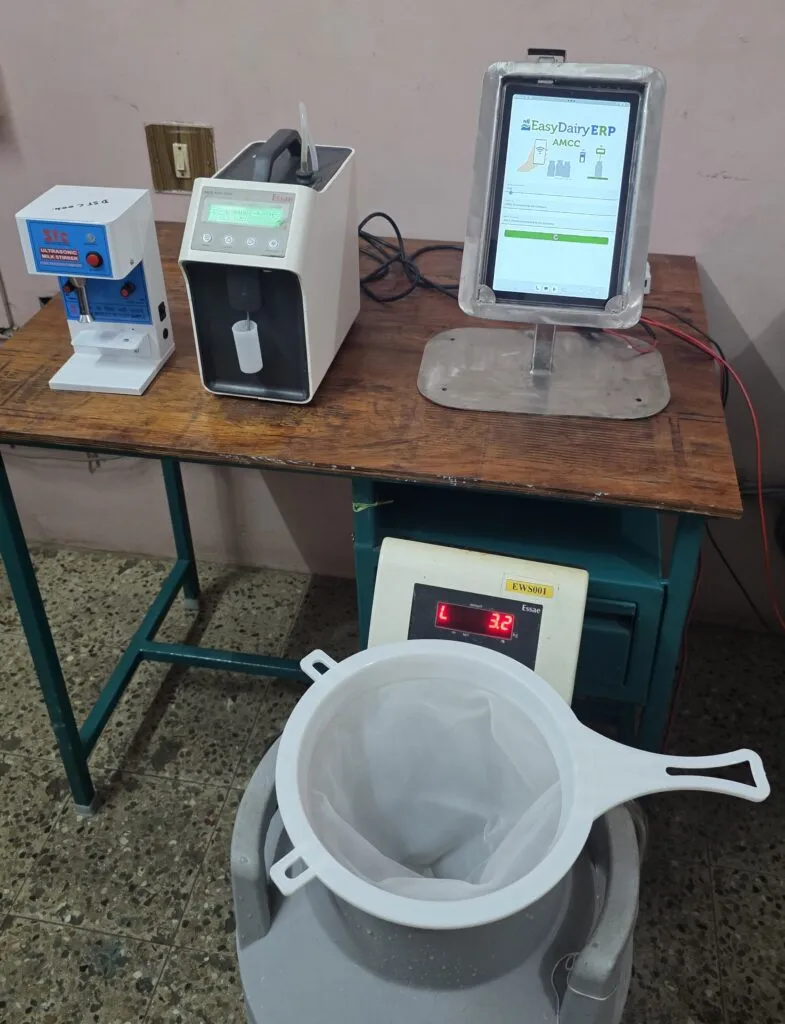
The AMCC (Automatic Milk Collection Center) app turns any Android phone or tablet at a village centre into a collection centre. The in-charge selects the analyser and scale, selects the farmer, captures FAT, SNF and weight, and saves the farmer’s record, which is billed on the phone. No DPU is needed. The home screen shows the last shift’s data from the ERP server.
The Chilling Center application captures weight and quality at the chilling centre from one to three analysers and a scale at once, on a tablet or a desktop, and sends it straight into procurement, where chilling charges are calculated automatically.
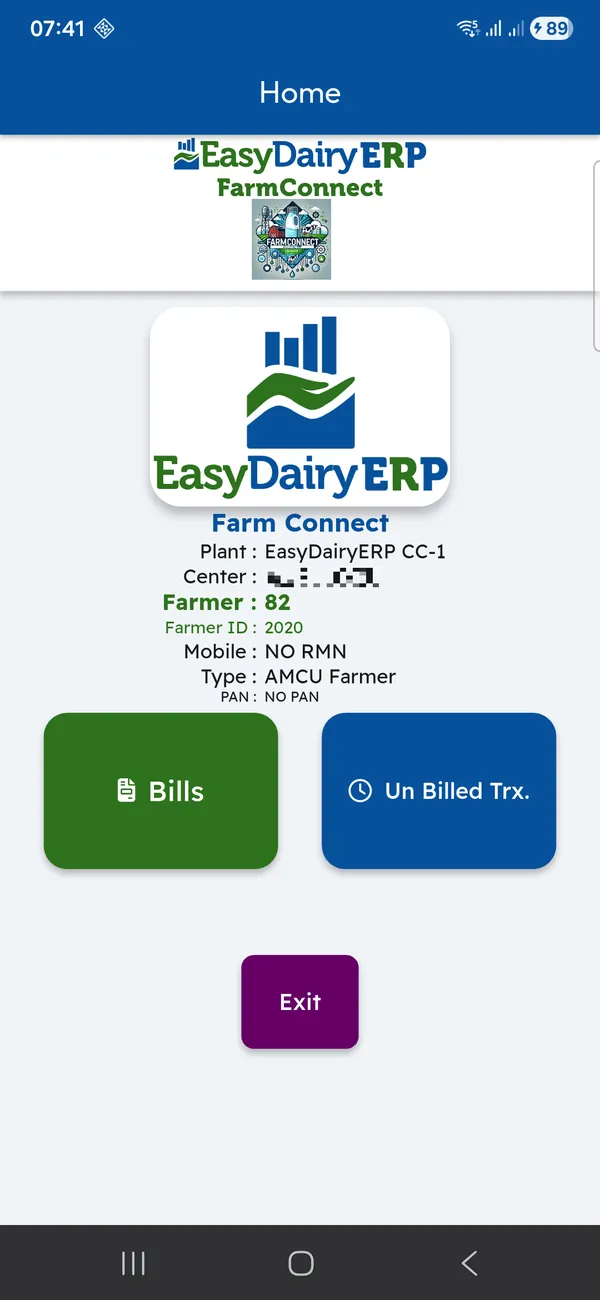
Farmer Connect is free for farmers. Each milk acknowledgement reaches the farmer’s phone within 10 seconds, and the farmer sees bills for every payment cycle, bill details, every pouring with date, shift, litres, FAT, SNF and rate, and the unbilled estimate for milk poured since the last bill. No bill needs to be printed, sorted or handed out, and farmers can check each test themselves.
| AMCC | Android; analyser and scale over USB or Bluetooth; offline; no DPU |
|---|---|
| Chilling Center | Android tablet or desktop; one to three analysers and a scale |
| Farmer Connect | Android; free for farmers; acknowledgement within 10 seconds |
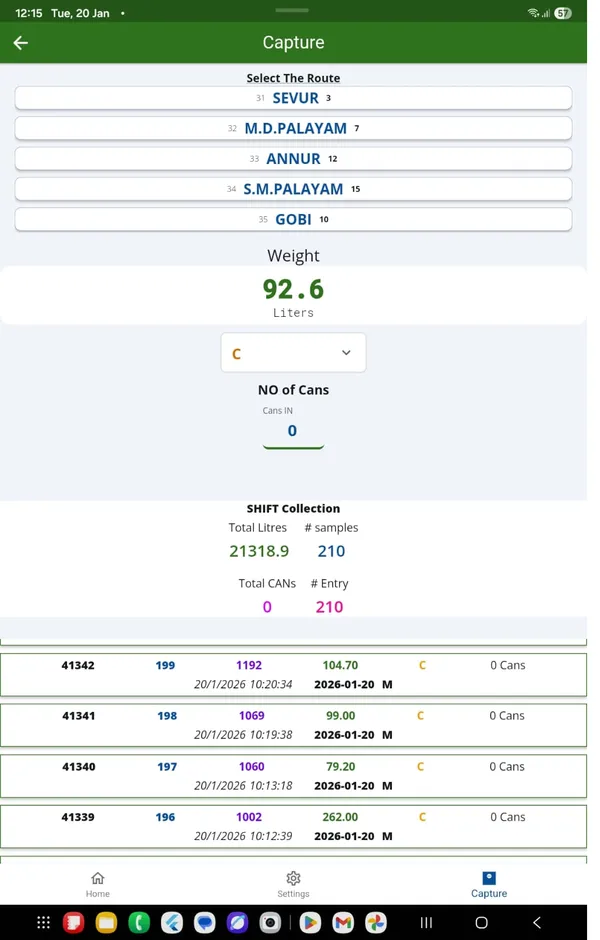
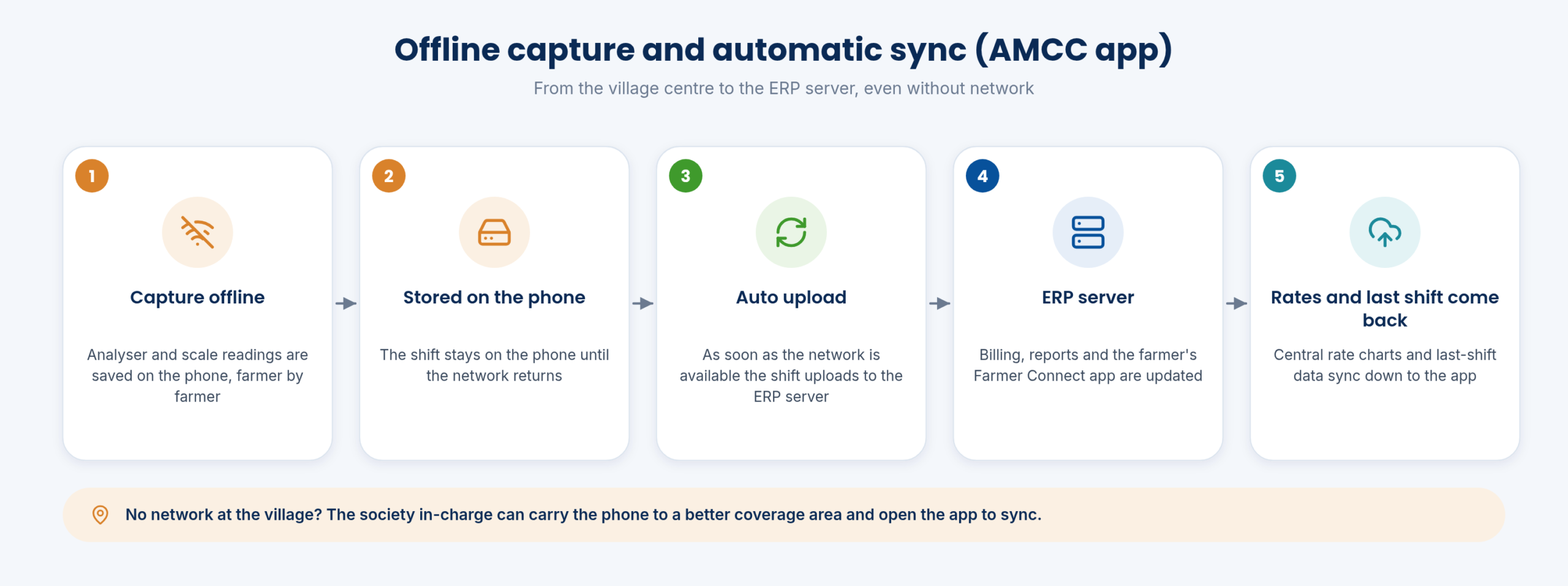
Village centres often have weak or no network, so the AMCC app captures both online and offline. Each farmer’s record is saved on the phone as it is captured, and the whole shift stays on the phone until the network returns.
As soon as the network is available, the shift uploads automatically to the ERP server. In remote villages, the society in-charge can carry the phone to a better coverage area and open the app to sync. In the other direction, the last shift’s data and the milk rate charts come down from the ERP to the app, so rates are managed centrally and every centre pays on the same chart.
The Milk Reception Desk follows the same idea at the dock: login and configuration re-sync run in batches with a live progress window, values are checked before saving, and the confirmation sound plays only after the record is stored, so nothing is lost silently. Duplicate uploads are blocked: the same test uploaded twice is stored once.
| Capture | Online and offline |
|---|---|
| Upload | Automatic when the network returns |
| Downstream sync | Last-shift data and rate charts from ERP to app |
| Safeguards | Duplicate tests stored once; save confirmed only after storage (Milk Reception Desk) |
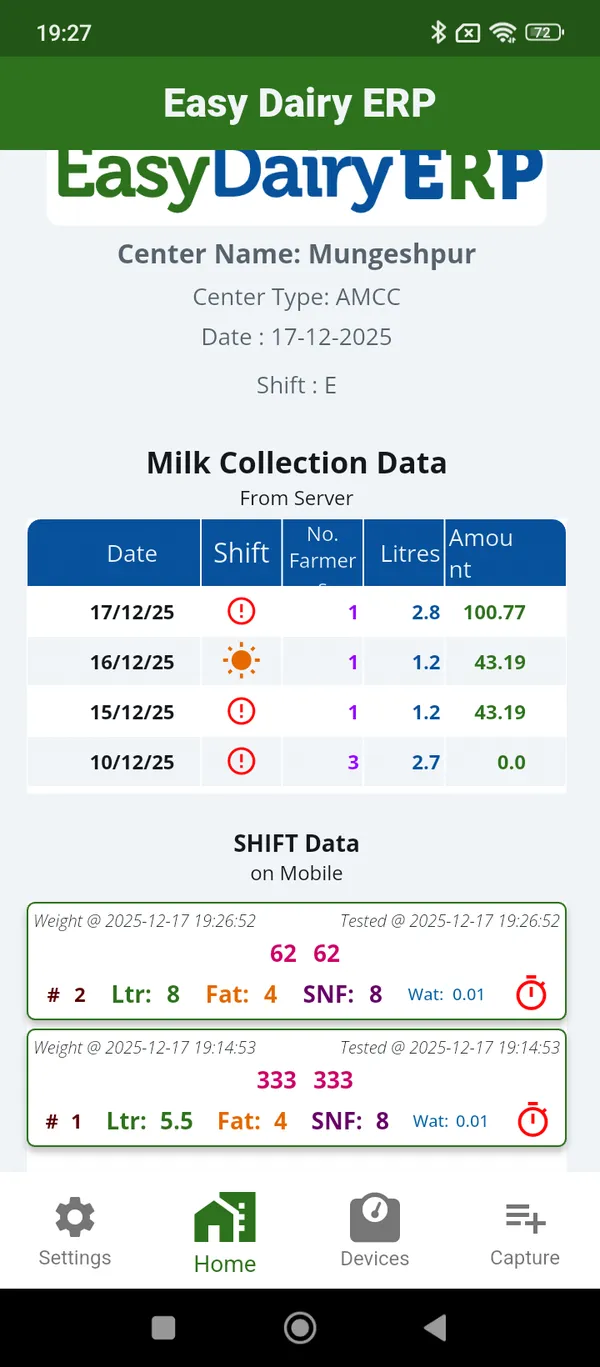
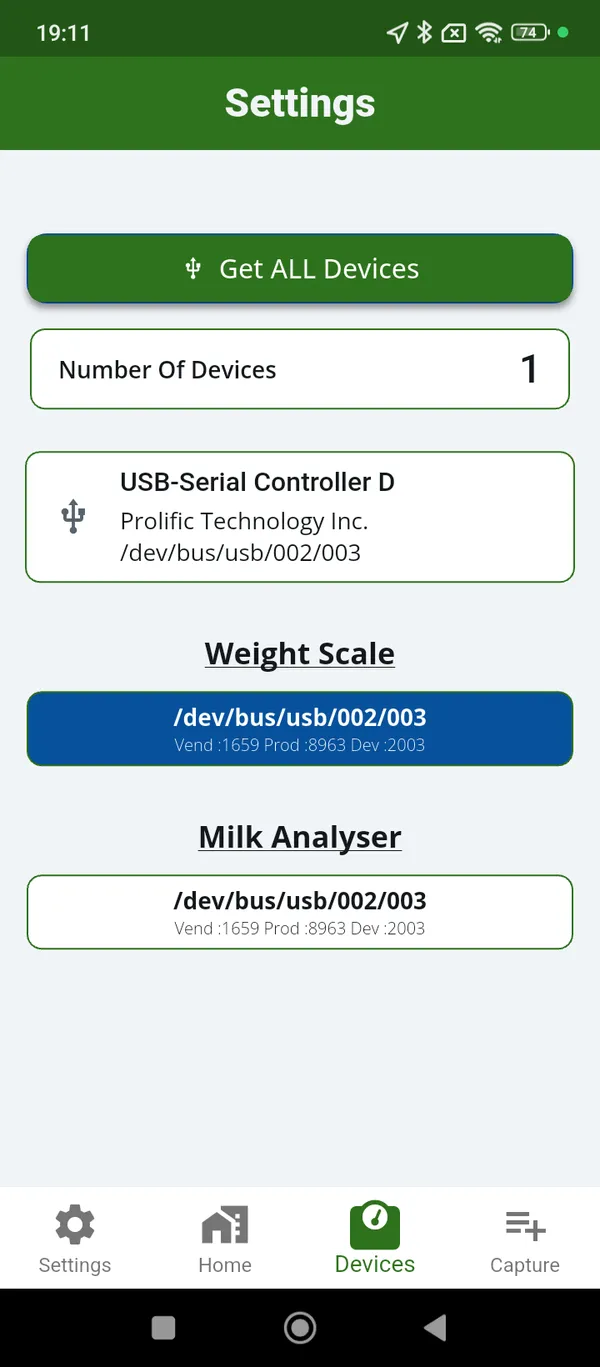
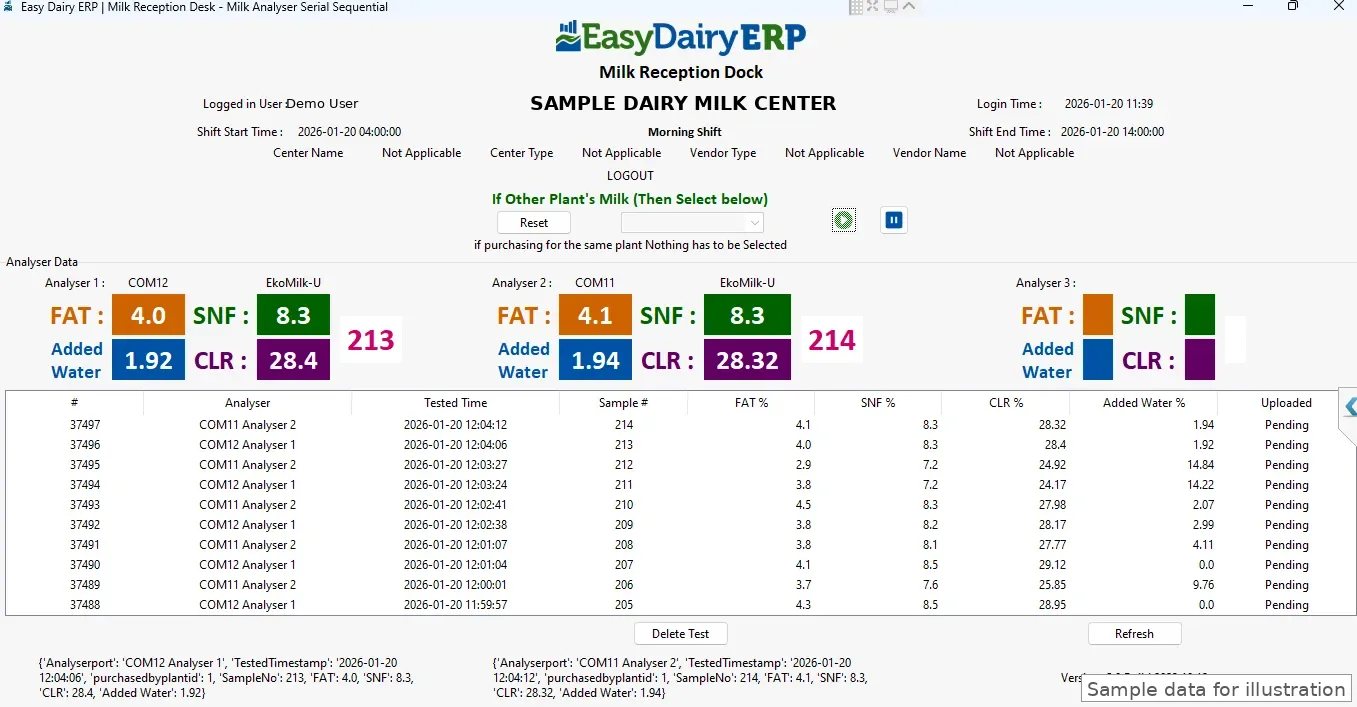
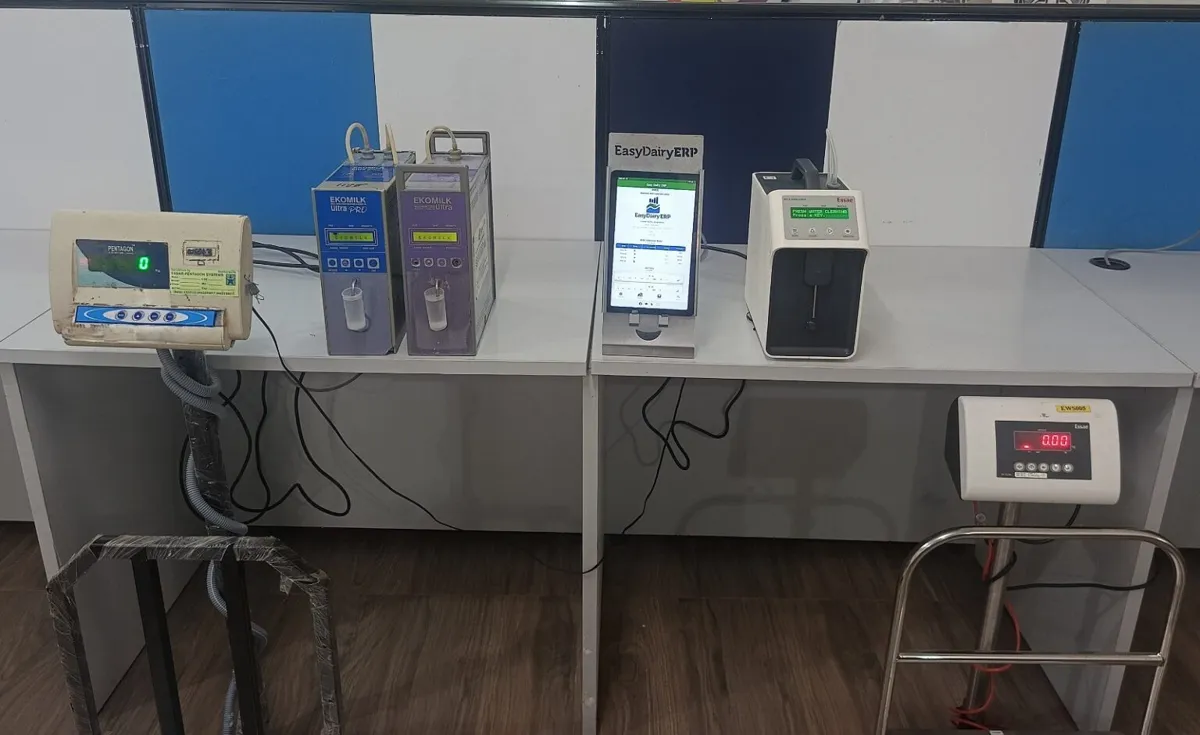
The EasyDairyERP desk and the AMCC app read the milk analysers and weighing scales that village centres already use, over a USB cable or over Bluetooth. Each device model is set up as a settings profile in the ERP (speed, parity and data format), so the centre picks its device and starts testing, with no guesswork at site. The same device profiles work on a desk PC, a phone or a tablet.
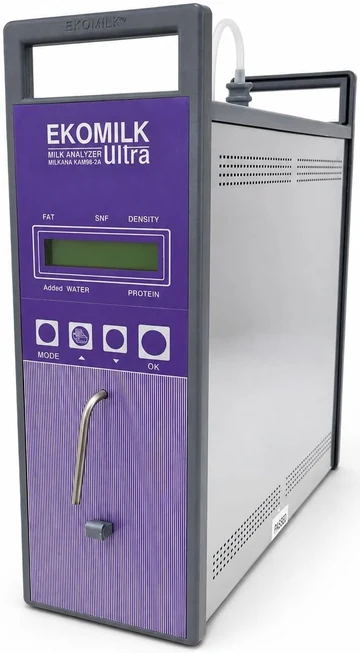
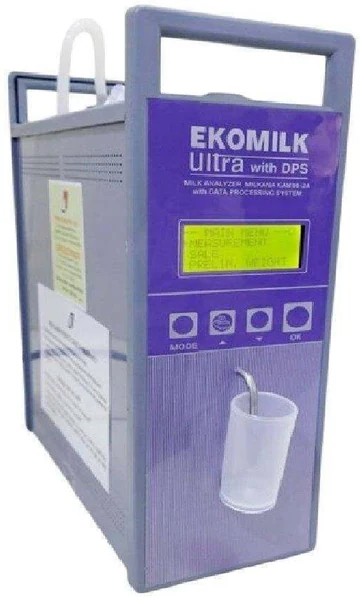
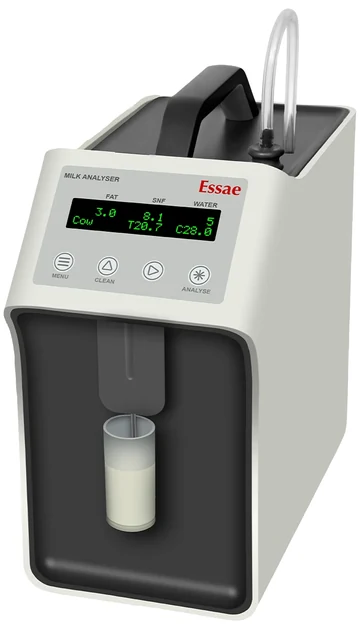
Compatible analysers include the EkoMilk Ultra, Ultra Pro and Ultra DPS, and Essae. The EkoMilk Ultra DPS is read three ways: over a USB cable (USB-OTG on a phone or tablet, with PL2303 and PL2303GC USB-serial chips supported), over Bluetooth through a small serial-to-Bluetooth module, and from its USB pen drive. The DPS end-of-shift summary print is captured on the phone and checked against procurement automatically.
Weighing scales connect over USB and Bluetooth, with a stable-weight lock and a live reading that keeps updating as milk is poured. Bluetooth scales and analysers reconnect automatically. FAT, SNF, added water, CLR and weight are captured straight into the rate chart, so nobody re-types a slip and the farmer’s bill uses the reading the analyser produced.
| Analysers | EkoMilk Ultra, Ultra Pro, Ultra DPS; Essae |
|---|---|
| Connections | USB serial, USB-OTG, Bluetooth, DPS USB pen drive |
| USB chips | PL2303, PL2303GC |
| DPS serial | 9600, even parity (built into the profile) |
| Parameters | FAT, SNF, added water, CLR, weight |
| DPU | Not required |
EkoMilk and Essae are trademarks of their respective owners; EasyDairyERP is not affiliated with them, and the names only describe compatibility.

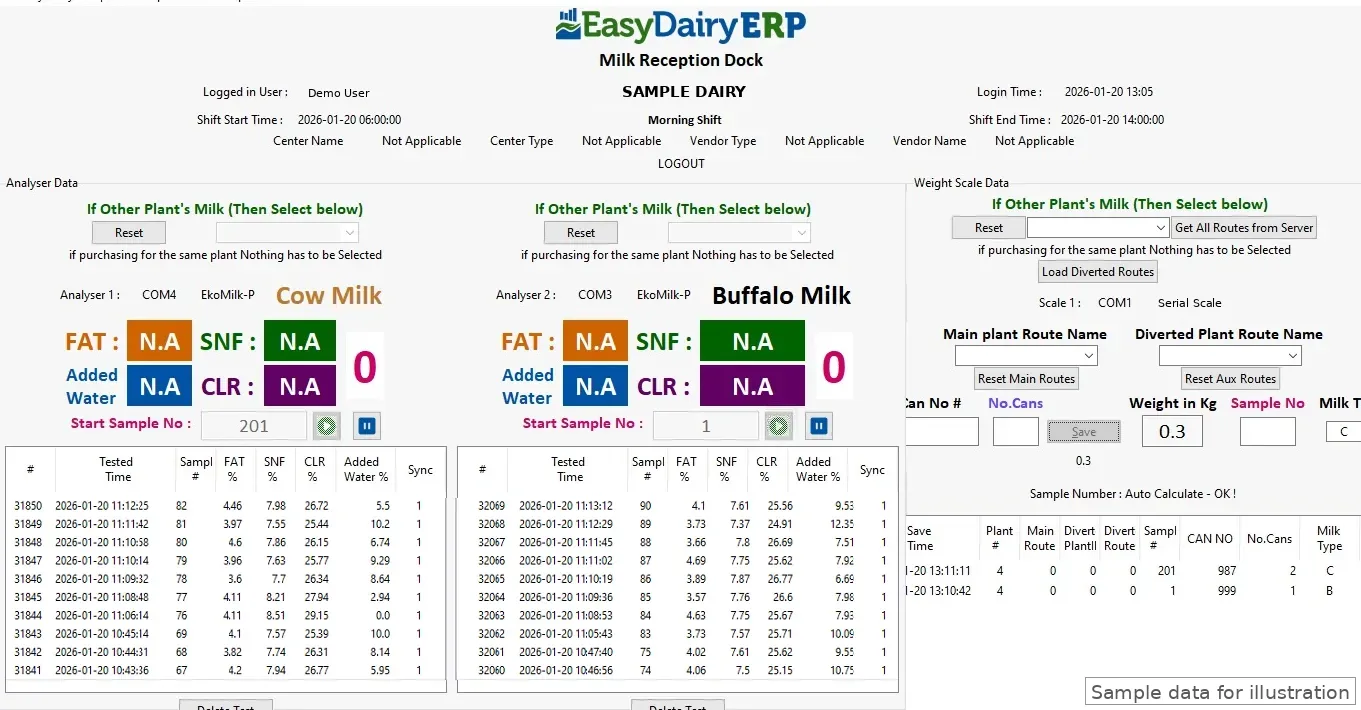
At the chilling centre and the plant dock, capture screens are laid out for the equipment in use. EasyDairyERP supports two analysers and one weighing scale; cow and buffalo milk testing on one screen with dual analysers and a scale; three analysers; two analysers with a serial weighing scale; a weighing scale alone; and a mobile app for the weighing scale.
When two analysers run in parallel, sample numbers stay in step, and a conflict stops the analyser so that one farmer’s result cannot be saved against another. A negative scale reading stays negative and Save is disabled. Zero, tolerance and can-number entry come from the plant profile.
The dock operator weighs, tests and saves in one flow, and the record lands in procurement at once. The procurement head then sees CC receipts, AMCC against CC differences and chilling charges without waiting for a file to be sent.
| Layouts | 2 analysers + 1 scale; dual analysers cow/buffalo + scale; 3 analysers; 2 analysers + serial scale; scale only; mobile app for scale |
|---|---|
| Protection | Sample numbers kept in step; negative weight blocks Save |
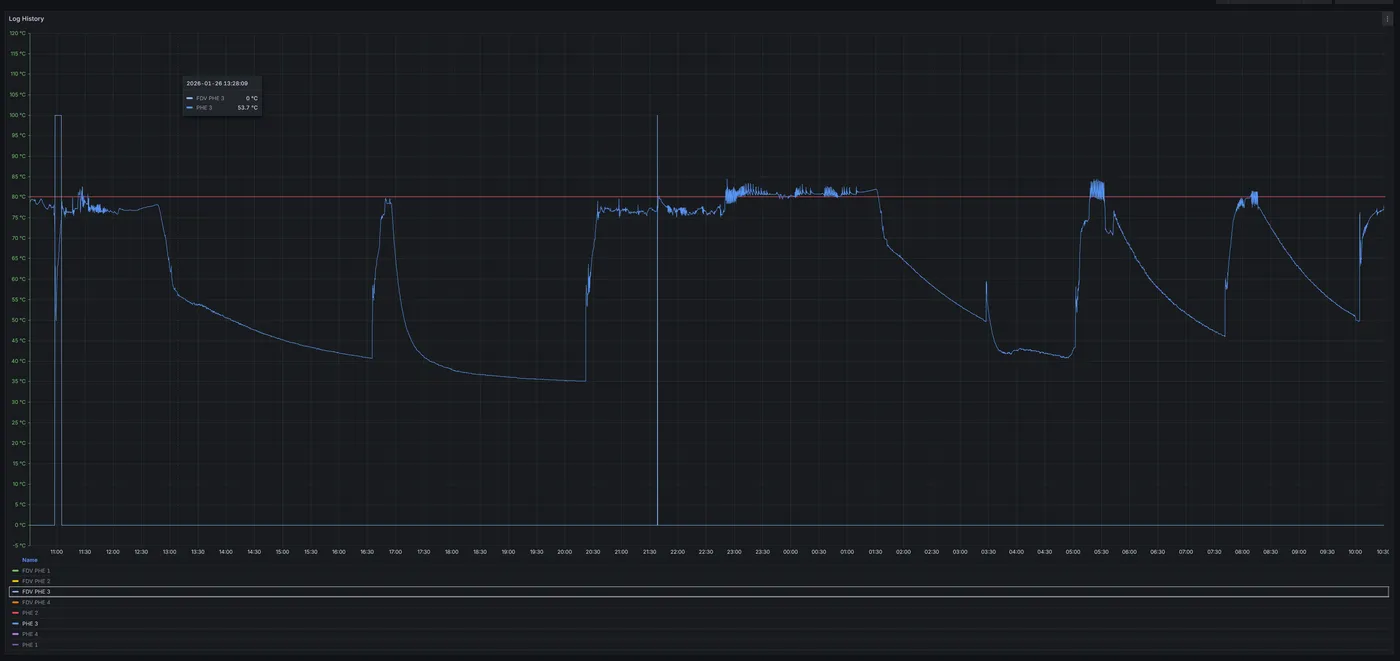
CCP monitoring is live. EasyDairyERP reads the critical control point data straight from the pasteuriser through an IoT gateway connected to its controller and sensors. Pasteurisation temperature at the holding section is logged continuously with a time stamp, and every flow diversion valve (FDV) event is recorded with its start, end, duration and the temperature that triggered it. The gateway buffers readings if the network drops.
The data is stored for multiple years on a server at the plant, sits next to batch-wise quality records, and is available for detailed analysis: diversions per shift and per day, total diverted minutes, the lowest holding temperature and trends by pasteuriser. An FSSAI auditor or a customer can get the full pasteurisation history of a batch in minutes, and the plant head sees live holding temperature and FDV status on the mobile app.
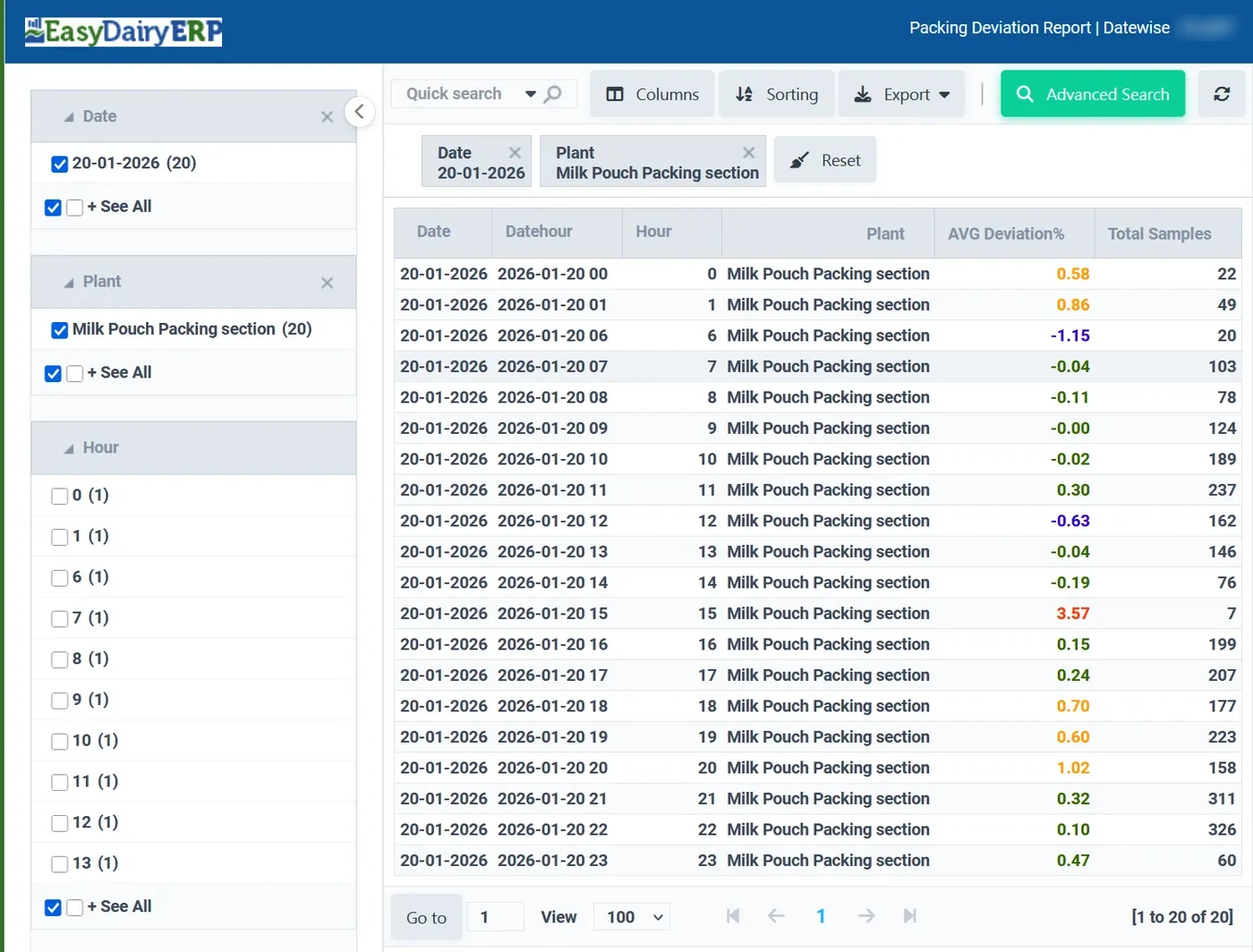
Pouch weights from the packing line are logged and analysed for deviation, with an hourly pouch weight deviation report. One weight scale per two filler heads lets the metrology team see head performance, shift-wise packing performance and weight variation, so the filler is reset before overfill or underfill grows. The IoT gateway, sensors and scales are additional hardware, fitted to suit the plant.
| CCP data | Holding temperature, FDV events (start, end, duration, trigger temperature) |
|---|---|
| Path | Pasteuriser controller and sensors → IoT gateway → EasyDairyERP → mobile and reports |
| Storage | Multi-year, on a server at your plant |
| Pouch weight | Logging, deviation analysis, hourly report; one scale per two heads |
| Hardware | Gateway, sensors and scales required |
Milk data quality and quantity are captured at the village level and reach the ERP without re-typing. Besides the AMCC app, village-centre data can be uploaded automatically to the main server via FTP or API, behind a firewall.
The DPS pen drive is read in one tap from a phone: every centre folder and every daily file is uploaded with the exact date, time and shift of each test, so one person can upload many centres in a few minutes. The raw files are kept on the server as received, for later audit, and tests that were never saved or were deleted are kept too.
That data powers checks no paper slip can: the Plausible Malpractice Report flags tests that were not kept and were followed within minutes by a better result for the same farmer, and the re-pour impact shows the money effect centre by centre. The report tells you which centres to check; it does not accuse anyone.
| Paths | AMCC app; FTP or API upload behind a firewall; DPS pen drive from a phone |
|---|---|
| Audit | Raw files kept on the server as received |
| Checks | Plausible Malpractice Report; re-pour impact |
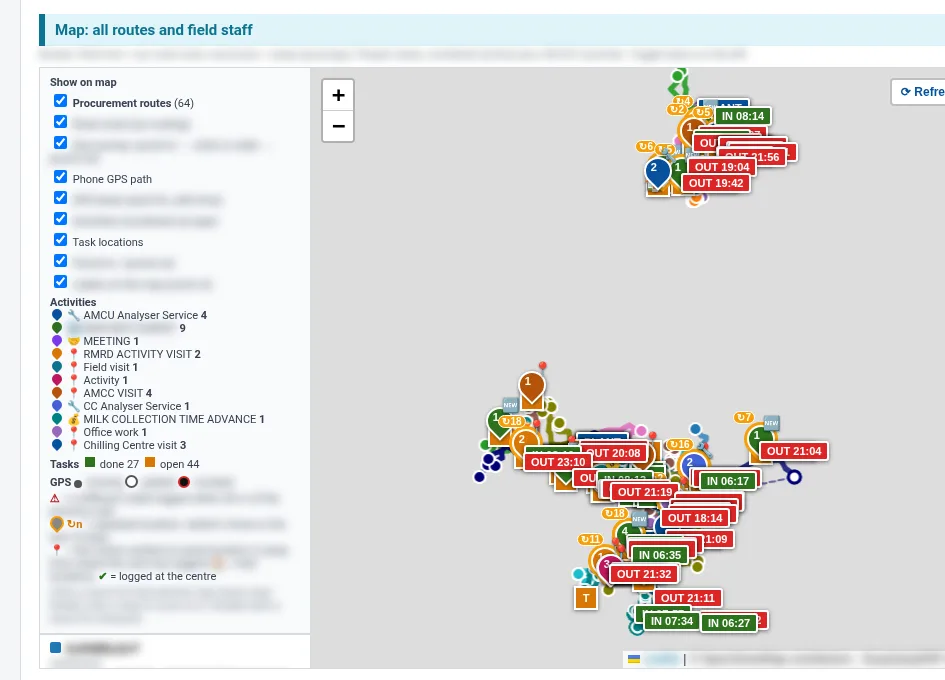
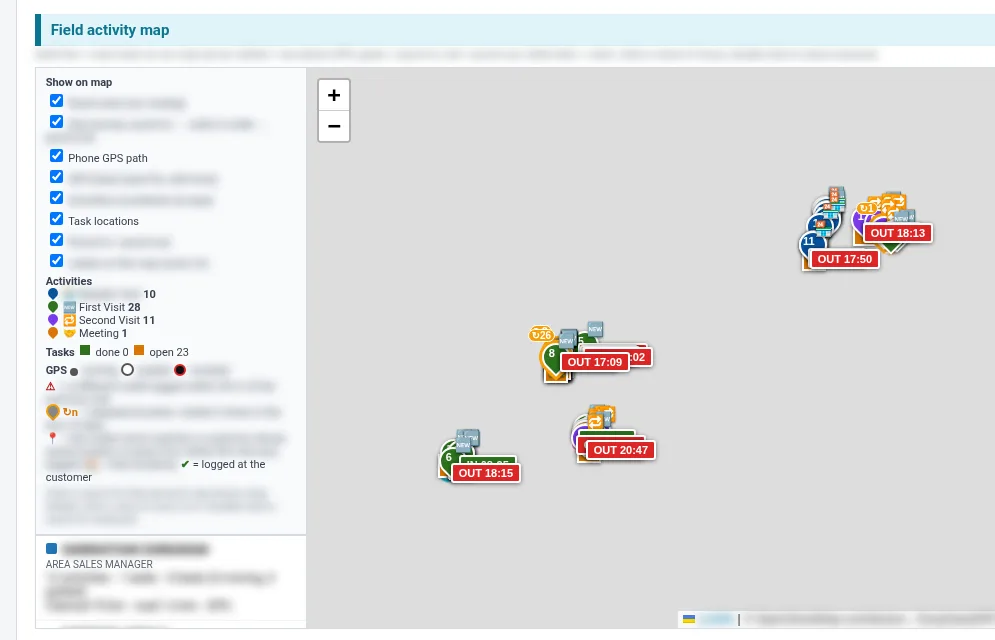
GPS tracking for mobile users is included as standard. Every field person on the EasyDairyERP app, whether a procurement officer, an AMCU service engineer or a sales officer, is tracked from punch-in to punch-out. Each visit, task and service call appears on the map where it happened. Location logging is started by the company’s HR and runs as a foreground task with the phone’s location permissions.
Each allowance claim is compared with the distance travelled: the claimed bike allowance or odometer km, the road km from punch-in through the visits to punch-out (routed on EasyDairyERP’s own map server, so there are no per-map charges), and the GPS km from the phone’s own beats. The longest silence shows when a phone stopped reporting, and mocked GPS is marked so fake-location apps are visible.
Vendors and customers carry GPS locations too. Procurement routes are rebuilt from plant to centres to plant, and today’s road km is compared with the approved km. GPS trend maps show volume by route and centre, route overlaps between plants show where two vehicles cover the same road, and customers can watch the delivery vehicle in real time. Vehicle GPS for the fleet is optional and needs GPS tags in the vehicles.
| Included | GPS for mobile users in all plans |
|---|---|
| Tracked | Procurement officers, AMCU service engineers, sales officers |
| Comparisons | Claimed km vs road km vs GPS km; route km vs approved km |
| Maps | Own map server; trend maps; route overlaps |
| Fleet | Vehicle GPS optional, needs GPS tags |
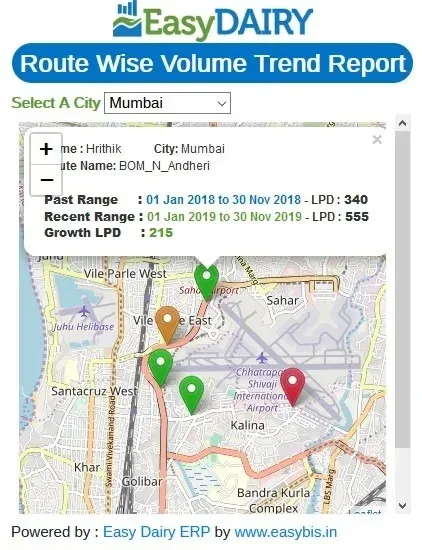
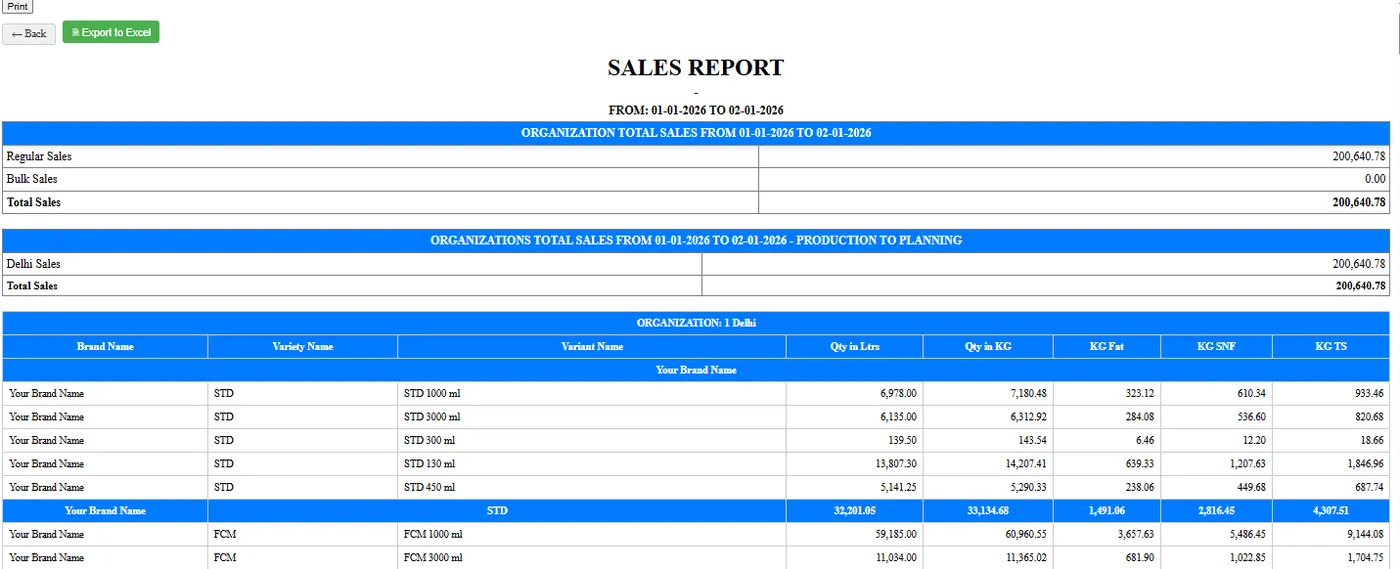
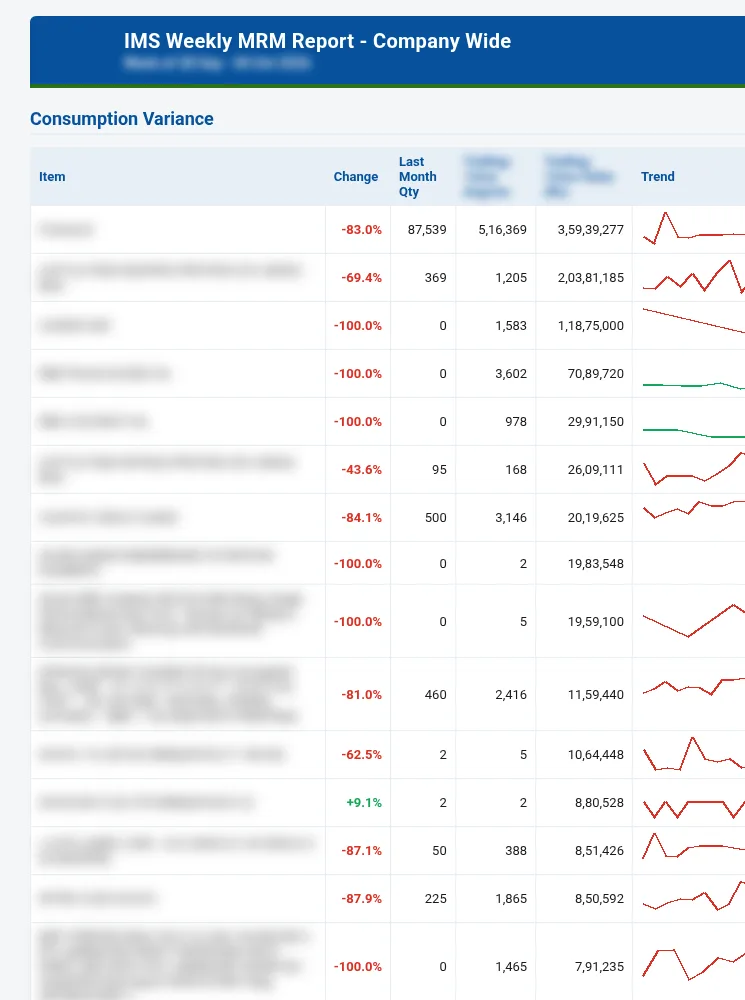
EasyDairyERP connects to the systems around it. Procurement generates XML files that can be uploaded into Tally for audit, and sales and other transactions export to accounting systems and other ERPs. The bank payment file for farmers and employees is generated directly, customised for all major banks, and a bank statement can be uploaded for amount receipts.
GST work is automated: the e-invoice API integration is automatic, GSTR-1 report generation is automated, and GST and HSN summaries are available in sales. Reports download to Excel and PDF, and the BI report pages carry an Excel download inside the attached page.
Reports arrive by mail before anyone asks. The Daily Procurement & Activity Report is in the inbox before 6 am, with the Daily Sales & Activity Report, day-close mails, TS mails, sales and procurement trend mails, shift-wise trend mails per plant, a weekly procurement update, a monthly review and the IMS weekly MRM report. Mail size and images are tuned so reports open fully in Gmail and on phones.
| Accounting | Tally XML; accounting system export / other ERP interface |
|---|---|
| Banking | Bank payment files for all major banks; bank statement upload |
| GST | E-invoice API integration; automated GSTR-1; GST/HSN summary |
| Downloads | Excel, PDF |
| Scheduled mails | Daily procurement and sales activity, day close, TS, trend, weekly and monthly reviews |
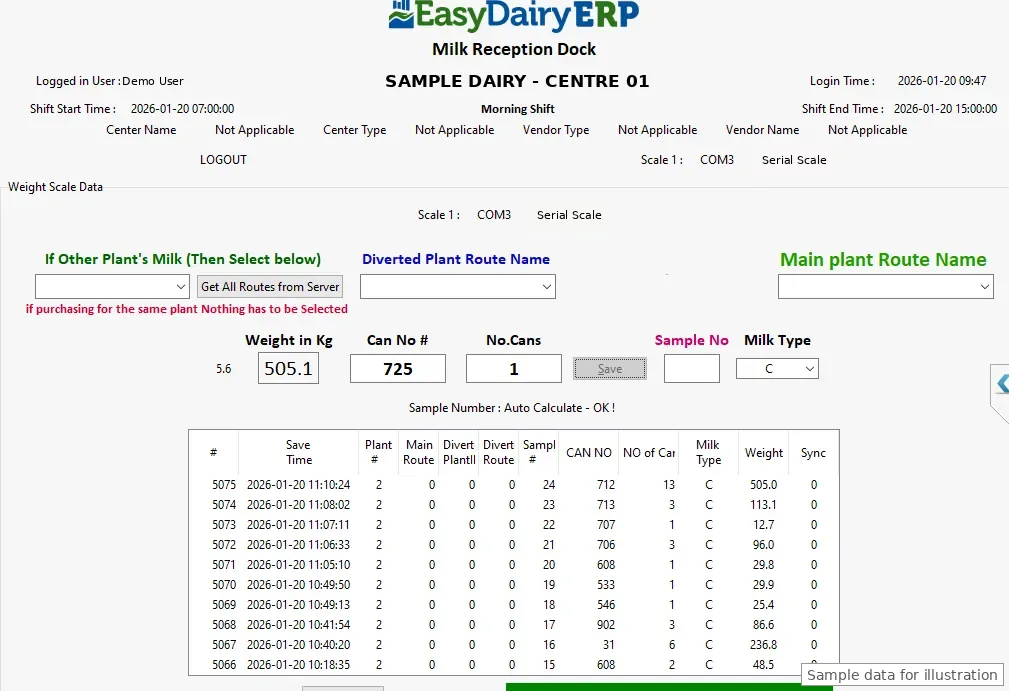
Three Windows applications run where a PC is the right tool. The Milk Reception Desk sits at the plant and chilling-centre dock: it weighs the can, reads the analyser and saves the record to the ERP. Setup takes a few clicks: type the company name, the desk shows its Application ID, checks for approval every 10 seconds, then links to the plant and syncs by itself. EkoMilk Ultra DPS is supported on all six analyser capture layouts.
The Weigh Bridge Desk handles tanker and material weighing at the plant. Plant in and out is integrated with the weighbridge, weighbridge images are stored as proof for every material, and material balance is cross-checked against the weighbridge, so stock and sales bills can be matched to weight.
Chilling Center / AMCU software for Windows covers chilling centres and AMCUs that work from a PC. The Windows desks are downloaded from the Downloads page and run on Windows 10, 64-bit.
| Milk Reception Desk | Plant and CC dock; analyser and scale capture; DPS on all six layouts |
|---|---|
| Weigh Bridge Desk | Tanker and material weighing; image proof; plant in/out |
| Chilling Center / AMCU | Windows |
| OS | Windows 10, 64-bit |
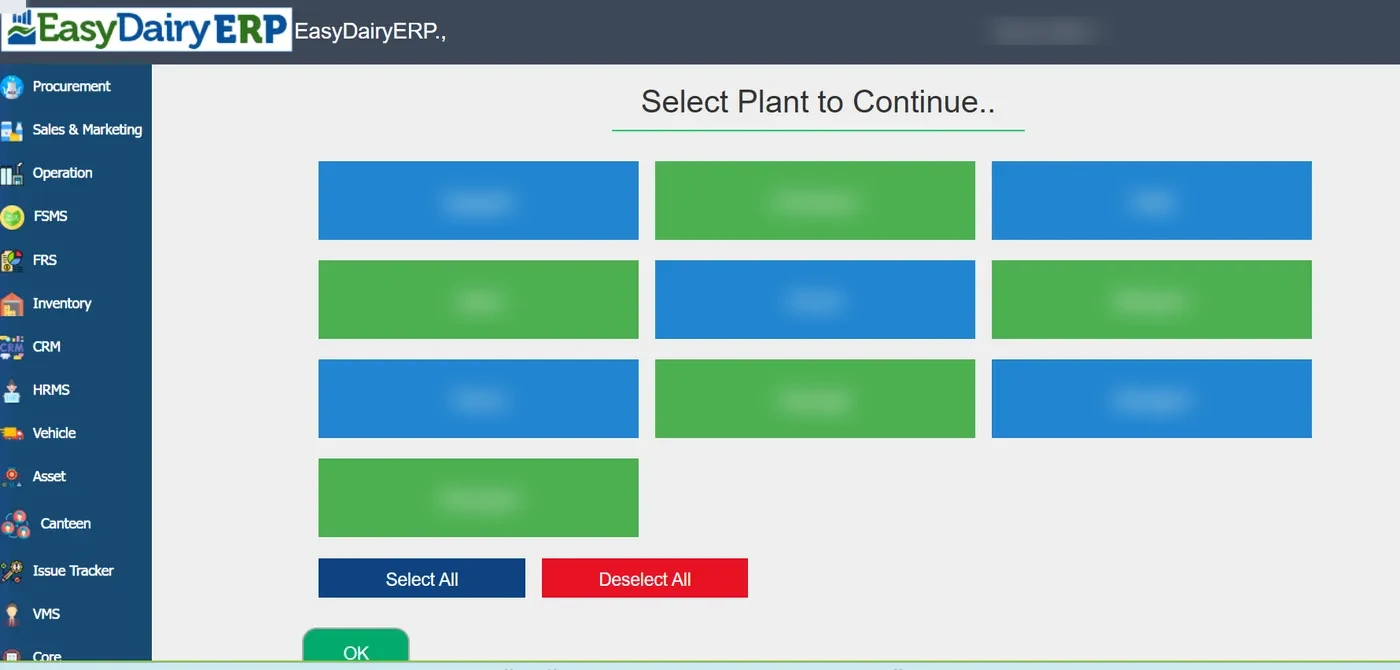
Several plants, branches, companies and organisation units are managed from one place. At the top of the screen the user picks one or more plants or org units, and sales and finance can be seen consolidated across them, then drilled down by org unit or month.
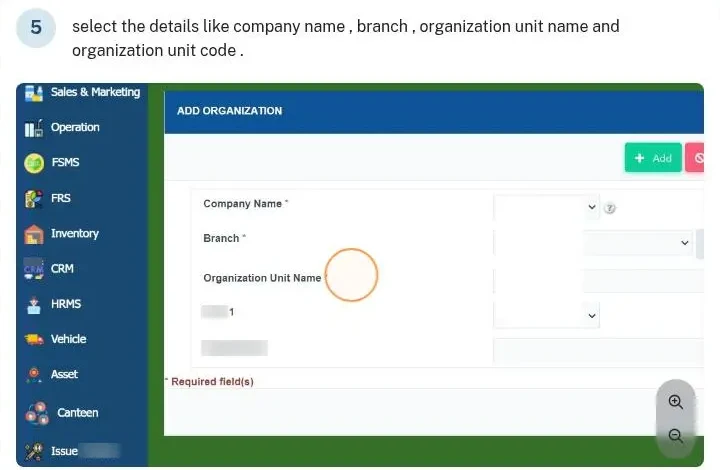
Organisation units are set up under Core, Organization Info: company name, branch, organisation unit name and code. Inter- and intra-company transfers are handled, plant-level total solids are matched across plants, and the MD sees all units without switching between systems.
For a group with more than one plant or company, this gives one login, one set of masters and consolidated reporting, while each unit keeps its own books and figures.
| Scope | Multiple plants, branches, companies and org units |
|---|---|
| Reporting | Consolidated sales and finance; drill-down by org unit and month |
| Set-up | Core → Organization Info → Organizational Unit |
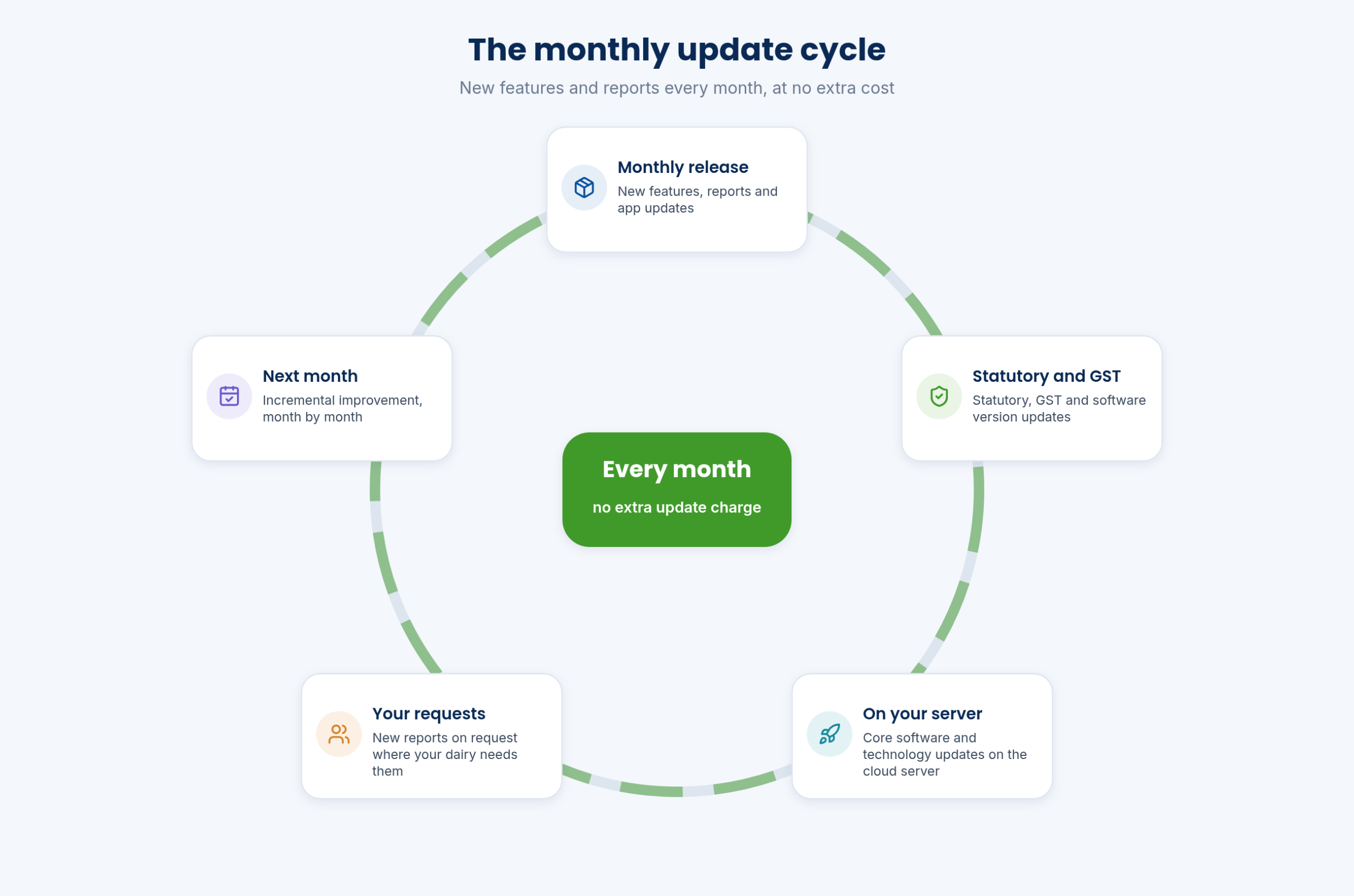
The ERP keeps growing. New features, reports and app updates are released every month, at no extra cost. Statutory, GST and software version updates and core software and technology updates are part of the cloud plan, and new reports are added on request where your dairy needs them.
Implementation follows the same rhythm: go live on the ERP, improve month by month, extend to more units and teams, and add new capabilities as the business changes. Most users learn the system in eight hours or less.
Recent updates show what that means in practice: field-force GPS tracking, mobile approvals, the AMCC and Chilling Center apps, rate charts pushed from the ERP to the mobile apps, e-invoice integration, daily procurement and sales activity reports, the IMS weekly MRM report and the market cost report.
| Cadence | Monthly |
|---|---|
| Cost | No extra update charge |
| Includes | New features and reports; statutory/GST/version updates; core technology updates |
| Custom reports | On request where needed |
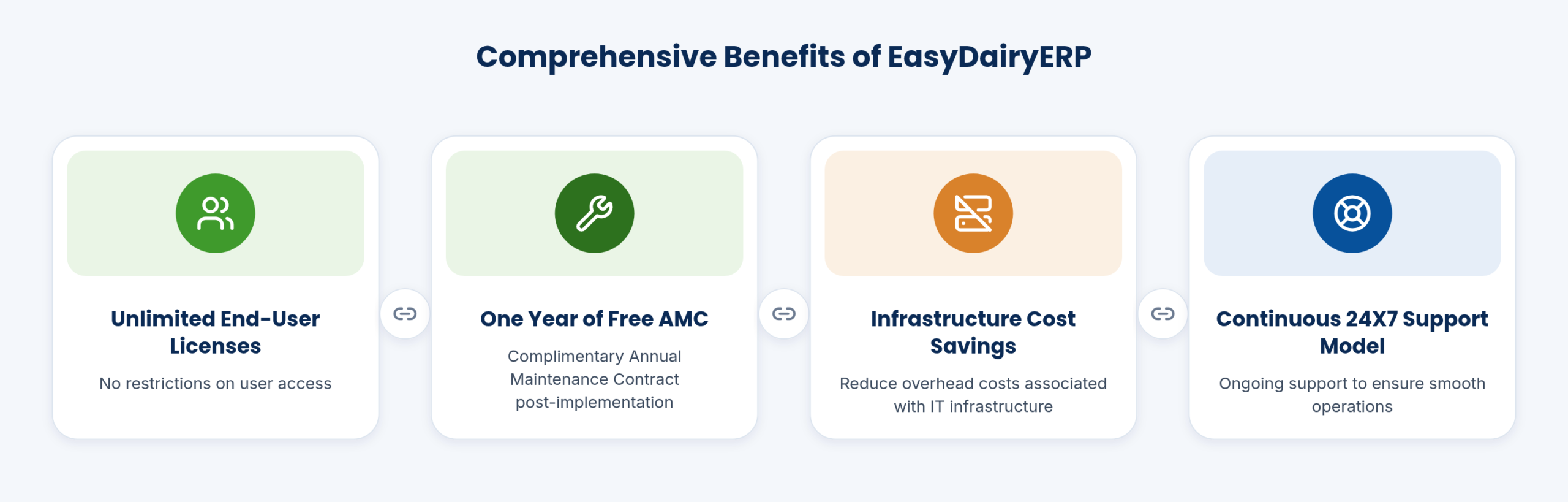
EasyBIS works on a continuous support model, with continual development and business support so that a dairy can adopt new standards and new analytics as new insights come in. The team is sized to work closely with each client.
Including the founders, EasyBIS has the right number of people to work closely with each client and to provide a continuous support platform for continual development and business support. Every page of the site carries the team’s phone number, mail address and a WhatsApp button.
On a dedicated cloud server for your dairy, on India cloud servers. Backups are kept in S3 buckets leased to you.
No. Every client runs on their own dedicated cloud server.
PostgreSQL, PHP, FastAPI, Python and Flutter: cutting-edge technology also used by Fortune 500 companies.
The AMCC app captures online and offline. Data stays on the phone and uploads automatically when the network returns; the in-charge can also carry the phone to coverage to sync.
Compatible analysers include EkoMilk Ultra, Ultra Pro, Ultra DPS and Essae, over USB or Bluetooth, together with USB and Bluetooth weighing scales. No DPU is needed.
The EasyDairyERP app runs on Android and iOS (iPhone and iPad). The AMCC, Chilling Center and Farmer Connect apps run on Android.
Yes: Milk Reception Desk, Weigh Bridge Desk and Chilling Center / AMCU for Windows 10, 64-bit.
No. Users are unlimited, with no per-employee, per-customer or per-centre charges. Pricing depends on milk volume and data storage.
Every month, with new features and reports and statutory, GST and version updates, at no extra cost.
Yes. Procurement generates Tally XML, other accounting systems can be interfaced, bank payment files are customised for all major banks, and e-invoice runs through an automatic API integration.
Yes. Multiple plants, branches, companies and org units are managed in one place, with consolidated sales and finance.
Yes, CCP monitoring is live. Pasteuriser temperature and FDV events are logged through IoT hardware, alongside pouch weight monitoring; the sensors and gateway are additional hardware.
GPS for mobile users is standard. HR switches on location logging for field staff, and the reports compare claimed km with road km and GPS km and show each visit on a map.
23 functions, each with a screen or diagram you can click to open full size, and a link to the step-by-step guide in the Docs. Key features are marked in orange.
Pricing does not depend on how many employees, customers or centres you add.
See how →New features and reports arrive every month at no extra cost.
See how →Data security is part of what we deliver to the MD and CEO.
See how →Approvals across modules can be given from the mobile app.
See how →Daily MIS is built automatically and consolidated on one screen, with top-10 BI views in a click.
See how →Statutory, GST and software updates monthly on cloud, yearly on-premise.
See how →EasyDairyERP is one ERP built only for Indian dairies.
See how →EasyDairyERP is built on PostgreSQL, PHP, FastAPI, Python and Flutter: cutting-edge technology also used by Fortune 500 companies.
See how →EasyBIS (Easy Business Information Solutions) has built EasyDairyERP for Indian dairies since 2015.
See how →Every client runs EasyDairyERP on their own dedicated cloud server.
See how →Backups of your EasyDairyERP database are kept in S3 buckets leased to the client.
See how →On the cloud plan, data is encrypted and stored on secured servers.
See how →The main EasyDairyERP app runs on Android phones and on iPhone and iPad.
See how →Tally XML exports, scheduled report mails, bank files and APIs connect EasyDairyERP to other systems.
See how →Windows apps for the milk reception desk, weighbridge and chilling centre or AMCU.
See how →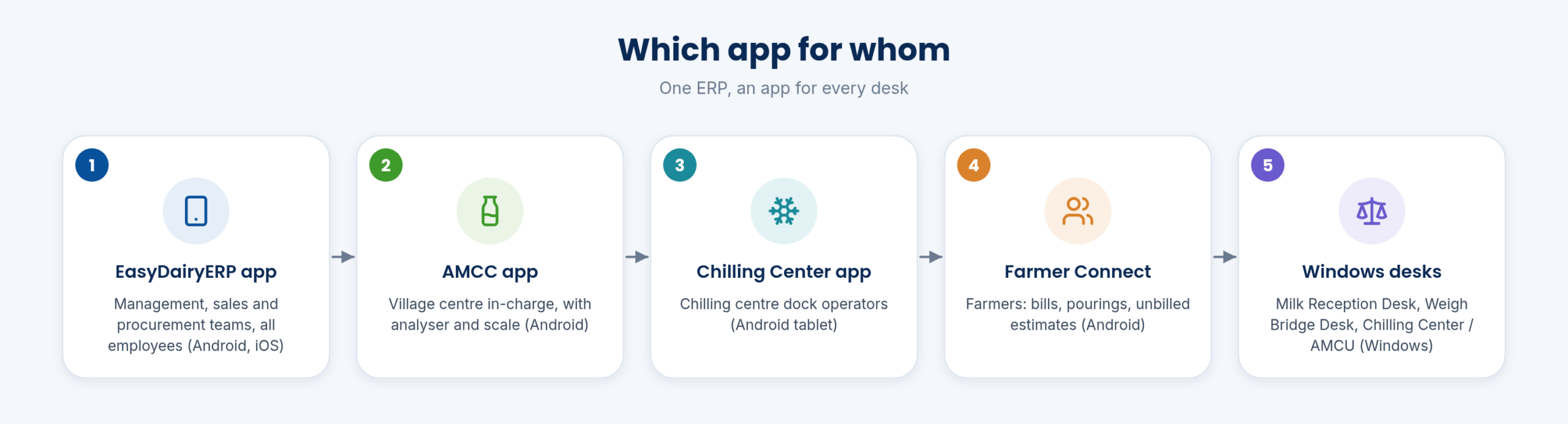
System overview, workflow PDFs and how-to guides for every module in the Docs.
See how →Each user signs in with their own ID and password, then chooses a module.
See how →HRMS and stores ask for the organisation first, so data stays in the right unit.
See how →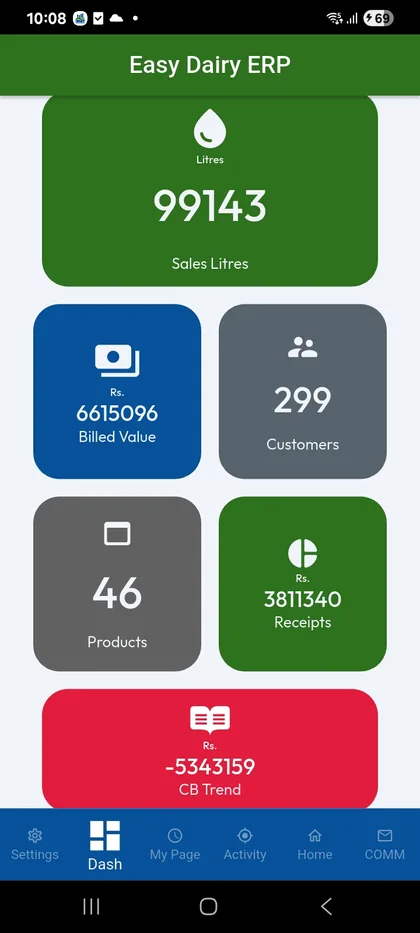
Every list has Add New, edit, quick search, columns, sorting, export and summary.
See how →Every master record carries a start date, end date and status.
See how →Masters and documents move from first entry through up to eight approval levels.
See how →of the reports a dairy asks for are already in EasyDairyERP, in several formats.
are new reports specific to your dairy, built on request as part of the monthly updates.
EasyBIS has built EasyDairyERP only for Indian dairies since 2015.
The functions page lists everything the modules do, and the module tour shows the screens one by one.
When you have seen enough, we are happy to show it to you live on our sample data: book a demo or call +91 94880 59495.