Guided product tour · Stop 20 of 27 ← AssetsHR and payroll →
Module · Fleet

Easy Vehicle Management

Allocation, trip sheets, service, breakdowns, accidents, permits and insurance reminders, tyres, batteries, loans, driver payroll, route costing and optional GPS, vehicle by vehicle.

Statutory remindersTyre and battery trackingOptional GPS
Easy Vehicle Management
Vehicle typesUp to 4 axles
ComplianceDaily email reminders
TyresTracked by tyre ID
GPSOptional, with GPS tags

Easy Vehicle Management runs the fleet vehicle by vehicle, with unlimited users.
On this page
Overview

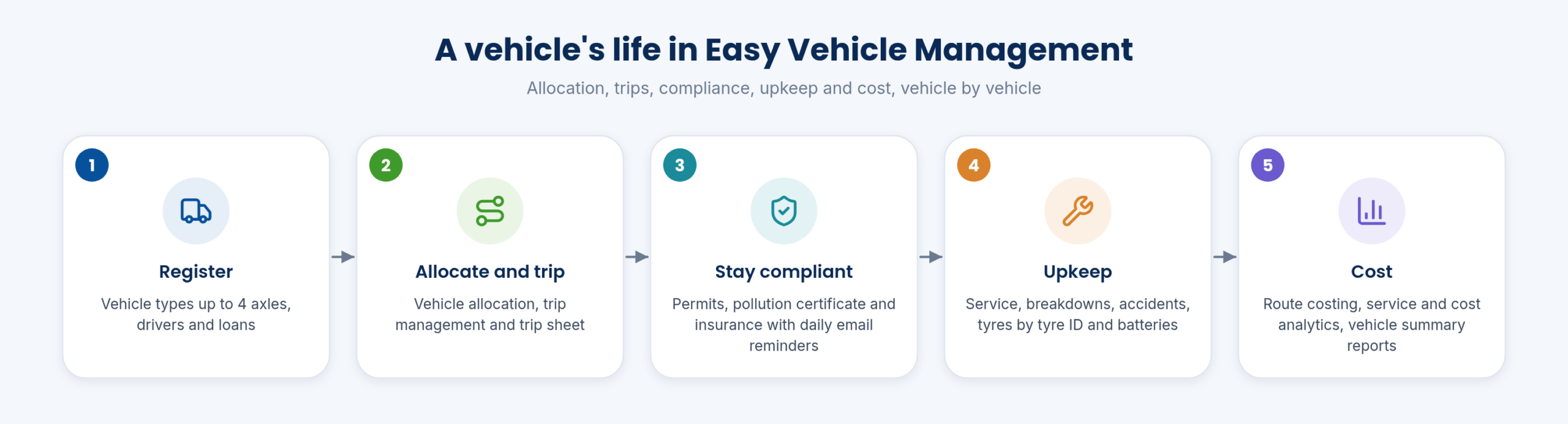
OverviewA vehicle’s life

A vehicle's life
A vehicle’s life
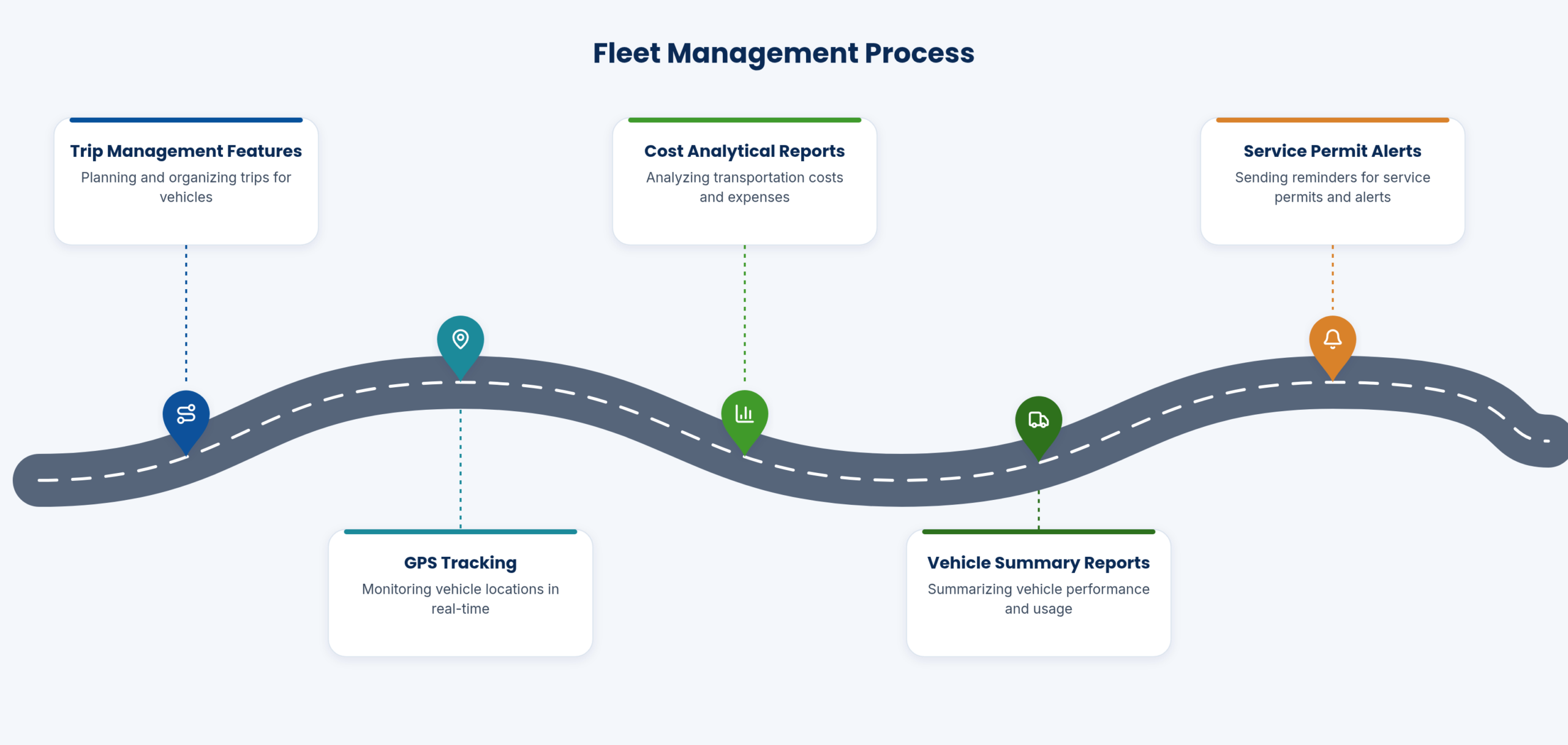
Fleet management process

Register, allocate, stay compliant, maintain and cost: the module follows each vehicle through these stages.

Vehicle management with GPS and vehicle automation suits larger fleets.

Functions on this topic
  • Unlimited users; vehicle types up to 4 axles
  • Vehicle management, with GPS and vehicle automation for larger fleets
Operations

OperationsAllocation, trips and drivers

Vehicles are allocated and trips managed with the vehicle trip sheet. Driver details carry a separate driver payroll, and the driver complaints system records issues.

Route costing shows what each route costs to run.
Who uses it
Transport in-chargeDriversAccounts
Functions on this topic
  • Vehicle allocation; trip management; vehicle trip sheet
  • Driver details with driver payroll (separate payroll); driver complaints system
  • Vehicle route costing
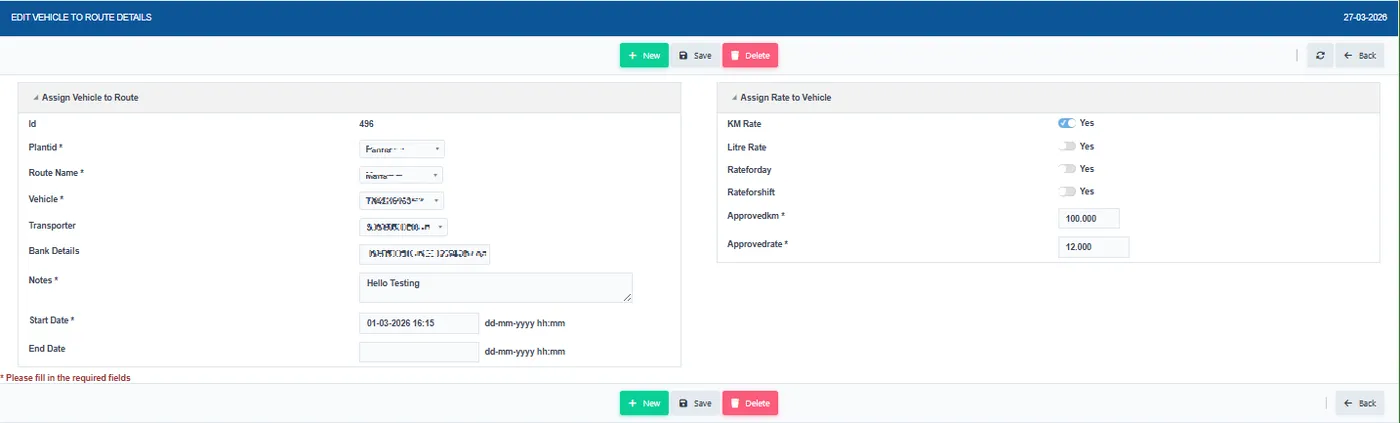
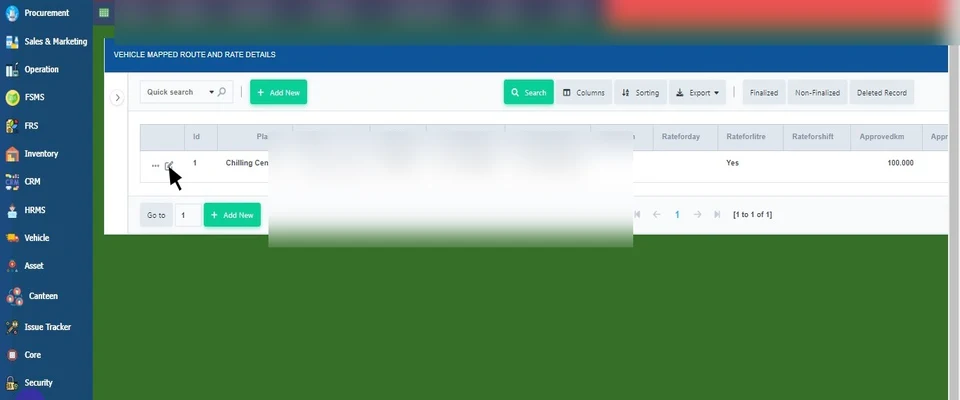
Vehicle route rate assignment
Compliance

CompliancePermits, insurance and reminders

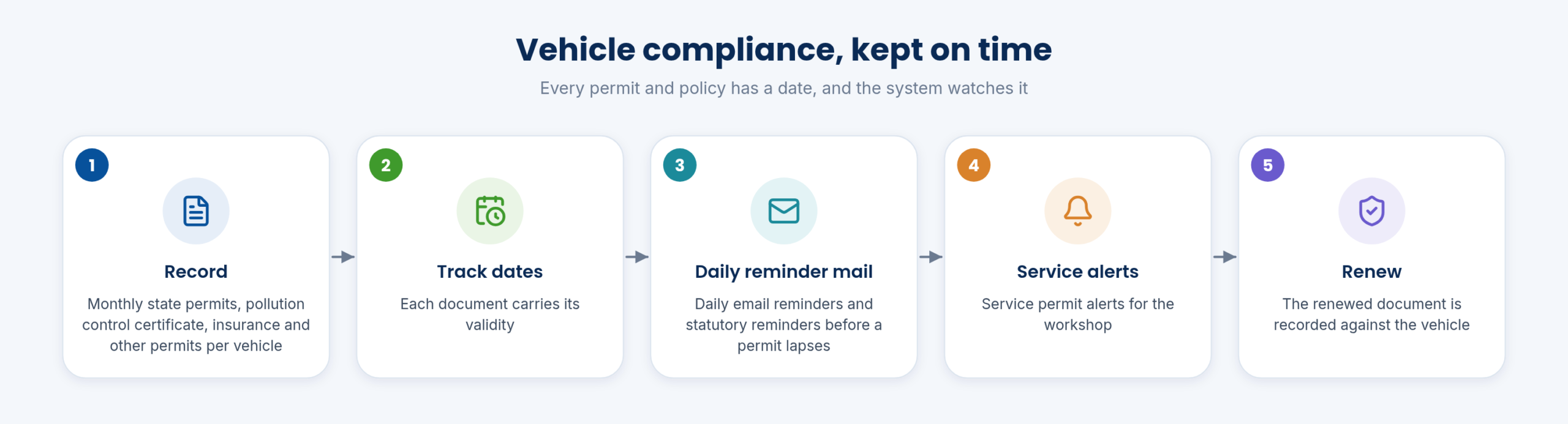
Vehicle compliance, kept on time

Monthly state permits, pollution control certificates, insurance and other permits are recorded, with daily email reminders and statutory reminders, and service permit alerts.

No permit lapses because the date was in someone’s diary.

Permits and licences sit with tyres and batteries among the key deliverables of vehicle management, and the reminders run alongside statutory reminders for the rest of the dairy.

Step by step
  1. Record the permit, PUC or insurance with its validity.
  2. The system tracks the dates.
  3. Daily email reminders go out before a lapse.
  4. Record the renewed document.
Who uses it
Transport in-charge
Functions on this topic
  • Permits and licences: Monthly state permit; pollution control certificate; insurance; all other permit details
  • Daily email reminders; statutory reminders
  • Service permit alerts
Upkeep

UpkeepService, breakdowns, tyres, batteries and loans

Vehicle service and maintenance are logged, with the accident register and breakdowns. Tyres are mapped by tyre ID, with retreading and purchase, and batteries are tracked with purchase and service. Vehicle loans are managed.

Each cost lands on the vehicle it belongs to.

Who uses it
WorkshopTransport in-charge
Functions on this topic
  • Vehicle service management; maintenance logging
  • Accident register; vehicle breakdown
  • Vehicle loans management
  • Tyre management: Tyre retreading; tyre mapping by tyre ID; tyre purchase
  • Battery purchase and service
Analysis

AnalysisReports and GPS

Vehicle and tyre transaction reports, vehicle-wise service analytics, cost analytics and vehicle summary reports show the fleet’s cost. GPS tracking is optional and needs GPS tags; GPS and all digital tracking sit in one system.

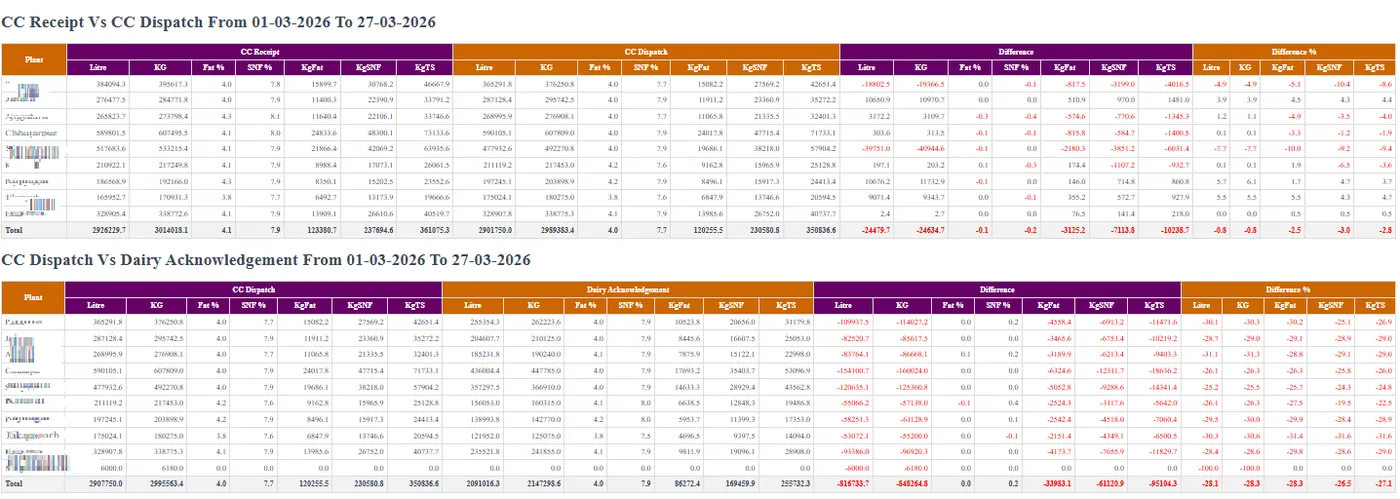
The tanker reconciliation ties transport to milk movement.
Who uses it
CFOTransport in-charge
Functions on this topic
  • Vehicle and tyre transaction reports; vehicle-wise service analytics; vehicle cost analytics; other analytics; vehicle summary reports
  • GPS tracking (optional; needs GPS tags); GPS and all digital trackings in one system
Tanker transport reconciliation

SpecificationsAt a glance

VehiclesUp to 4 axles; unlimited users
TripsAllocation, trip sheet
DriversDetails, separate payroll, complaints
CompliancePermits, PUC, insurance, daily reminders
UpkeepService, breakdowns, accidents, tyres, batteries, loans
GPSOptional with GPS tags

FAQFrequently asked questions

Is GPS required?

No, it is optional and needs GPS tags.

Are drivers paid here?

Yes, with a separate driver payroll.

Do reminders go out?

Yes, daily email reminders for permits and insurance.

In detail

Every function, with a picture

16 functions, each with a screen or diagram you can click to open full size, and a link to the step-by-step guide in the Docs. Key features are marked in orange.

Every vehicle and fleet function

Unlimited users; vehicle types up to 4 axles

Unlimited users; vehicle types up to 4 axles

Fleet records for any number of users and vehicles up to 4 axles.

See how →
Vehicle allocation and more

Vehicle allocation and more

Allocate vehicles, manage trips and keep a trip sheet for each vehicle.

See how →
Vehicle service management; maintenance logging

Vehicle service management; maintenance logging

Plan vehicle service and log every maintenance job.

See how →
Driver details with driver payroll (separate payroll) and more

Driver details with driver payroll (separate payroll) and more

Driver records with their own payroll, and a system for driver complaints.

See how →
Accident register; vehicle breakdown

Accident register; vehicle breakdown

Accidents and breakdowns are recorded for each vehicle.

See how →
Permits and licences

Permits and licences

Monthly state permit; pollution control certificate; insurance; all other permit details.

See how →
Daily email reminders; statutory reminders

Daily email reminders; statutory reminders

Daily email reminders before statutory documents expire.

See how →
Vehicle loans management

Vehicle loans management

Track loans taken on vehicles.

See how →
Tyre management
Key feature

Tyre management

Tyre retreading; tyre mapping by tyre ID; tyre purchase.

See how →
Battery purchase and service

Battery purchase and service

Record battery purchases and service for each vehicle.

See how →
Vehicle route costing

Vehicle route costing

Cost each vehicle route.

See how →
Vehicle and tyre transaction reports and more

Vehicle and tyre transaction reports and more

Reports and analytics on vehicles, tyres, service and running cost.

See how →
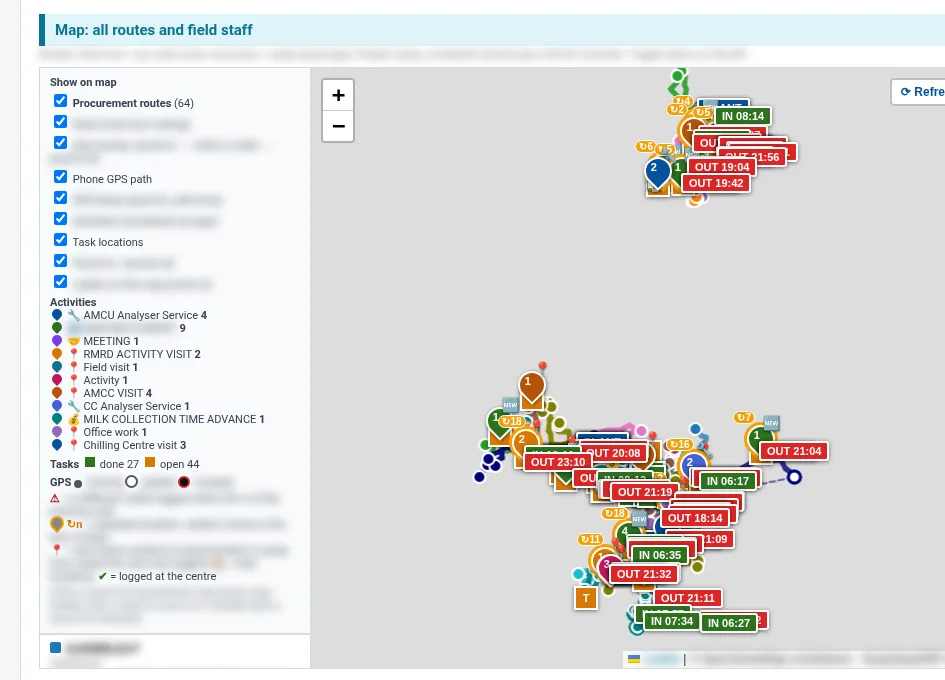
GPS tracking (optional and more
Key feature

GPS tracking (optional and more

Optional vehicle GPS tracking with GPS tags, alongside all other tracking in one system.

See how →
Service permit alerts

Service permit alerts

Alerts before vehicle service and permits fall due.

See how →
Vehicle and transporter details

Vehicle and transporter details

Vehicle types, vehicles and transporters set up once for routes.

See how →
Route rate assignment

Route rate assignment

Assign a rate to each vehicle route for transport billing.

See how →
See it in the demo tourThe Assets, vehicles, CRM and requests chapter shows these screens in the order the work happens.

Interactive step-by-step guides

Adding vehicle and transporter details

Keep exploring at your own pace

Every module page walks through the screens, reports and mobile apps in the same way, so you can see exactly how EasyDairyERP fits your dairy.

When you have seen enough, we are happy to show it to you live on our sample data: book a demo or call +91 94880 59495.

Next stop on the tour (21 of 27)Easy Human Resource Management SystemContinue the tour →