
Chilling centre pilferage control on one page: TS loss, deleted tests and re-pours, by plant
A procurement audit report that helps spot fat/SNF manipulation at the collection point. It lists every deleted test and weight, every re-pour, and the rupee difference against the first reading.
Every deleted test has a rupee value.
See exactly how much more was paid after a test was deleted and the milk was saved again, ranked by village, plant and farmer.
What does the test deletion and re-pour impact report do?
The EasyDairyERP test deletion and re-pour impact report is part of procurement pilferage control. It lists every milk test deleted on the analyser, every weight deleted on the scale, every farmer who was tested and then saved again within 10 minutes, every “testing and pouring” pattern (a zero-quantity test followed by a saved reading with different fat/SNF in the same shift), and every hand-typed quantity or fat/SNF entry. For each one it calculates the rupee difference against the first reading and flags HIGH where the saved reading is higher than the first test, so procurement managers can review it by village or centre, by plant and by farmer. The analysis is built from deleted data and works with most milk analysers, including EkoMilk Ultra, EkoMilk Pro, EkoMilk Ultra Pro, EkoMilk Ultra DPS and Essae.
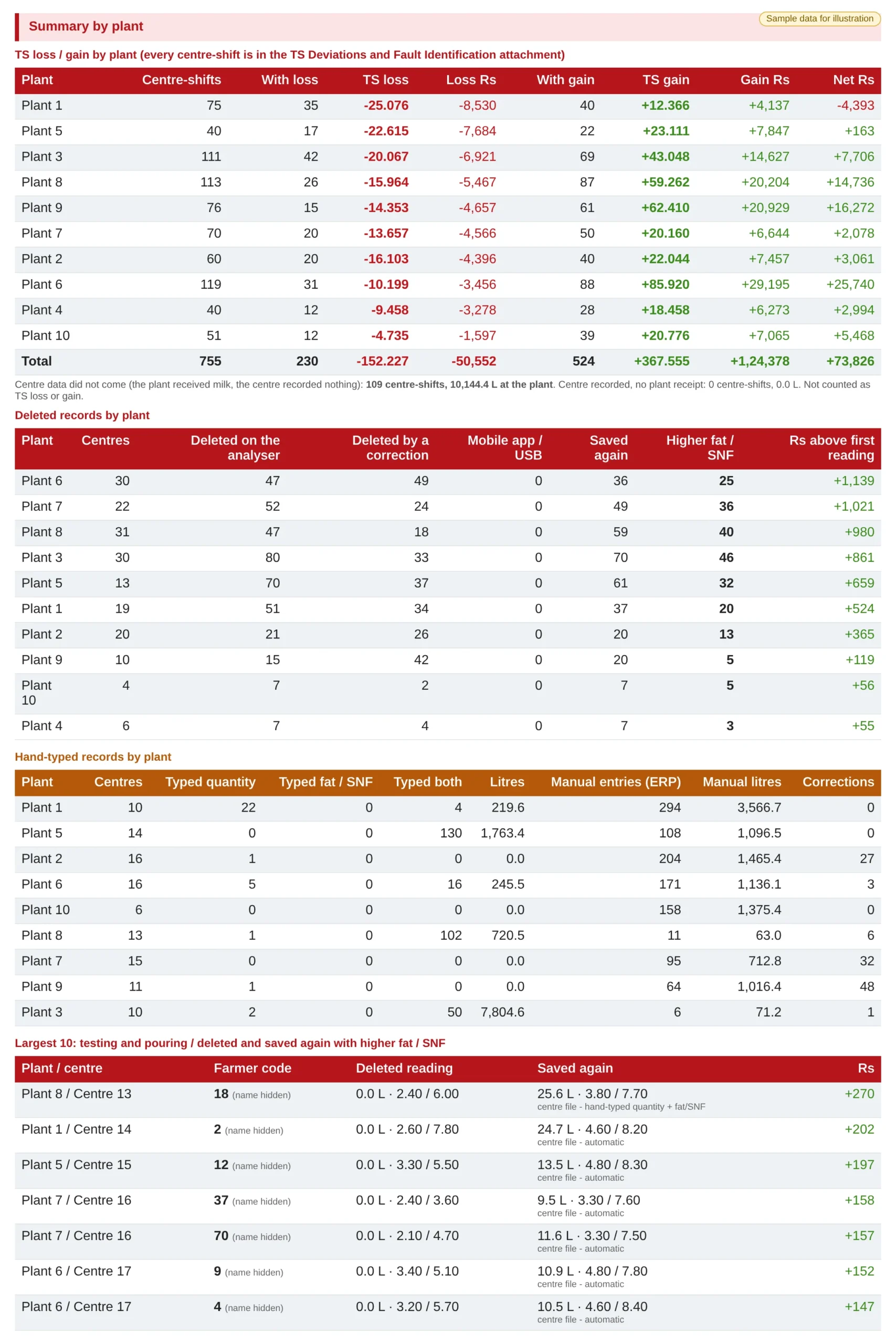
Summary by plant: the one-page pilferage control view
The lead view for each chilling centre plant. TS loss and gain against plant receipt per centre-shift with the rupee value, centre-shifts where the centre recorded nothing but the plant received milk, deleted records, hand-typed records and the largest testing-and-pouring events. The detailed tables below drill into each line.
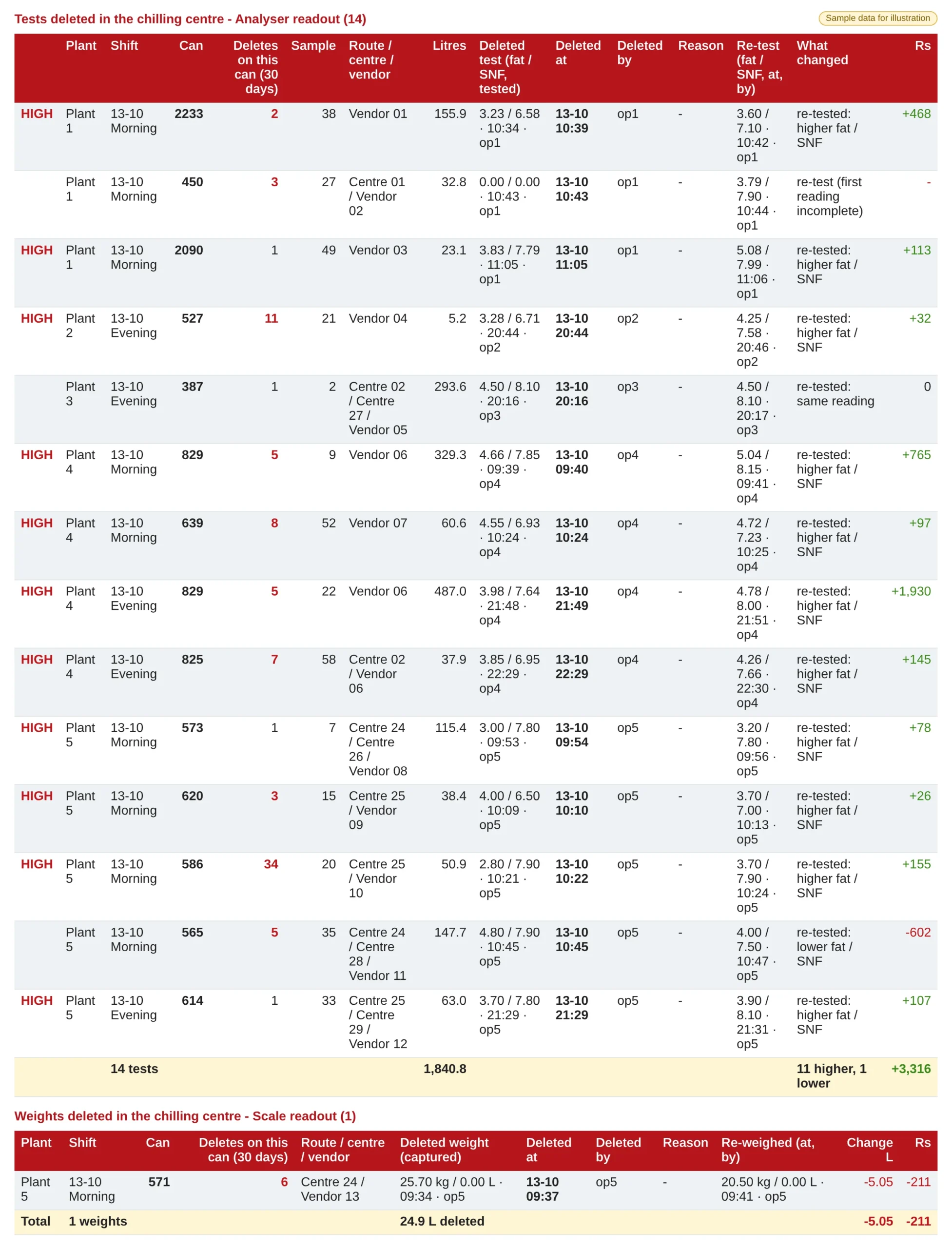
Tests and weights deleted in the chilling centre
Every deleted analyser test and scale weight, with plant, shift, can, how many times that can has had a deletion in the last 30 days, sample, litres, the deleted reading with time and operator, the re-test or re-weigh, what changed and the rupee impact. Total rows give tests, litres, higher and lower re-tests and the net rupees. HIGH marks a re-test that came back higher; red counts mark cans with repeat deletions.
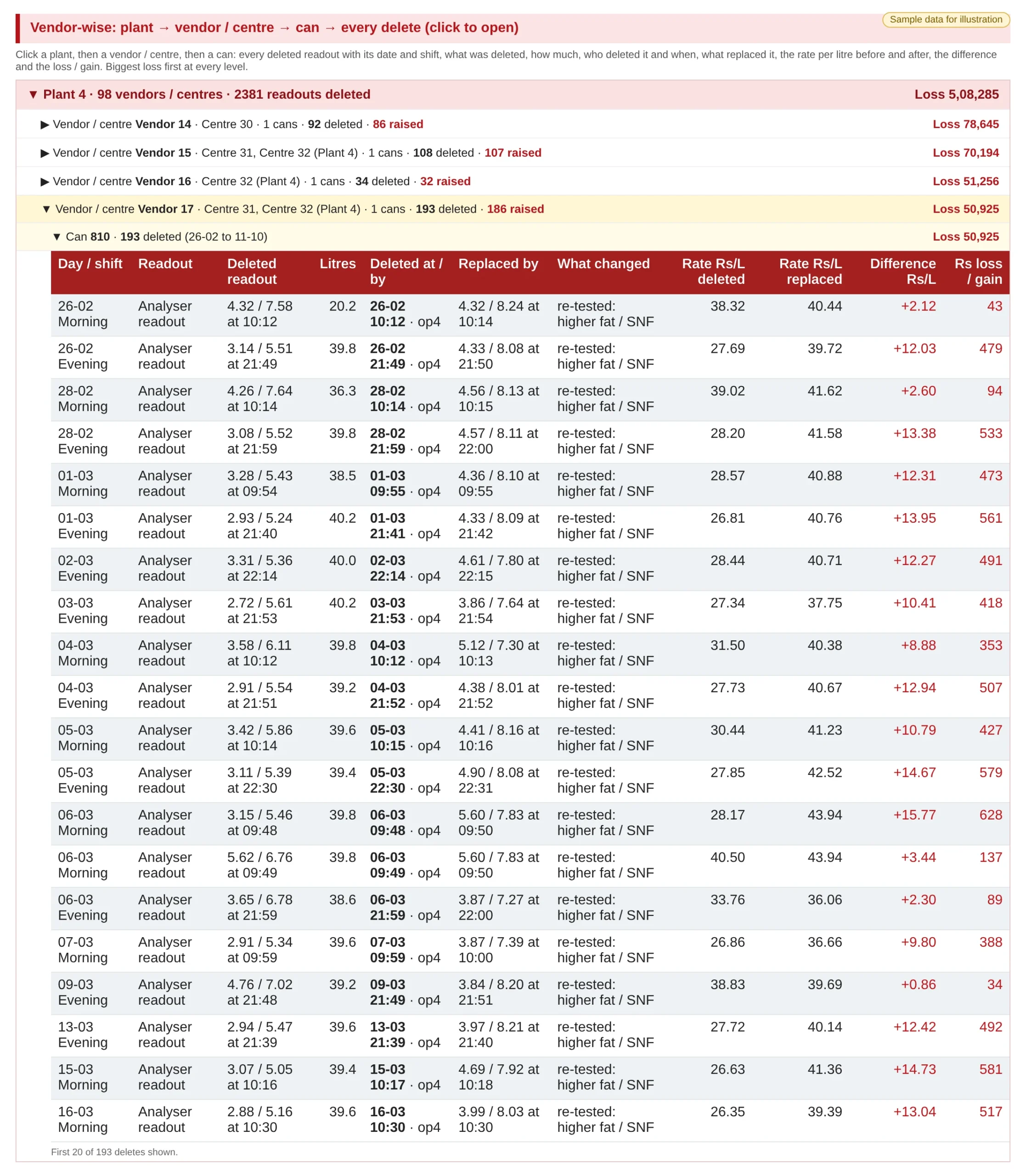
Vendor-wise drill-down: plant → vendor → can → every delete
Open a plant to see every vendor or centre, open a vendor to see its cans, and open a can to see every deleted readout. Biggest loss is shown first at every level. Each delete shows the day and shift, the deleted fat/SNF, litres, who deleted it and when, what replaced it, the rate per litre before and after, and the difference. The difference × litres gives the rupee loss. In this sample, one can was re-tested 193 times over several months, each time at a higher fat/SNF: the report flags a pattern like this so it can be investigated, rather than proving wrongdoing on its own. Works with most milk analysers, including EkoMilk Ultra, EkoMilk Pro, EkoMilk Ultra Pro, EkoMilk Ultra DPS and Essae.
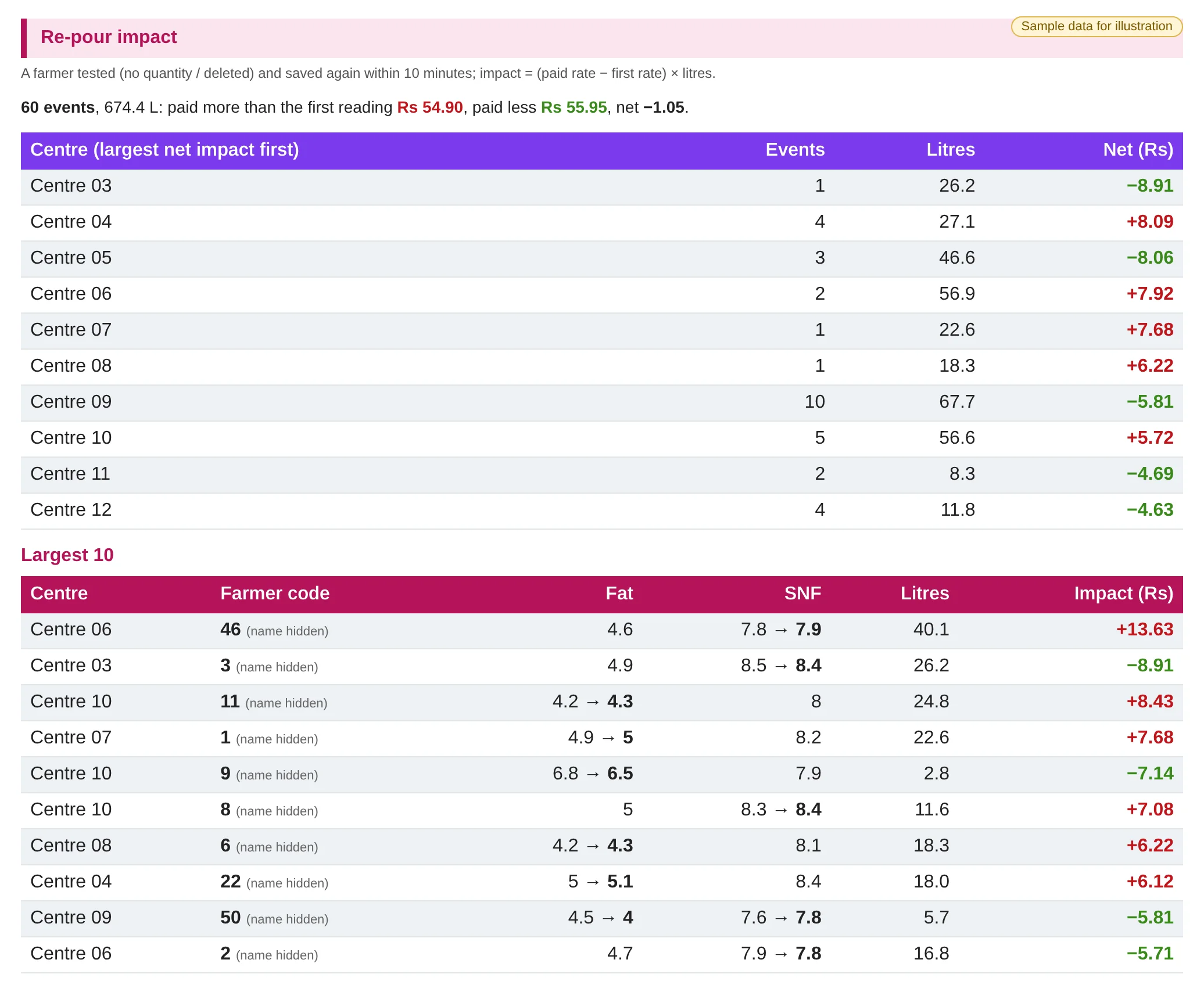
Re-pour impact by centre and farmer
A farmer tested with no quantity, or deleted, then saved again within 10 minutes. Impact = (paid rate − first rate) × litres. A summary line, a centre table ranked by net impact, and the largest 10 farmer events, shown by farmer code.
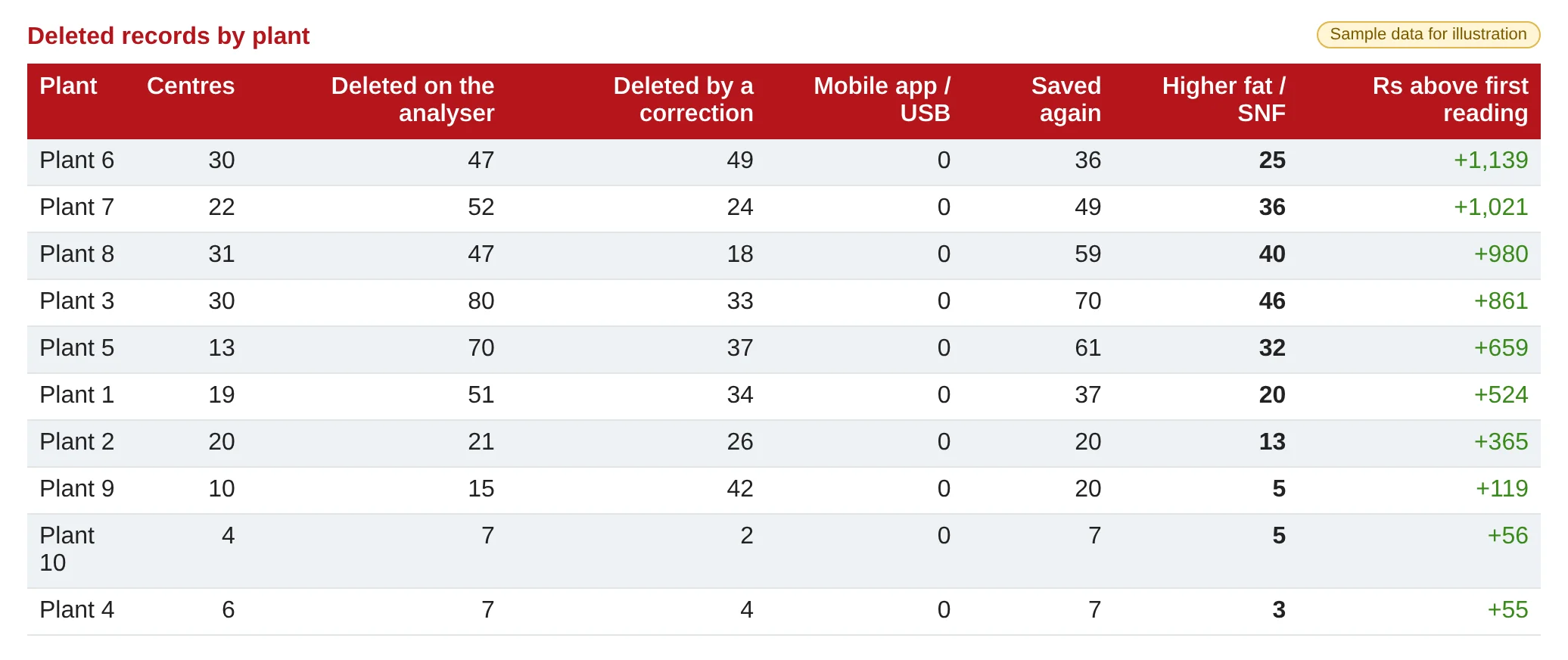
Deleted records by plant
Plant-level view: centres, deletions on the analyser, deletions by correction, mobile app/USB, how many were saved again, how many came back with higher fat/SNF, and the rupees paid above the first reading.
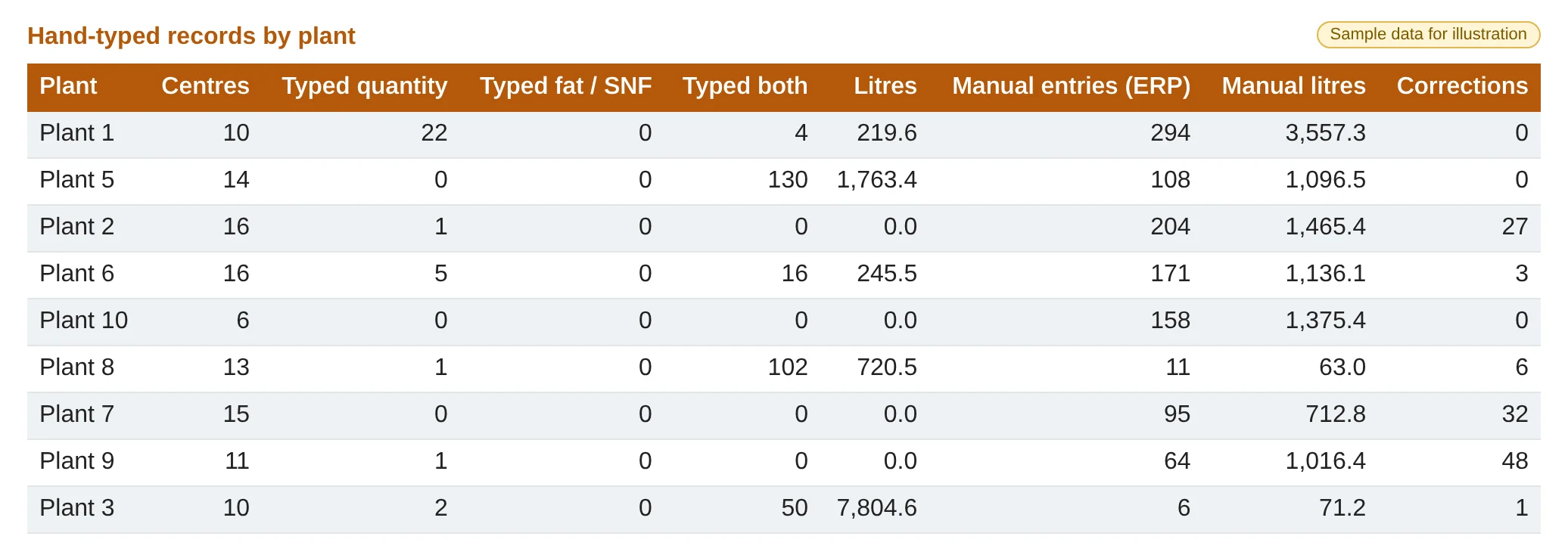
Hand-typed records by plant
Where quantity or fat/SNF was typed by hand instead of read from the scale or analyser, alongside manual ERP entries, manual litres and corrections.
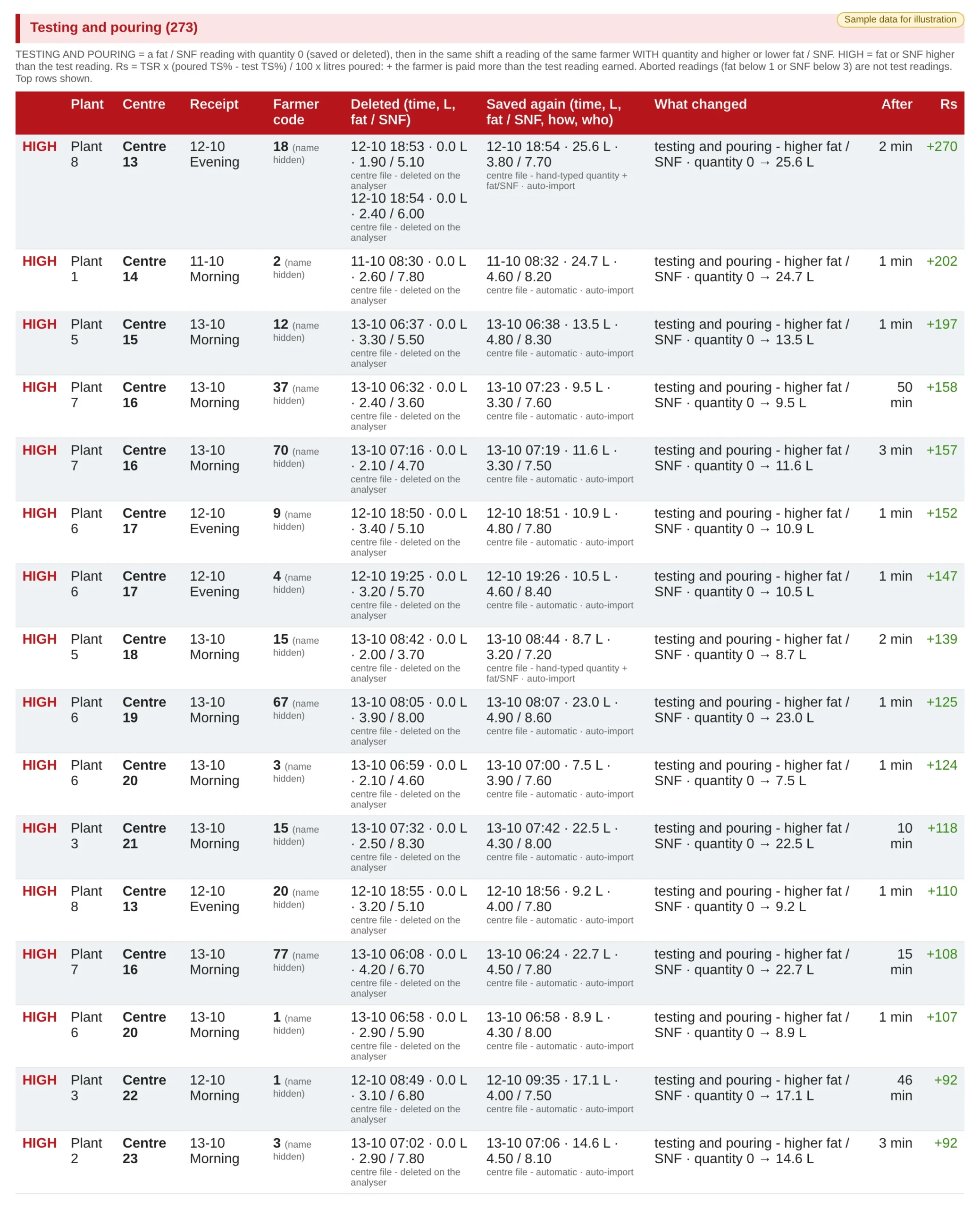
Testing and pouring
A zero-quantity fat/SNF reading followed, in the same shift, by a reading for the same farmer with quantity. Shows how it was saved again, who saved it, the minutes between, and the rupee value.
Features
TS loss and gain by plant
Every centre-shift compared with plant receipt: how many showed a TS loss or gain, the TS kg and the rupee value, with a total row.
Missing centre data
Flags centre-shifts where the plant received milk but the centre recorded nothing, kept apart from TS loss or gain.
Deleted analyser tests
Each deleted test is kept with its fat/SNF, time, operator, deletion time and reason, next to the re-test that replaced it.
Deletes on this can (30 days)
Each deleted test or weight shows how many deletions the same can has had in the last 30 days. Repeat deletions on one can stand out in red, flagging patterns rather than one-off corrections.
Works with most milk analysers
The pilferage analysis is built from deleted data. Works with most milk analysers, including EkoMilk Ultra, EkoMilk Pro, EkoMilk Ultra Pro, EkoMilk Ultra DPS and Essae.
Vendor-wise drill-down
Plant → vendor / centre → can → every delete, biggest loss first at every level, with the rate per litre before and after and the rupee loss on each delete. Helps spot cans that are deleted and re-tested again and again.
Deleted scale weights
Deleted weights are shown against the re-weigh, with the change in litres and rupees.
Re-pours within 10 minutes
Flags a farmer tested without quantity, or deleted, and saved again within 10 minutes, with the paid rate compared to the first rate.
Testing and pouring
Helps spot a zero-quantity “trial” test followed by a poured reading with better fat/SNF in the same shift.
Hand-typed entries
Separates typed quantity, typed fat/SNF and typed both from device readings, by plant and centre.
Rupee impact on every row
Re-pour: (paid rate − first rate) × litres. Testing and pouring: TSR × (poured TS% − test TS%) / 100 × litres poured. Plus means the farmer was paid more than the first reading earned.
HIGH flags
HIGH marks rows where the saved fat or SNF is higher than the first test, so reviewers start with the entries that raised the payout.
Village, plant and farmer views
Ranked by centre (events, litres, net rupees), summarised by plant, and listed as the largest farmer events by farmer code.
Who and how
Every row shows the operator and the source: on the analyser, by a correction, mobile app/USB, automatic import or hand-typed.
Fair both ways
Lower re-tests and same readings are shown too, so a genuine re-test for an incomplete reading is easy to tell apart.
Frequently asked questions
What counts as a re-pour?
A farmer who was tested with no quantity, or whose test was deleted, and then saved again within 10 minutes. The report compares the paid rate with the first rate and multiplies by litres.
How is the rupee impact calculated?
For re-pours: (paid rate − first rate) × litres. For testing and pouring: TSR × (poured TS% − test TS%) / 100 × litres poured. A plus figure means the farmer was paid more than the first reading would have earned.
What does HIGH mean?
The fat or SNF saved after the deletion or test is higher than the first reading. It is a flag for review, not proof of wrongdoing: some re-tests are genuine, for example when the first reading was incomplete.
What does “Deletes on this can (30 days)” show?
How many times tests or weights on that same can were deleted in the last 30 days. A single deletion is often a genuine correction; repeat deletions on one can flag a pattern worth reviewing.
How does the vendor-wise drill-down work?
Open a plant, then a vendor or centre, then a can. Every deleted readout on that can is listed with who deleted it and when, what replaced it, the rate per litre before and after, and the rupee loss (difference × litres). Biggest loss comes first at every level, and repeated re-tests of one can at higher fat/SNF are flagged for review.
Are aborted readings counted as tests?
No. Readings with fat below 1 or SNF below 3 are treated as aborted and are not counted as test readings.
Can I see it by village, plant and farmer?
Yes. There is a centre view ranked by net impact, a plant summary of deletions and hand-typed records, and farmer-level rows by farmer code.
Which analysers and scales does it work with?
Works with most milk analysers, including EkoMilk Ultra, EkoMilk Pro, EkoMilk Ultra Pro, EkoMilk Ultra DPS and Essae. The analysis is built from deleted analyser and scale data captured through the Milk Reception Desk and collection apps.
How does this help control pilferage?
Fat/SNF manipulation through deleted tests and re-pours raises the payout without more milk. Putting every deletion, re-pour and typed entry in one report with its rupee value helps spot repeat patterns by operator, centre or farmer early.
See it live
We walk you through this on our sample data, step by step. Call +91 94880 59495 or write to info@easybis.in.