
Milk Reception Desk: weigh and test every can at the dock, straight into the ERP
Desktop capture software for chilling centres and plant reception docks. It reads the weighing scale and one to three analysers at once, and syncs each receipt to EasyDairyERP procurement.
Works without internet. Syncs itself when the connection is back.
The dock never stops for a network outage. Every can is captured and saved on the desk, and whenever the internet connects, every pending entry goes to the ERP automatically, with no manual step.
What is the EasyDairyERP Milk Reception Desk?
The EasyDairyERP Milk Reception Desk is desktop software for chilling centres and plant milk reception docks. It runs on Windows 11, Windows 10, Windows 7 (64-bit) and Ubuntu, reads weight from the weighing scale and fat, SNF, CLR and added water from one to three milk analysers (EkoMilk Ultra, EkoMilk Pro, EkoMilk Ultra Pro, EkoMilk Ultra DPS and Essae) over serial, IoT or network connections, records each receipt against the shift, route and milk type, keeps working offline, and automatically sends every unsynced entry to EasyDairyERP procurement whenever the internet connects, with no manual step. A mobile app covers the same capture on a tablet or phone.
EkoMilk and Essae are trademarks of their respective owners, named only to describe compatibility. EasyDairyERP is not affiliated with them. Screens show sample data.
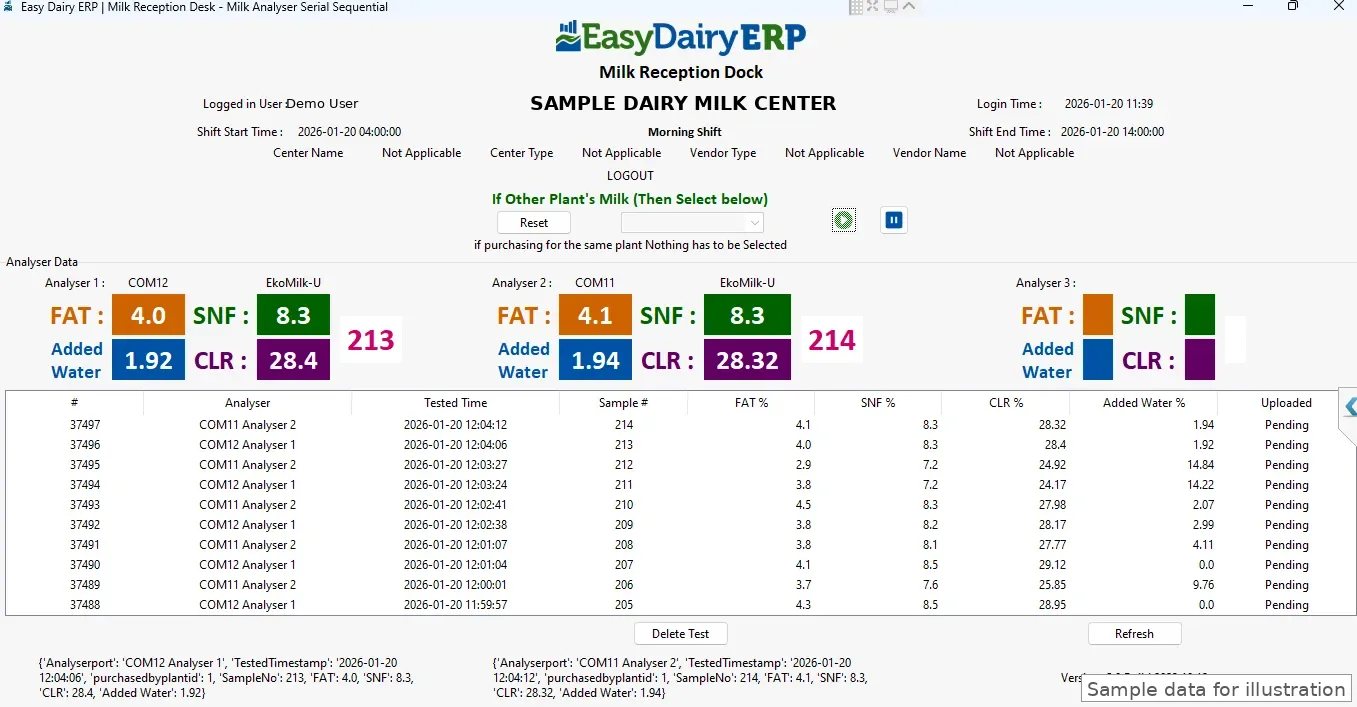
Three analysers, read in serial sequence
For busy docks with three analysers on serial ports. The desk reads each analyser in turn and shows fat, SNF, CLR and added water for each, with the sample number, in large tiles. Every test is listed below with its time and its upload state.
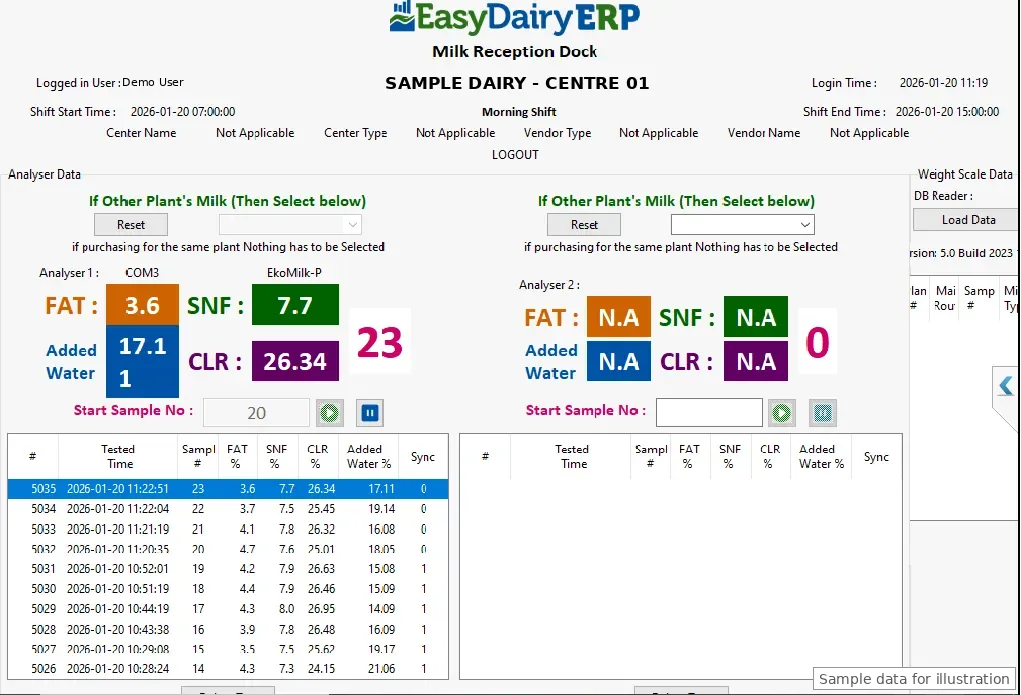
Two analysers with a network weighing scale
Two analysers test side by side while the weighing scale is read over the network (IP). Each analyser has its own start sample number, and every row shows whether it has synced.
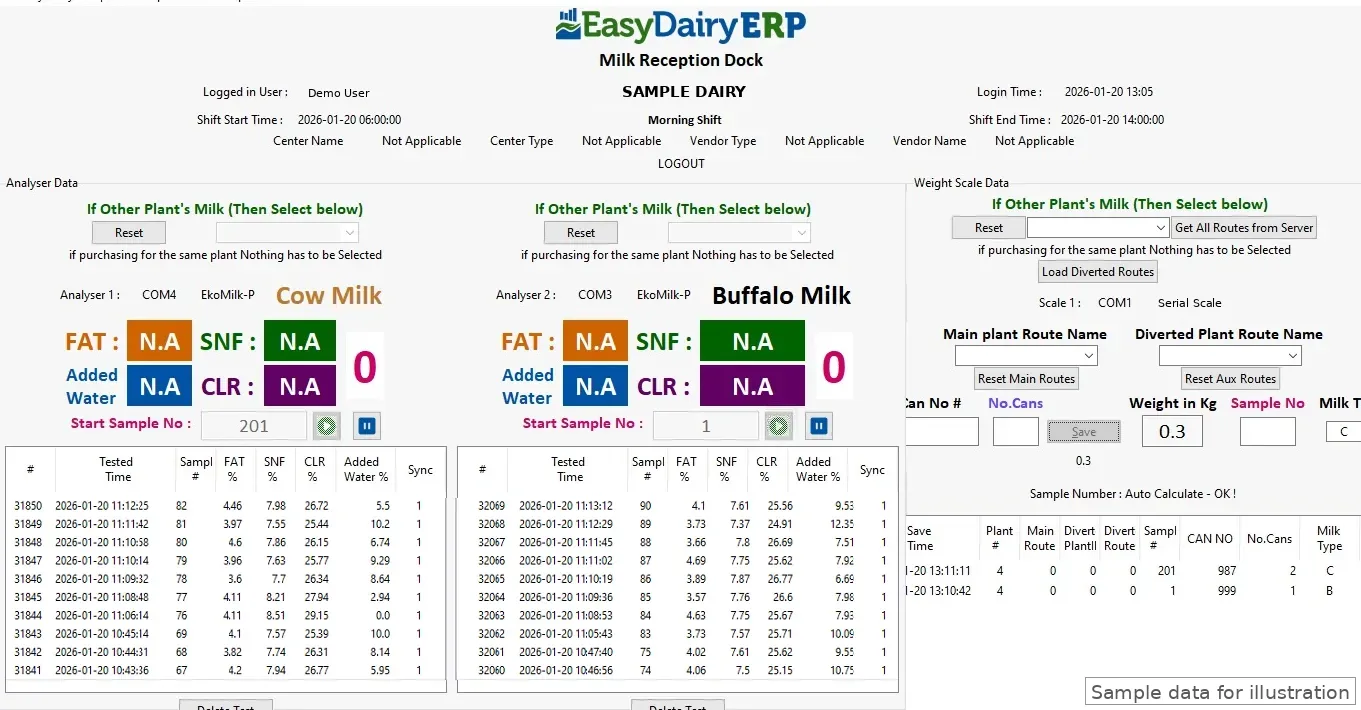
Cow and buffalo on one screen: two analysers and a serial scale
One analyser for cow milk and one for buffalo milk, with a serial weighing scale on the same screen. Weight, can number, number of cans, sample number and milk type are saved against the main or diverted route.
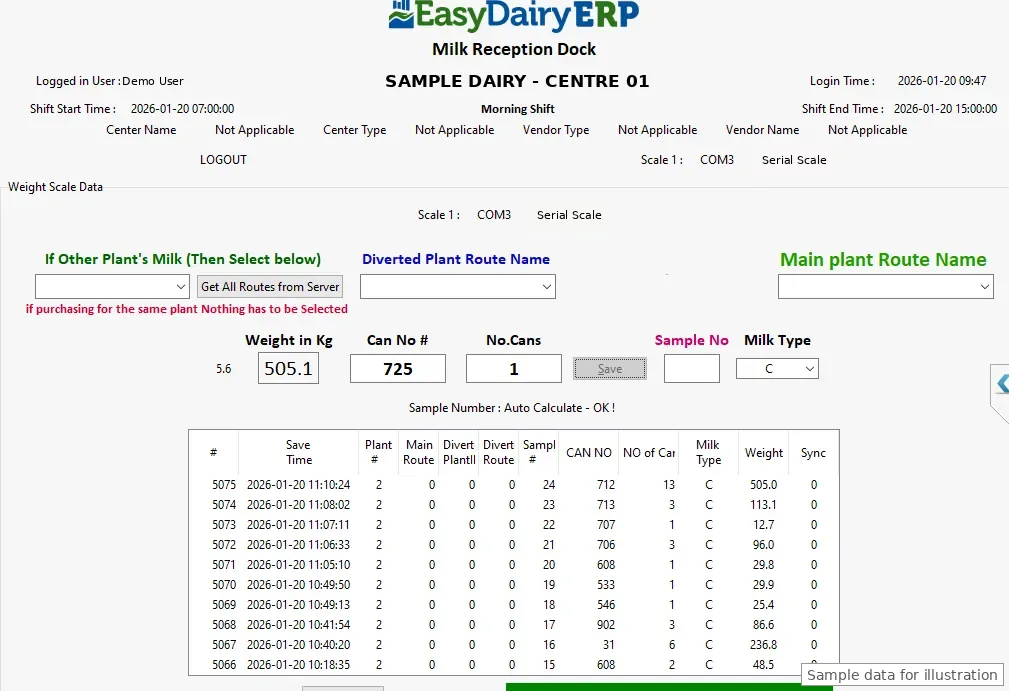
Weighing scale only
For docks that only weigh. The operator records weight in kg, can number, number of cans and milk type, and the sample number is calculated automatically.
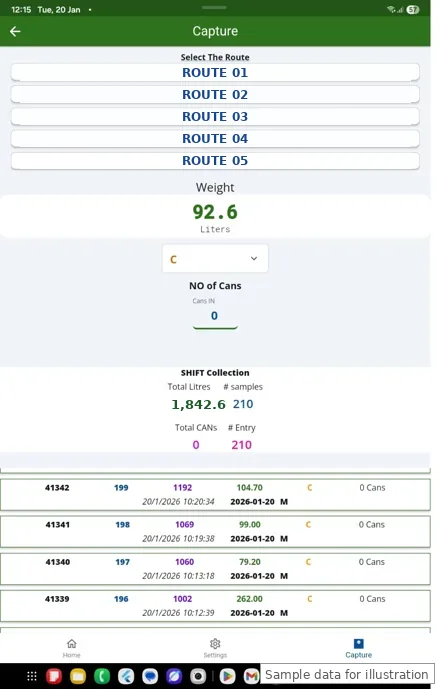
Chilling centre mobile app
The same capture on a tablet or phone: pick the route, read the weight, set the milk type and number of cans, and watch the shift totals. Shift extension requests are raised from the app.
Features
A layout for every dock
Weighing scale only; IoT weighing scale; one analyser with an IoT scale; two analysers; two analysers with a scale over serial, network (IP) or a controller; and three analysers over IoT or serial-sequential.
Cow and buffalo on one screen
Separate analysers for cow and buffalo milk, with milk type recorded on every can.
Analysers you already own
EkoMilk Ultra, EkoMilk Pro, EkoMilk Ultra Pro, EkoMilk Ultra DPS and Essae. A dedicated EkoMilk Ultra DPS module is included.
Fat, SNF, CLR and added water
Each test shows fat, SNF, CLR and added water in large tiles, with the sample number, so the operator sees the result at a glance.
Weight, cans and routes
Weight in kg, can number, number of cans, sample number (auto-calculated) and milk type, against the main plant route or a diverted route.
Other plants’ milk
Milk received on behalf of another plant is tagged to that plant at capture.
Works offline, syncs later
Capture carries on when the internet drops. Receipts are stored on the desk, and whenever the internet connects, every unsynced entry goes to the ERP on its own, with no manual step.
Shift control
Morning and evening shifts run on set start and end times shown on screen, and every receipt is saved against its shift.
Shift extension on approval
A centre that needs more time requests a shift extension from the mobile app. It can be approved on the fly, and the approval syncs to the desk.
Separate analyser and scale shifts
Two shifts can run independently, one for the analysers and one for the weighing scale, so testing and weighing need not open and close together.
Sample reserve
A built-in sample reserve function at the desk.
Sync marking
Every row shows whether it has synced to the ERP, so pending records are visible before the shift closes.
Voice and sound prompts
Audio prompts for zero-check, ready-to-save and save-success keep the operator in step without watching the screen.
Configure and options
Ports, analyser and scale set-up and station options are configured on the desk itself.
Windows and Ubuntu
Installers for Windows 11, Windows 10, Windows 7 (64-bit) and Ubuntu. Latest version 8.12.
Frequently asked questions
Which operating systems does the Milk Reception Desk run on?
Windows 11, Windows 10, Windows 7 (64-bit) and Ubuntu.
How many analysers can one desk read?
One to three, together with a weighing scale. Three-analyser docks can read over IoT or serial-sequential.
Which analysers are supported?
EkoMilk Ultra, EkoMilk Pro, EkoMilk Ultra Pro, EkoMilk Ultra DPS and Essae.
How are the scale and analysers connected?
By serial port, IoT, network (IP) or a controller, depending on the station layout chosen.
Can it handle cow and buffalo milk separately?
Yes. A layout puts cow and buffalo milk on one screen with dual analysers and a scale, and milk type is saved on every can.
Does it work without internet?
Yes. The desk keeps capturing offline. Whenever the internet connects, all unsynced entries are sent to EasyDairyERP automatically, with no manual step.
Can a centre extend its shift?
Yes. The centre requests a shift extension from the mobile app, it can be approved on the fly, and the approval syncs.
Can the analyser and the weighing scale run on different shifts?
Yes. Two separate shifts can run, one for the analysers and one for the weighing scale.
How does the data reach the ERP?
Automatically. Each receipt syncs to EasyDairyERP procurement on its own, and the desk marks every row as synced or pending.
Is there a mobile version?
Yes. Chilling centre capture is also available as a mobile app for tablets and phones.
See it live
We walk you through this on our sample data, step by step. Call +91 94880 59495 or write to info@easybis.in.