
Docs
How-to guides, system overviews and workflows for EasyDairyERP: procurement, sales and marketing, stores and HRMS. Start with the workflow, then follow the step-by-step guides.
Choose a topic
Procurement | Milk Purchase System
Procurement masters, rate charts, billing set-up and the procurement workflow.
Open the docsSales and Marketing System
Sales masters, orders, dispatch, invoicing, returns and the sales workflow.
Open the docsInventory Management System | Stores
Stores masters, requests, quotes, purchase orders, GRN and the stores workflow.
Open the docsHuman Resource Management System | HRMS
Employee masters and the HRMS set-up.
Open the docsWorkflows at a glance
Swipe sideways to see the whole diagram →
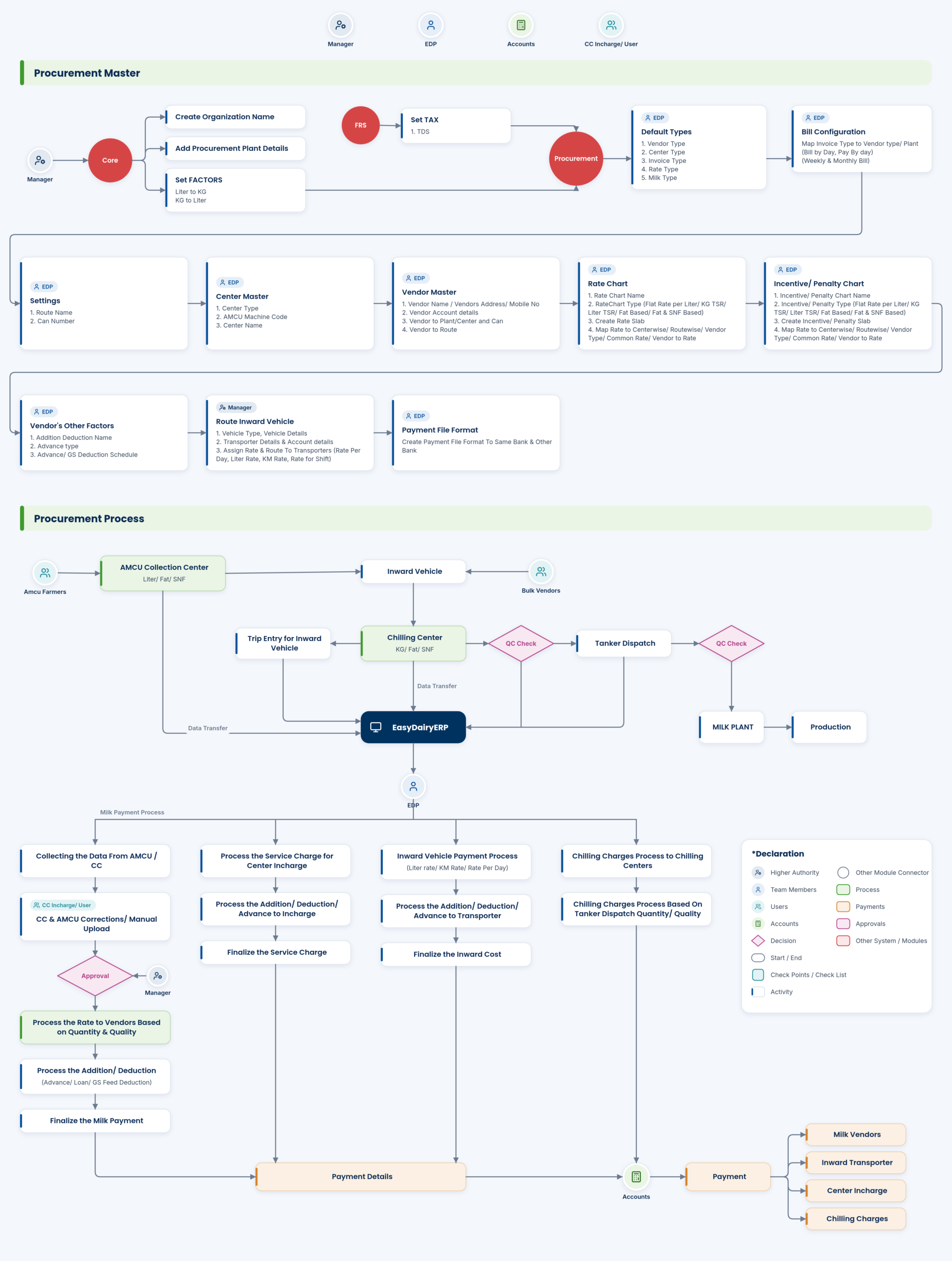
Swipe sideways to see the whole diagram →
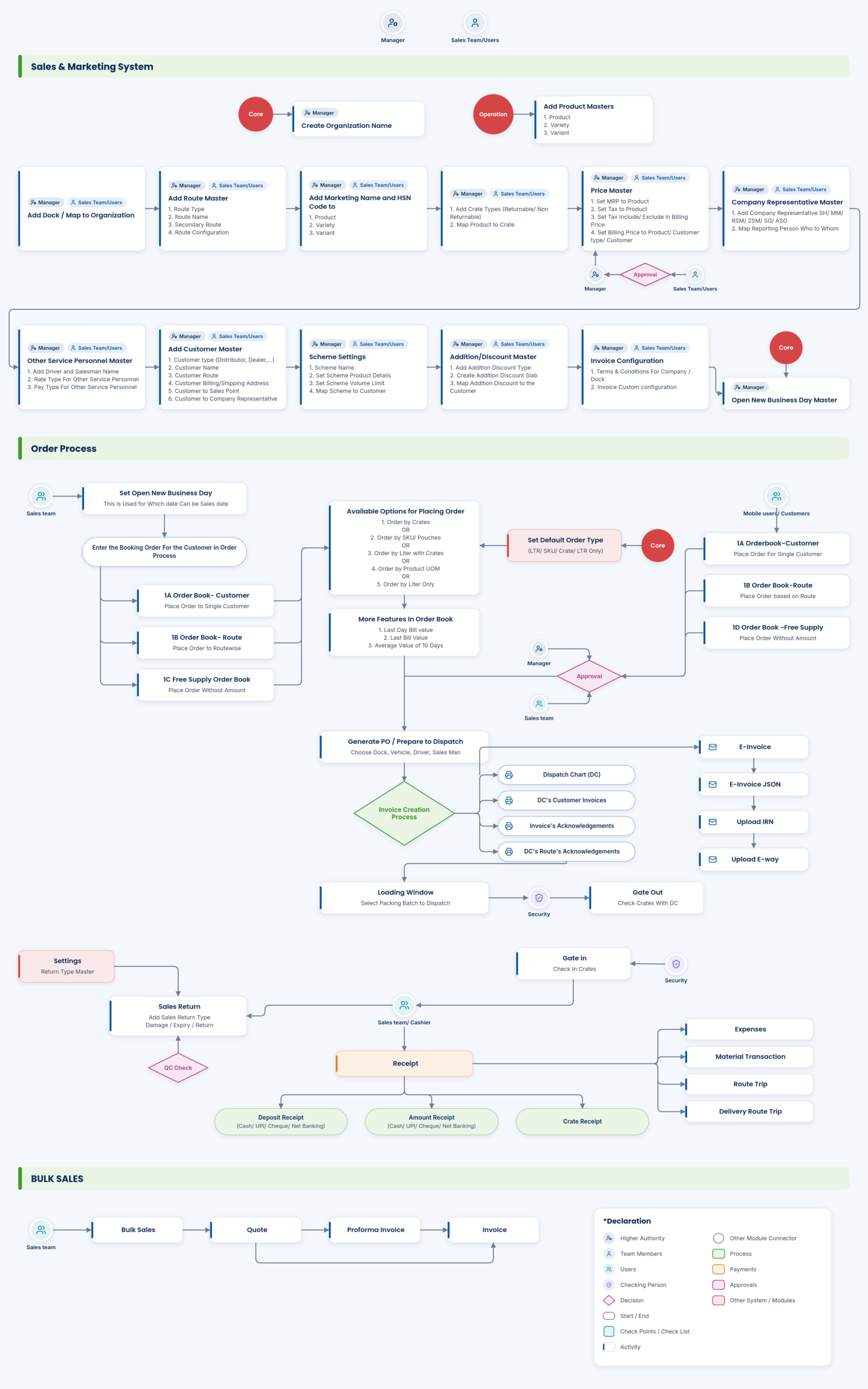
Swipe sideways to see the whole diagram →
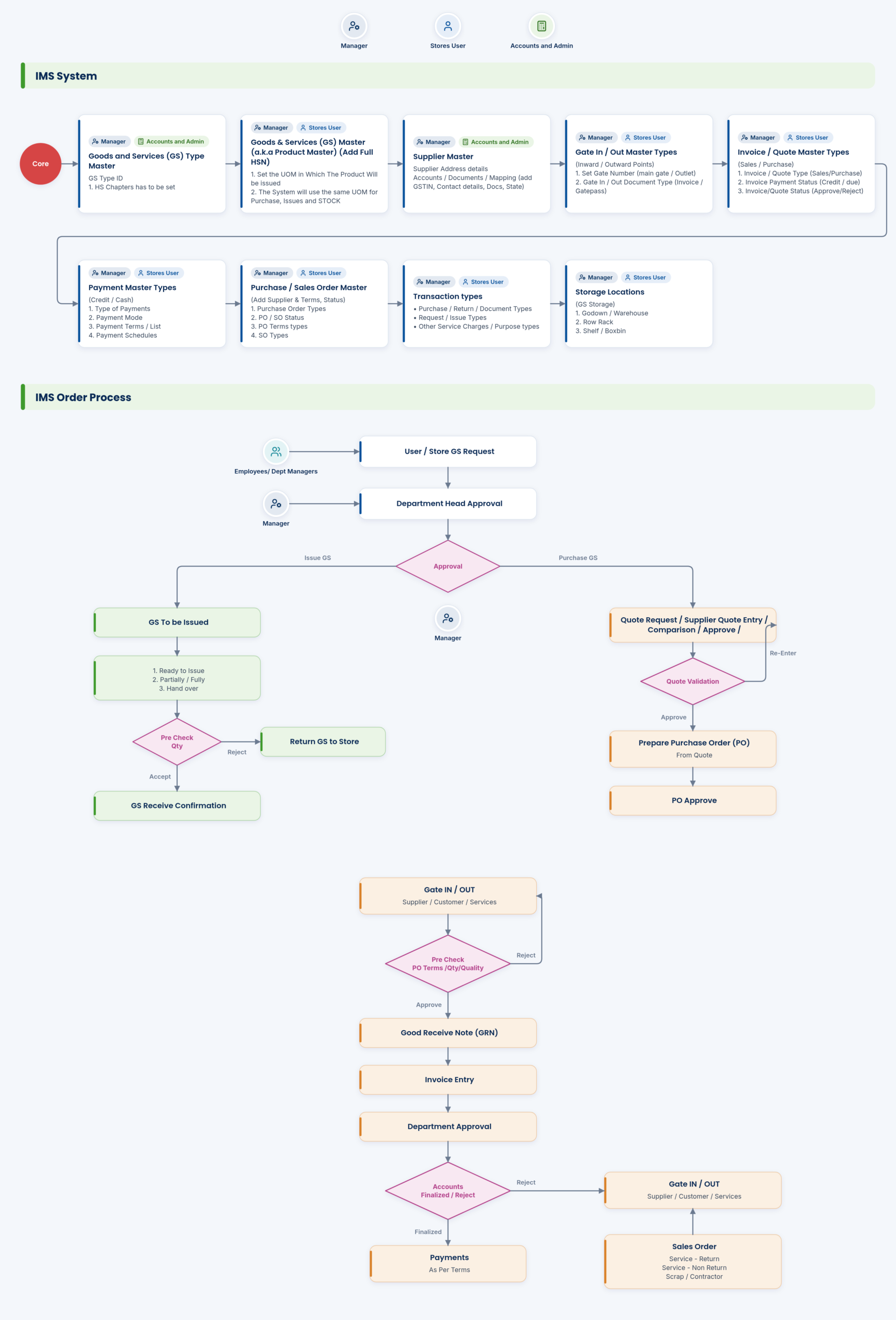
What the documentation covers
Rate charts, billing and payments
- Rate chart types and slabs: Flat rate per litre, KG TSR, litre TSR, fat based, fat & SNF based; rate slabs
- Incentive / penalty charts: Add incentive or penalty chart; assign common or to a vendor
- Billing in your cycle: by day, weekly, every ten days, fortnightly or monthly
- Service charges for procurement in-charge (VLCC service charge): Generate service charges; assign VLCC service charge to vendors; process, adjust and finalise service charge
- Bank file generation: Bank file to upload on the bank site; customisation for all major banks; payment file format (same bank / other bank)
- Vendor / farmer / producer master: Step-by-step guide: add vendor | farmer | producer
- Procurement factors, default types and TDS set-up: Litre/KG factors; vendor, centre, invoice, rate, milk types; TDS
- Can management: Can management; Milk Can Stock Report; route and can number settings
Sales, orders, billing and GST
- Bulk sales: Quote, proforma invoice, invoice
- Rate control, multiple pricing options: Litre-, crate-, customer-, route-based; price master with approval
- Four order screen types: Crates, SKUs, litres with crates, litres
- Order books: Customer, route-wise and free-supply order books; place order book – customer / free supply
- Customer sales average for quick quantity billing
- Open new business day; anytime day closure; invoice date forwarding
- Dispatch generation, DC and acknowledgements
- E-invoice automatic API; e-way bill
- Gate in / gate out vehicle details with crate check
- Schemes (free product on billed product); scheme control
- Receipts and deposits: Cash, online, DD, cheque; deposit handling; cheque handling; deposit / amount / crate receipts
- Sales returns: Add sales return type; add sales return; QC check
- Company expenses, material transactions, route trips and delivery routes
- Sales masters (docs): Organisation unit; brand / product / variety / variant; dock; sales points; routes; HSN code and marketing name; product to crate; MRP; tax; billing price; company representative; other service personnel; customer, address, customer to sales point, address to representative; addition / discount and assignment; invoice configuration
Village milk collection and analysers
- Chilling Center / AMCU for Windows: Desktop capture software download (docs footer)
Farmer Connect
- Farmer App download: Linked in docs footer
Chilling centres and milk reception
- Chilling charges: Auto-calculated from procurement data; chilling charges screen; processed per tanker dispatch quantity / quality
Milk transport and field operations
- Vehicle, transporter and route set-up: Step-by-step guide: add vehicle and transporter details, route details, assign transporter to vehicles; route inward vehicle master (vehicle type, transporter account, rate per day / litre / KM / shift)
- Trip entry for inward vehicle
- Inward vehicle payment and inward cost finalisation
Stores, inventory and purchase
- Goods & services purchase workflow; GS request / department issue / quote request workflow
Field force and the sales app
- Customer order ASO approval; order deviation approvals
- Attendance, tasks, market survey, allowances: Docs app section; login with employee mail id
Platform and commercial model
- Continuous support from our team after go-live
Apps, downloads and resources
- EasyDairyERP mobile app (Android and iOS)
- AMCC app download (latest version)
- Chilling Center app; Farmer App downloads: Linked from docs footer
- Milk Reception Desk and Weigh Bridge Desk for Windows; Chilling Center / AMCU for Windows
- Documentation / knowledge base: System overview, workflow (downloadable PDFs), how-to docs for procurement, sales, stores, HRMS; features and functional-area index
Getting started
1 click-by-click guides. Each guide is shown below exactly as published on Scribe; open the step summary for a quick text version.
Step-by-Step Guide: EasyDairyERP – Task & Attendance Process
Open in Scribe ↗Step summary (text)
- EasyDairyERP Login , Click “Task & Attendance”
- Daily Attendance Click “Punch IN”
- For Attendance Click “Selfie”
- Click “Image Uploaded”
- Click “ODO Meter Reading”
- Click “Vehicle KM”
- Type ” 45000″
How to use the guides
On this page
DocsSet up in this order
Each module is set up in the same order: first the organisation and the masters, then the prices or rules, then the daily process. The workflow diagram on each topic page shows that order, and each how-to guide covers one step, click by click.
The illustrated guides blur the names that identify a dairy; the screens and steps are the real ones.
DocsThe four topics
Procurement: centres, vendors, rate charts, incentives, additions and deductions, transport, bill configuration and invoices. Sales and marketing: products, docks, routes, customers, prices, orders, dispatch, invoices, returns and cancellations. Stores: goods and services, store locations, requests, quotes, purchase orders, gate in and out, payments and stock corrections. HRMS: departments and employees.
Start with the topic for the module you are implementing first.
Keep exploring at your own pace
Every module page walks through the screens, reports and mobile apps in the same way, so you can see exactly how EasyDairyERP fits your dairy.
When you have seen enough, we are happy to show it to you live on our sample data: book a demo or call +91 94880 59495.