
Easy Dairy Sales and Marketing
Route sales, distributors and dealers, bulk and special orders: priced, billed with GST, delivered, collected and analysed in one system, with your sales team working from the app.
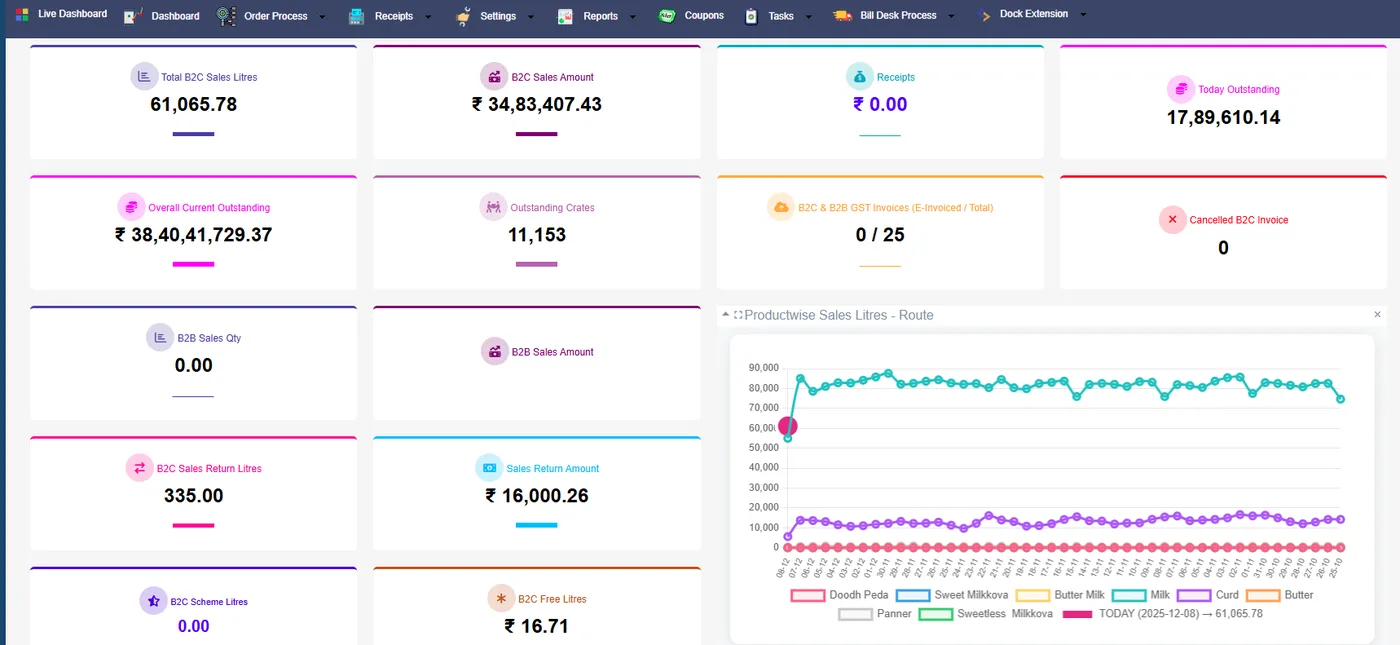
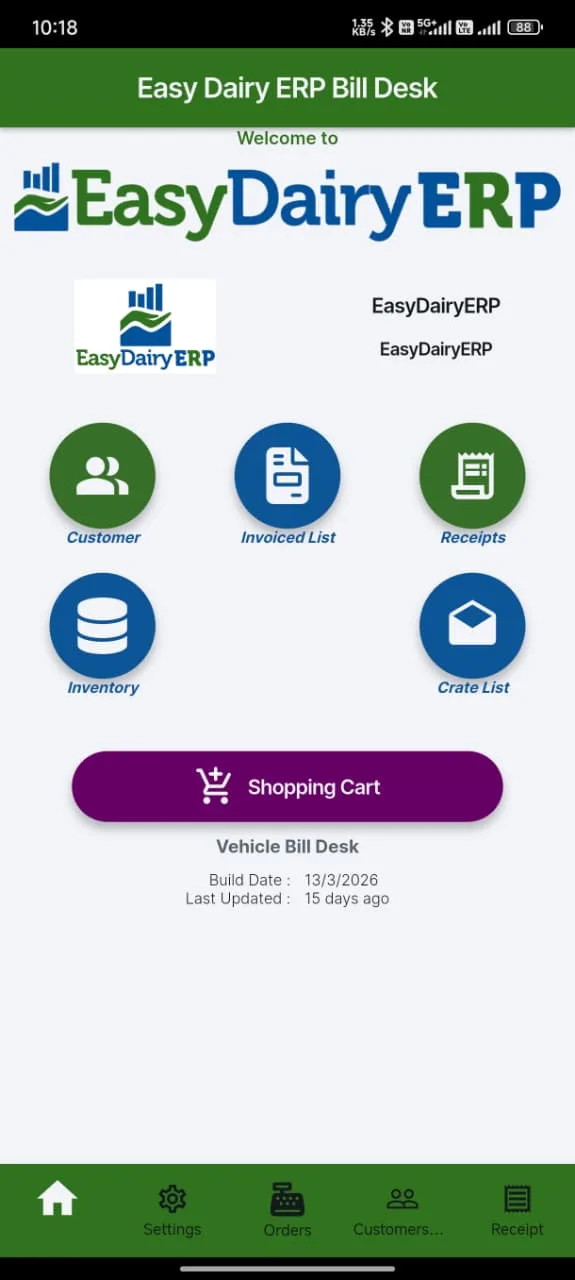
Easy Dairy Sales and Marketing runs the dairy’s sales day: route dispatches, retail and bulk sales, special orders, pricing, schemes and discounts, dispatch and gate, GST invoices, receipts, crates and freezers, costing and the reports and mails that close the day. Each function is explained below in the order the day runs, with the real screen or the click-by-click guide beside it.
On this page
The sales day
A sales day, step by stepSet-up
Organisation, products, routes and customersPricing, schemes, discounts and incentivesOrders
Order books, special orders and the four order screensRetail and bulk salesDispatch
Dispatch, gate out, DC and vehicle traceabilityBilling
GST billing, e-invoice, e-way bill and GSTR-1Collections
Receipts, deposits, bank statement upload and credit controlCrates, freezers, returns and cancellationsCosts
Leakage, pouch costing, transport and vehicle paymentsField force
Sales team levels, approvals and the field forceAnalyse
Reports, trends, alerts and the day-close mailMore
At a glanceFrequently asked questionsThe sales dayA sales day, step by step
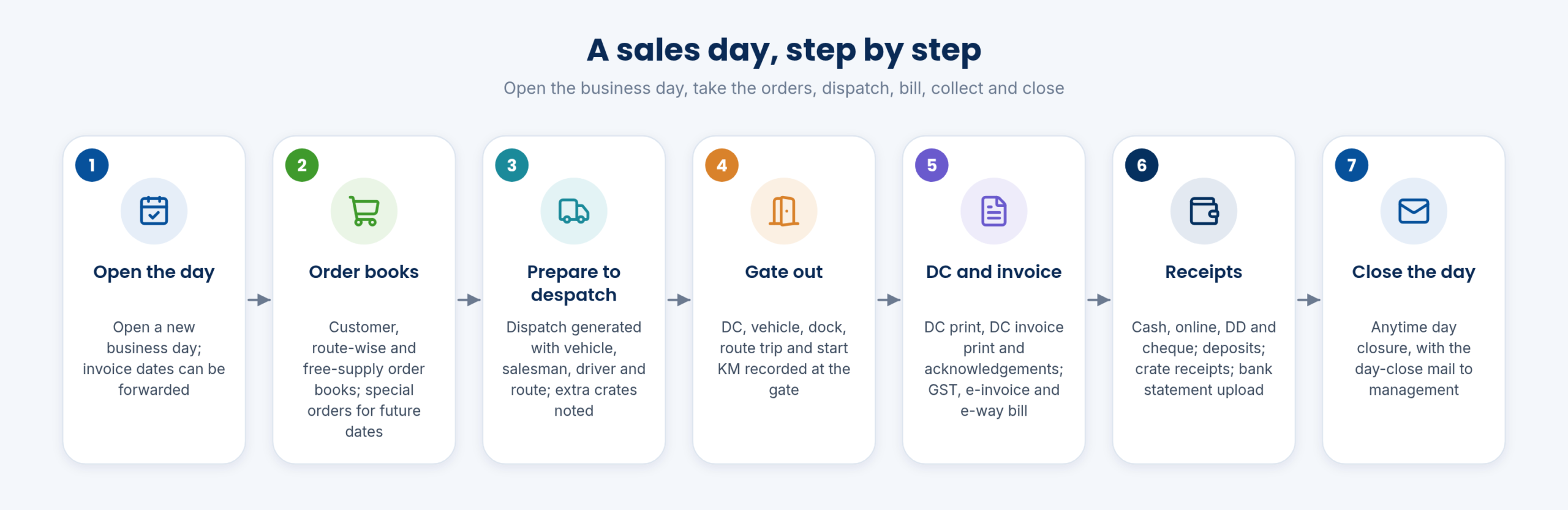
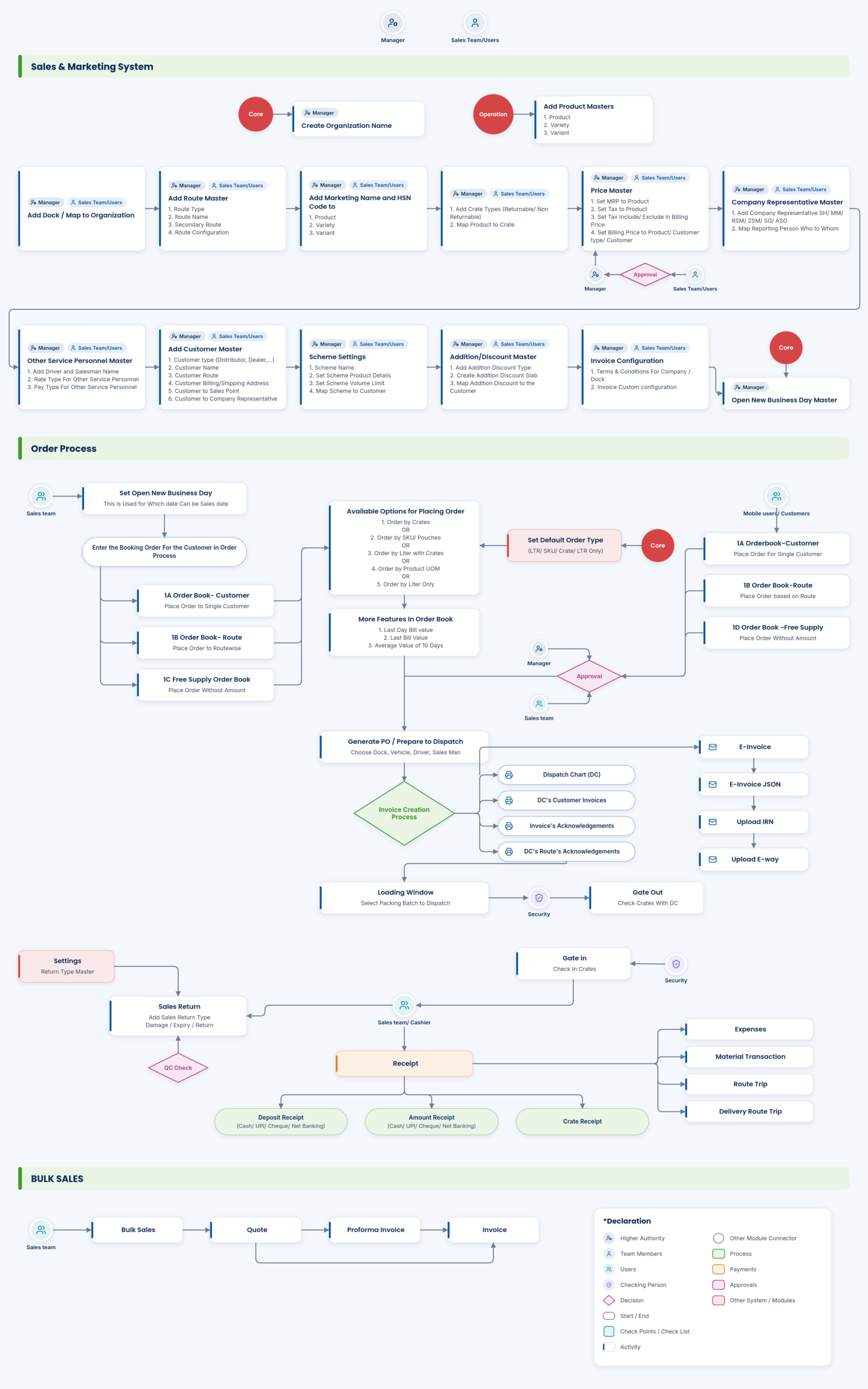
Set up the products, routes and prices once; then every day runs the same way. The business day is opened, orders come in through the order books, dispatch is prepared and the vehicle leaves through the gate, the DC and invoice are printed, receipts and crates come back, and the day is closed with the day-close mail.
The day can be closed at any time, and invoice dates can be forwarded where the dispatch belongs to the next day, so night dispatches and early-morning routes are billed on the right date.
Every route follows the same, recorded sequence, so nothing leaves the plant without an order, a DC and an invoice.
- Open new business day; anytime day closure; invoice date forwarding
- Regular route dispatches and sales
Set-upOrganisation, products, routes and customers
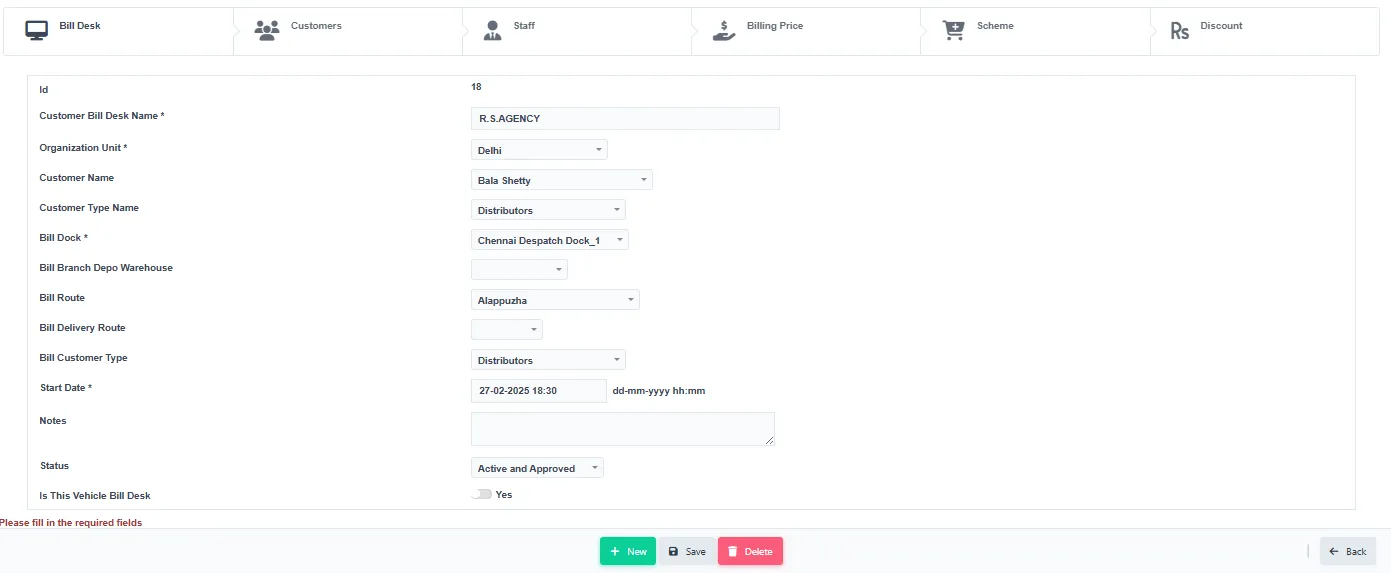
Sales masters are set up once. The organisation unit comes first; then brands, products, varieties and variants with bar codes; docks and sales points (branch, depot, warehouse, factory outlet); routes and route types; HSN codes and marketing names; products mapped to crates; MRP and tax on the MRP; billing prices; company representatives and other service personnel; and customers with their addresses, sales points and representatives.
Users and products are unlimited, with all your products, routes and customers in one place. Data is stored for analytics too, including branding costs and distribution, so the reports later can break sales down by any of these masters.
- Core → Organization Info → Organizational Unit: add the unit.
- Product Details: add brand, product, variety and variant; HSN code and marketing name.
- Sales Points → Dock Name: add the dock; add branch, depot and warehouse.
- Route → Route Type, then the route.
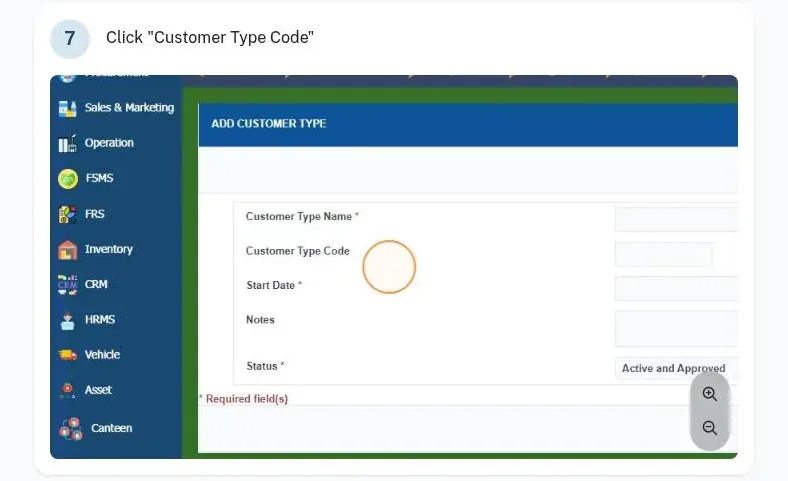
- Customer → Customer Type, customer, address and customer to sales point.
One record per product, route and customer feeds orders, invoices, GST and every report.
- Sales masters (docs): Organisation unit; brand / product / variety / variant; dock; sales points; routes; HSN code and marketing name; product to crate; MRP; tax; billing price; company representative; other service personnel; customer, address, customer to sales point, address to representative; addition / discount and assignment; invoice configuration
- Unlimited users, with all your products, routes and customers in one place
- Data storage for analytics incl. branding costs and distribution
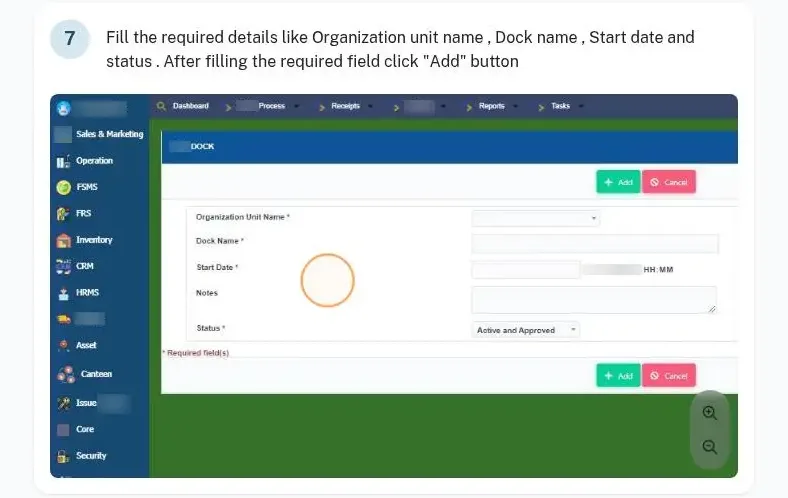
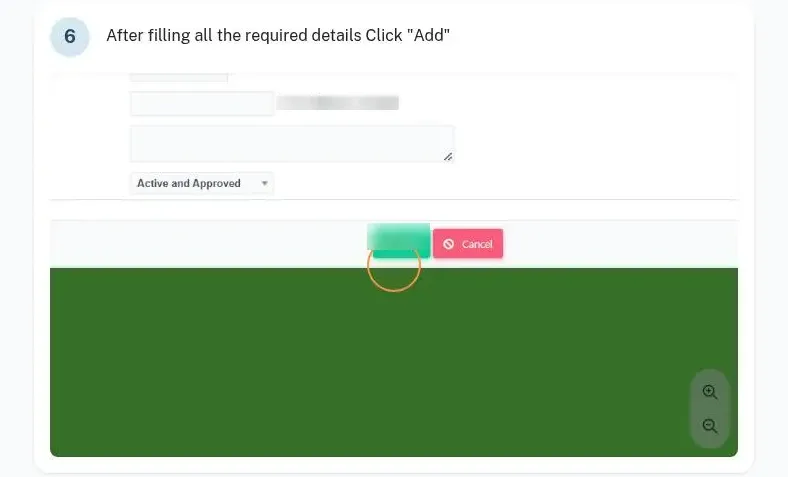
Set-upPricing, schemes, discounts and incentives
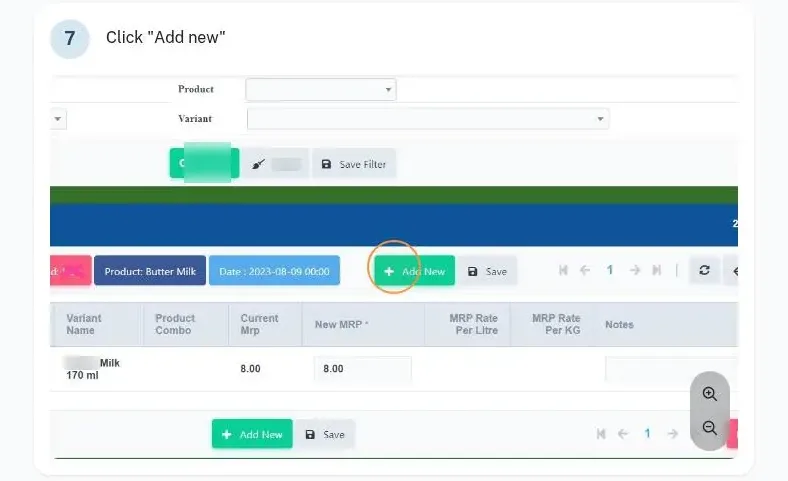
Rate control offers multiple pricing options: litre-based, crate-based, customer-based and route-based, held in a price master with approval. MRP is added per dock, variety and variant, with tax on the MRP.
Schemes give a free product on a billed product, with scheme control, and free samples are accounted for. Trade discounts run daily, fortnightly, monthly or at random, slab-wise; distributor and dealer incentives, advanced incentive plans and multiple billing structures with slab incentives are supported. Additions and discounts are created, then mapped with release rules such as redeem-after days and amount.
- Add the MRP for the dock, variety and variant; add the tax.
- Create the addition or discount, with litre-per-bill options and dates.
- Map it: redeem-after days or amount, and how often it is released.
- Approve the price in the price master.
Every price, scheme and discount follows an approved rule and shows up in the incentive and discount statements.
- Rate control, multiple pricing options: Litre-, crate-, customer-, route-based; price master with approval
- Schemes (free product on billed product); scheme control
- Free sample accounting
- Trade discounts and incentives: Daily / fortnightly / monthly / random; slab-wise trade discount; distributor-dealer incentive; advanced incentive plans; multiple billing structures, slab incentives
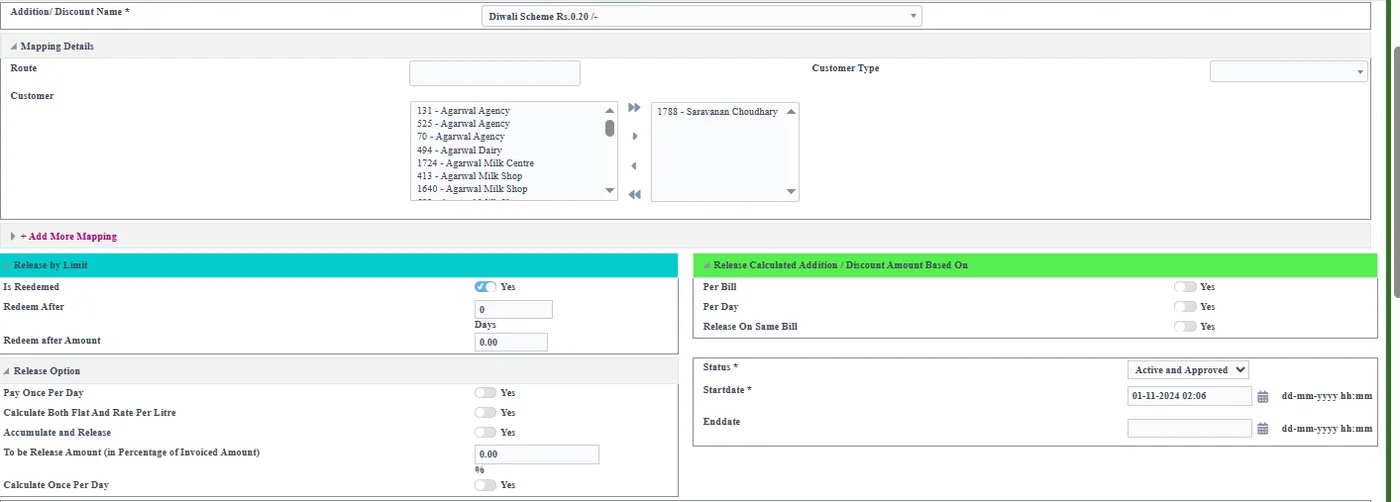
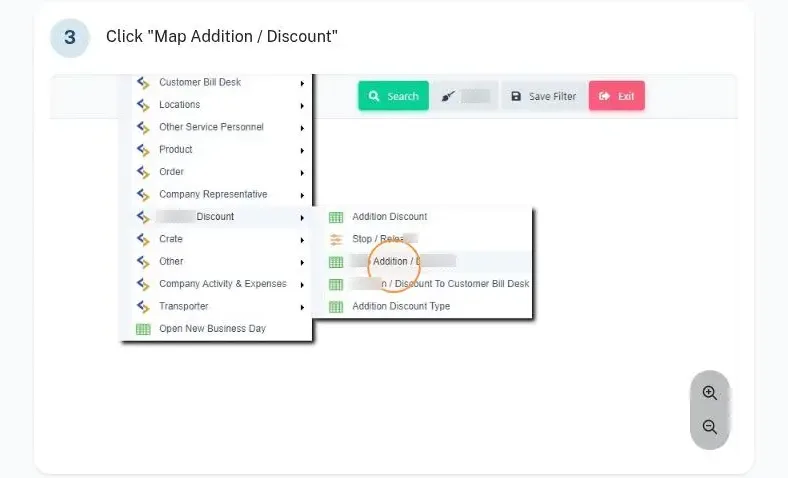
OrdersOrder books, special orders and the four order screens
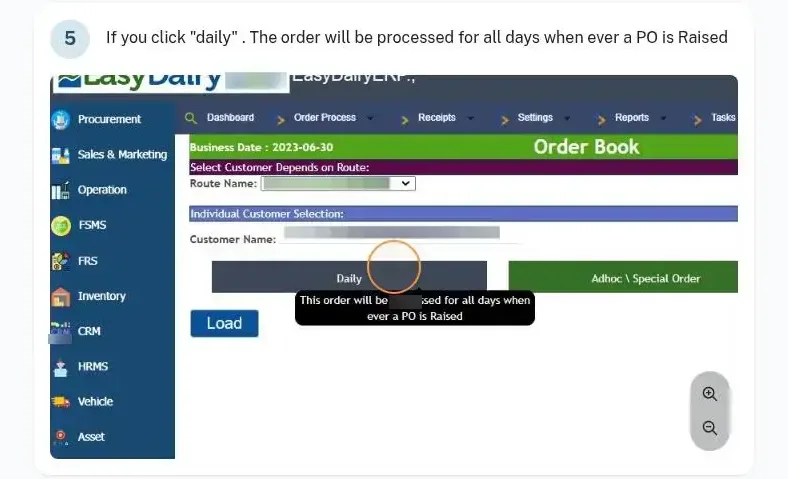
Orders come in through order books: the customer order book, the route-wise order book and the free-supply order book. A customer order can be daily (processed every day until changed), ad hoc or special (processed only for the date given), or an order plan for multiple dates, so special orders for future dates are booked ahead.
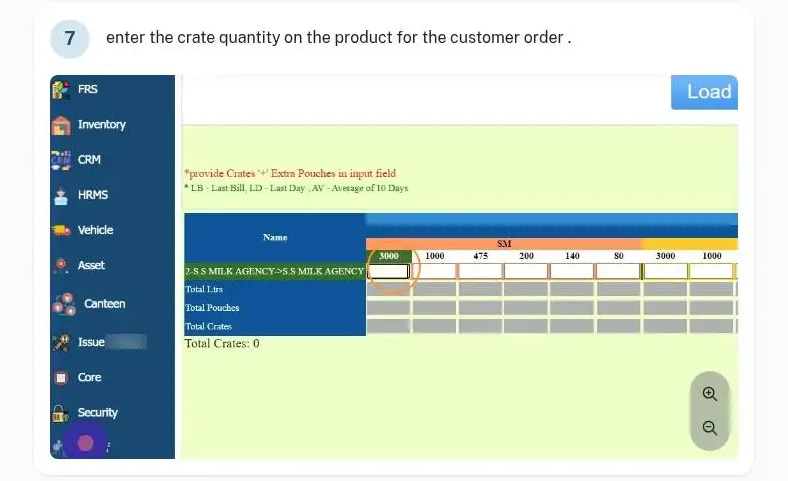
There are four order screen types, crates, SKUs, litres with crates and litres, so each customer is ordered in the unit they buy in. The customer sales average gives quick quantity billing for regular customers. Distributors and dealers can also order on mobile; see Sales and Marketing Mobile Application.
- Order Process → 1A. Order Book – Customer: select the route and customer.
- Choose daily, ad hoc / special, or order plan.
- Enter the quantities on the order screen type the customer uses.
- For free supply, use 1C. Order Book – Free Supply.
- Four order screen types: Crates, SKUs, litres with crates, litres
- Order books: Customer, route-wise and free-supply order books; place order book – customer / free supply
- Special orders for future dates
- Customer sales average for quick quantity billing
OrdersRetail and bulk sales
Retail sales and bulk sales run in the same system as the routes. Bulk sales follow their own documents: a quote, then a proforma invoice, then the invoice.
Because bulk, retail and route sales share the masters and the GST set-up, the day-close reports and the P&L see all of them together.
- Retail sales
- Bulk sales: Quote, proforma invoice, invoice
DispatchDispatch, gate out, DC and vehicle traceability
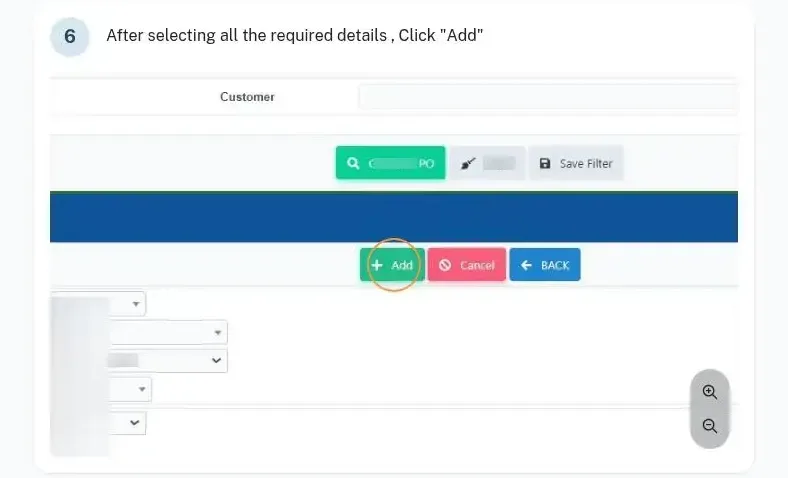
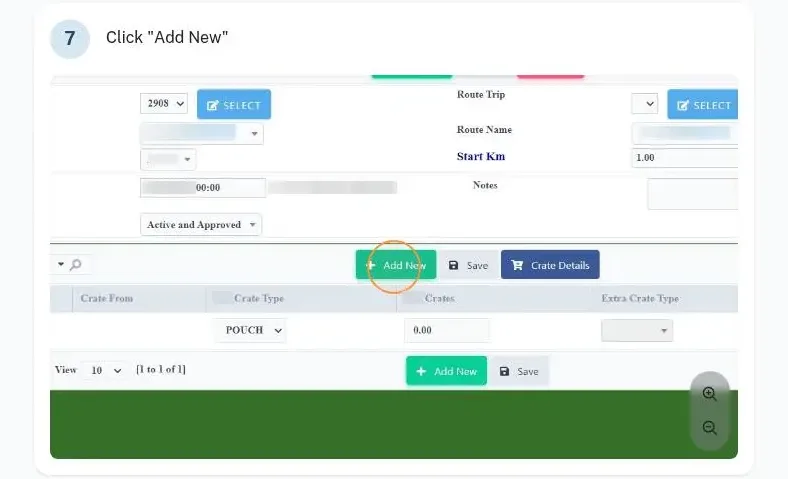
When orders are ready, Prepare to Despatch generates the dispatch with the vehicle number, salesman, driver and route, and extra crates given are noted. At the gate, Gate Out records the DC, vehicle, dock, route trip and start KM; gate in and gate out vehicle details are checked with the crates.
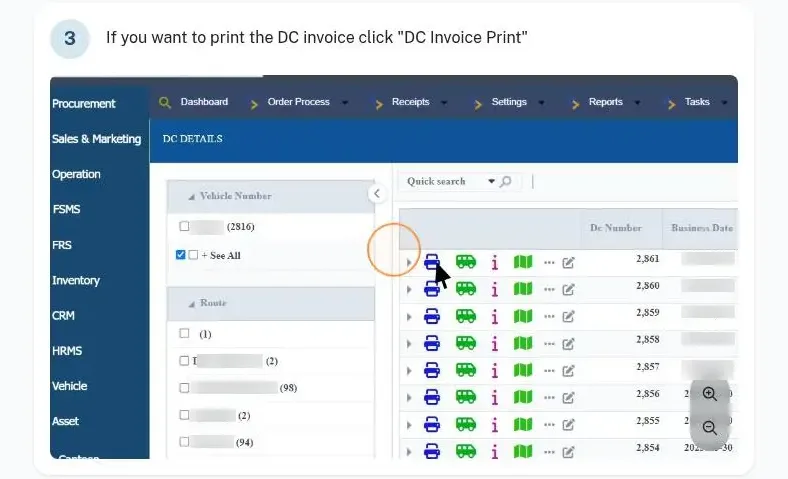
The DC details screen prints the DC, the DC invoice, the invoice acknowledgement and the DC route acknowledgement. DC vehicle traceability shows which vehicle carried which DC, and route trips and delivery routes record the customer sequence and kilometres.
- Order Process → 2. Prepare to Despatch: select the orders and generate the dispatch.
- 5A. Gate Out: record the DC, vehicle, route trip and start KM.
- 3. DC Details: print the DC, DC invoice and acknowledgements.
Every crate and every DC leaving the plant is tied to a vehicle and a route trip.
- Dispatch generation, DC and acknowledgements
- DC vehicle traceability
- Gate in / gate out vehicle details with crate check
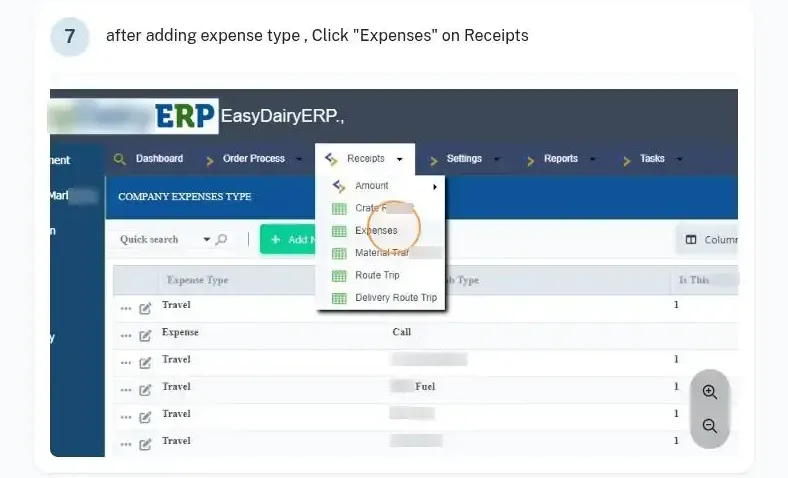
- Company expenses, material transactions, route trips and delivery routes
BillingGST billing, e-invoice, e-way bill and GSTR-1
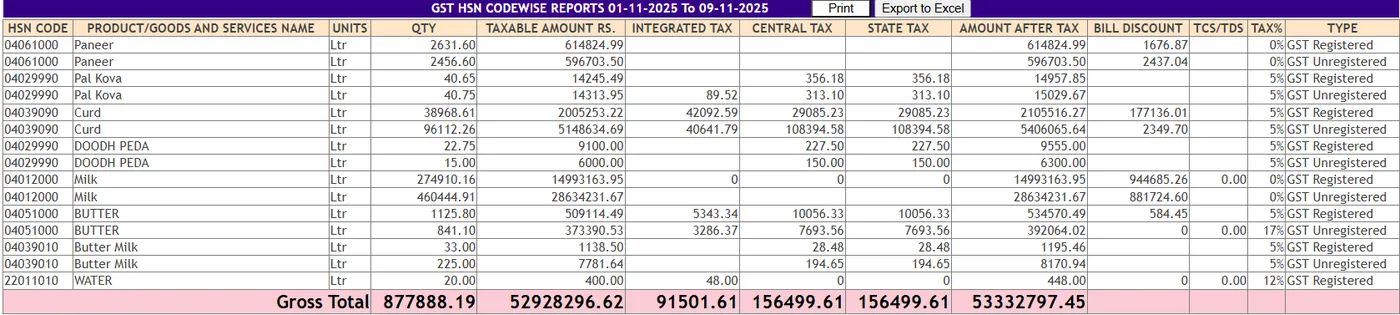
Invoices handle inter-state and intra-state billing and tax billing, with GST filing and GST reports. The e-invoice is generated through the automatic API, the e-way bill is produced, and the GSTR-1 report is generated automatically, HSN-wise and customer-wise.
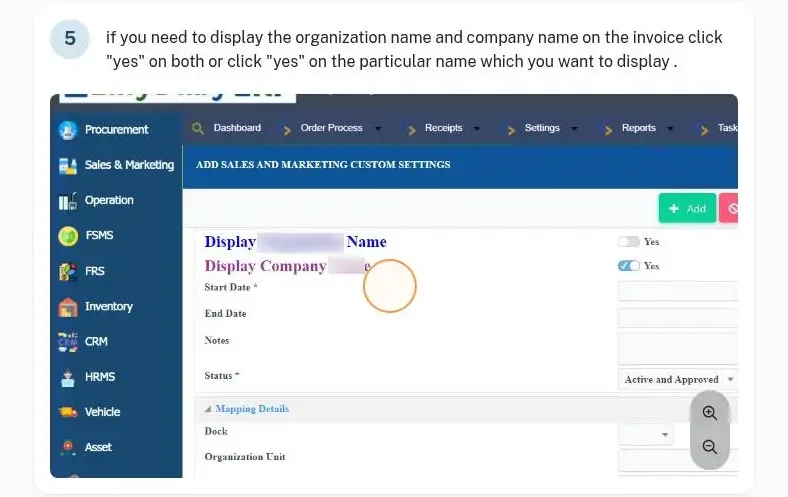
Invoice configuration controls what appears on the invoice, such as the organisation and company name, and can be mapped to a particular branch, depot or warehouse. Sales data exports to Tally.
GST compliance comes out of the day’s billing, without a separate filing exercise.
- Inter / intra-state billing, tax billing, GST filing and GST reports
- E-invoice automatic API; e-way bill
- GSTR-1 report generation automated
- Tally export
CollectionsReceipts, deposits, bank statement upload and credit control
Receipts are taken in cash, online, by DD and by cheque, with deposit handling and cheque handling, and deposit, amount and crate receipts are recorded. A bank statement can be uploaded to record amount receipts in bulk.
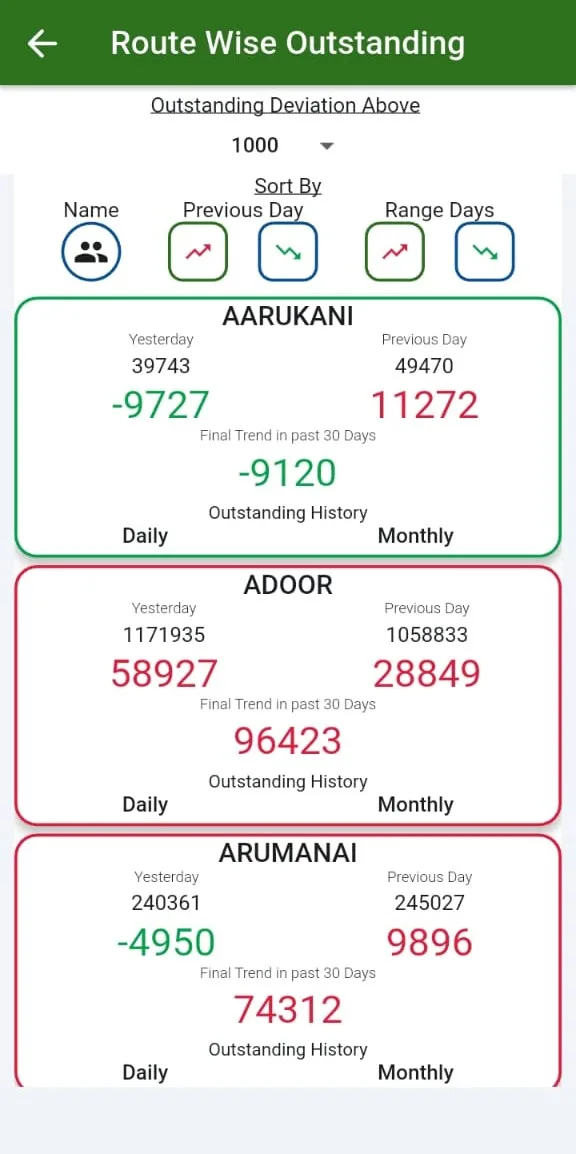
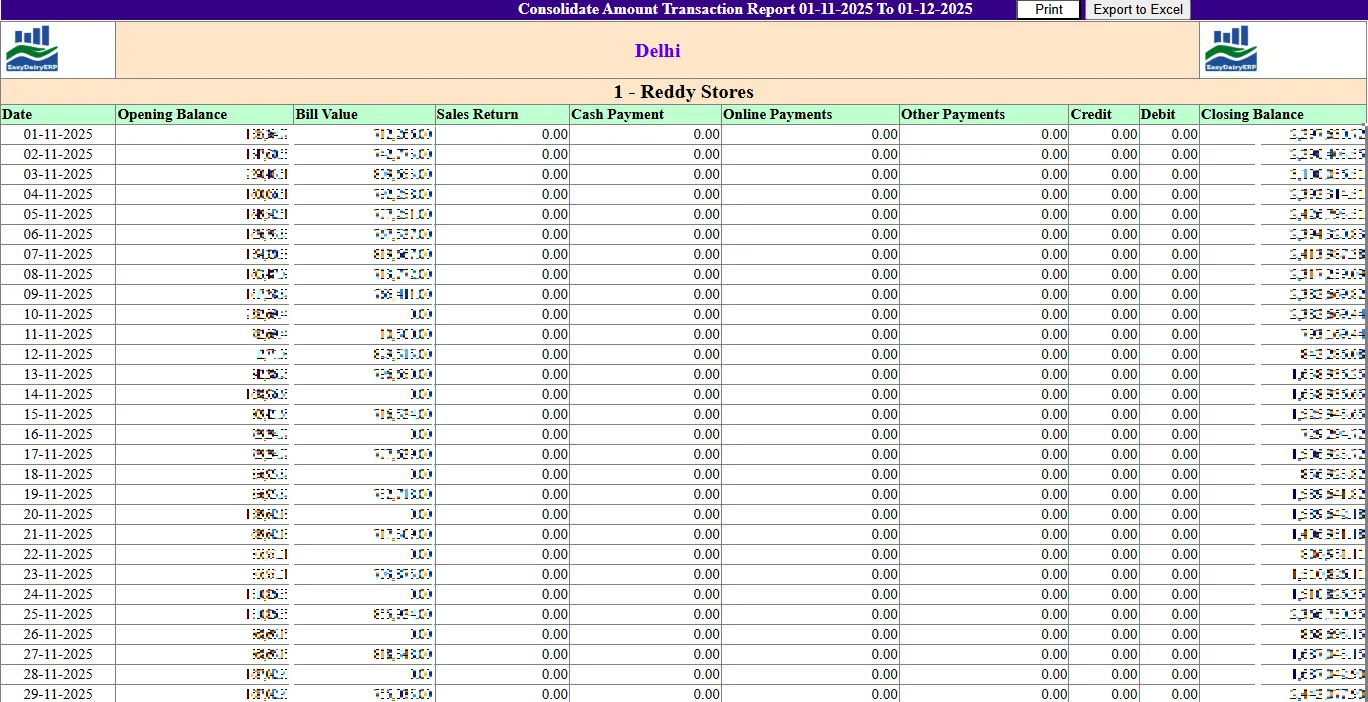
Credit control sets credit limits and automatically stops billing when a customer crosses the limit; credit limit control works with dynamic approvals, so an exception is approved rather than ignored. The discount ledger and party ledger show each customer’s position.
Outstanding cannot quietly grow beyond the agreed limit.
- Receipts and deposits: Cash, online, DD, cheque; deposit handling; cheque handling; deposit / amount / crate receipts
- Bank statement upload for amount receipt
- Credit control: Credit limits, automatic stop billing; credit limit control and dynamic approvals
- Discount ledger; party ledger
CollectionsCrates, freezers, returns and cancellations
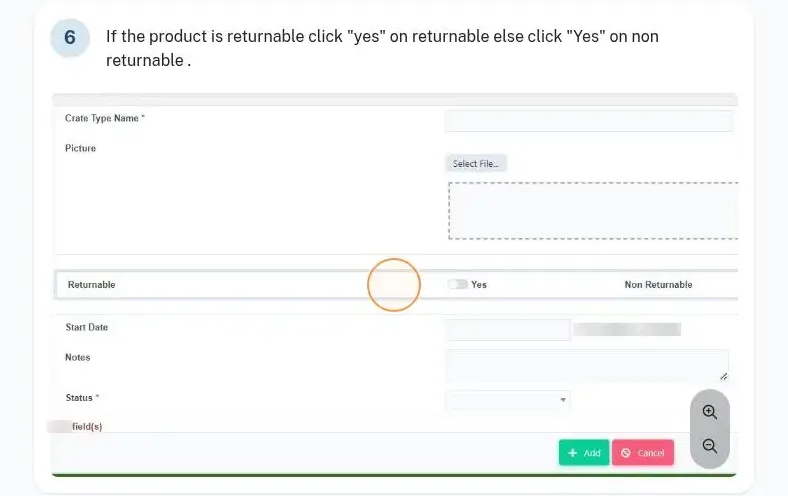
Crates are managed by type and mapped to products, and crate receipts come back with the route. Freezers placed with customers are managed with their deposits and returns.
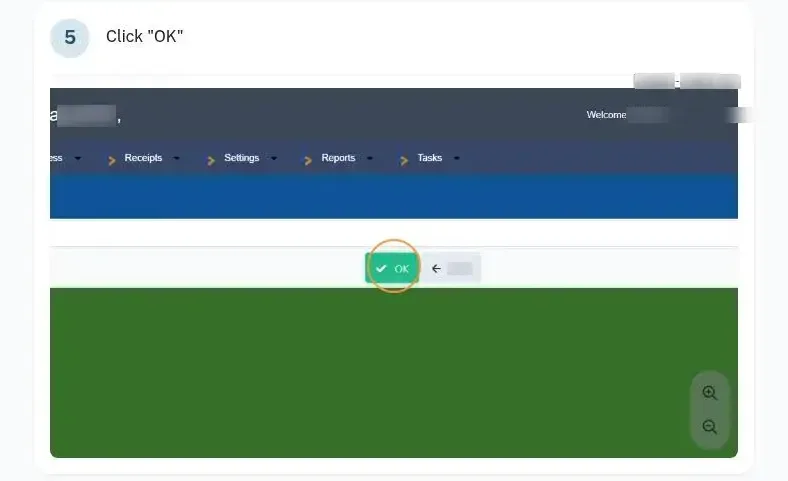
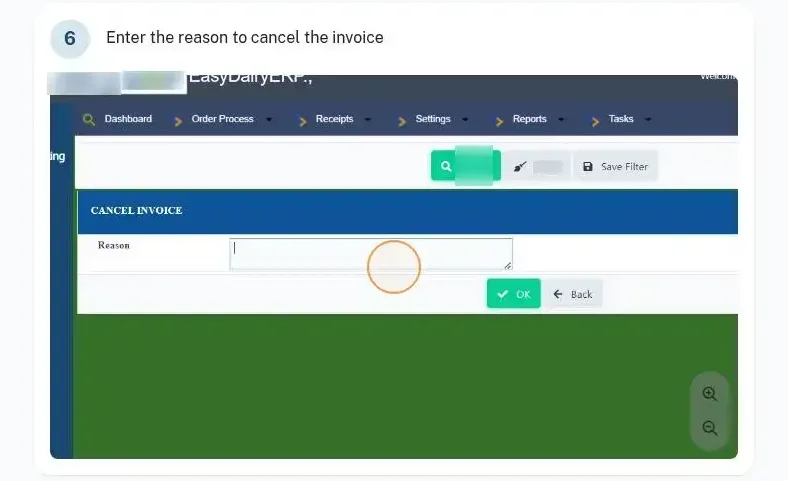
Sales returns are recorded against the sales order with a return type and a QC check. Orders, purchase orders and invoices are cancelled with a reason, so every cancellation is explained.
- Crate management
- Freezer management: deposits, returns
- Sales returns: Add sales return type; add sales return; QC check
- Cancellations: Cancel sales order, purchase order, invoice
CostsLeakage, pouch costing, transport and vehicle payments
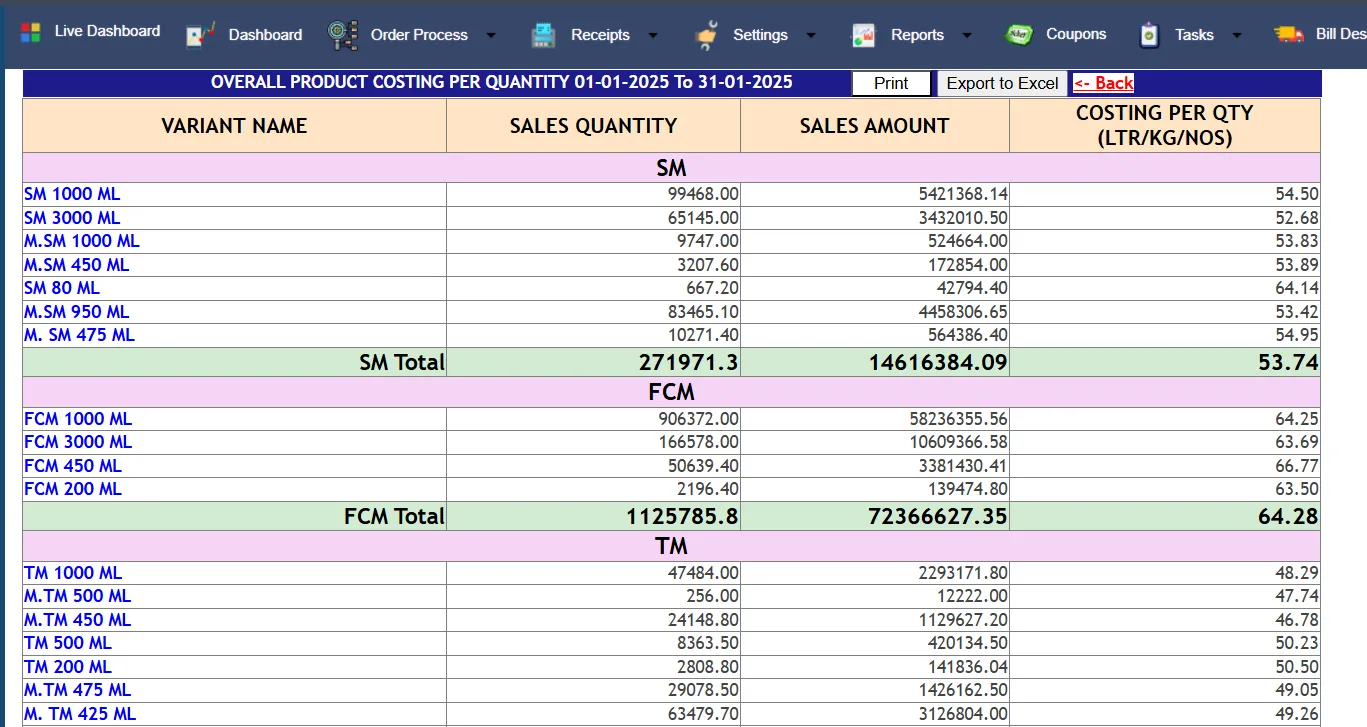
Leakage costing and monthly or pouch costing show what each pouch really costs. Secondary transport charges, outward transport costing and billing, vehicle boy payments and vehicle control cover the cost of getting milk to the customer.
Company expenses and material transactions are recorded in receipts. Sales pouch weight is matched with the weighbridge pouch weight (sales bill weight matching).
- Leakage costing
- Monthly costing / pouch costing
- Secondary transport charges; outward transport costing and billing
- Vehicle boy payments; vehicle control
- Sales pouch vs weighbridge pouch weight matching (sales bill weight matching)
Field forceSales team levels, approvals and the field force
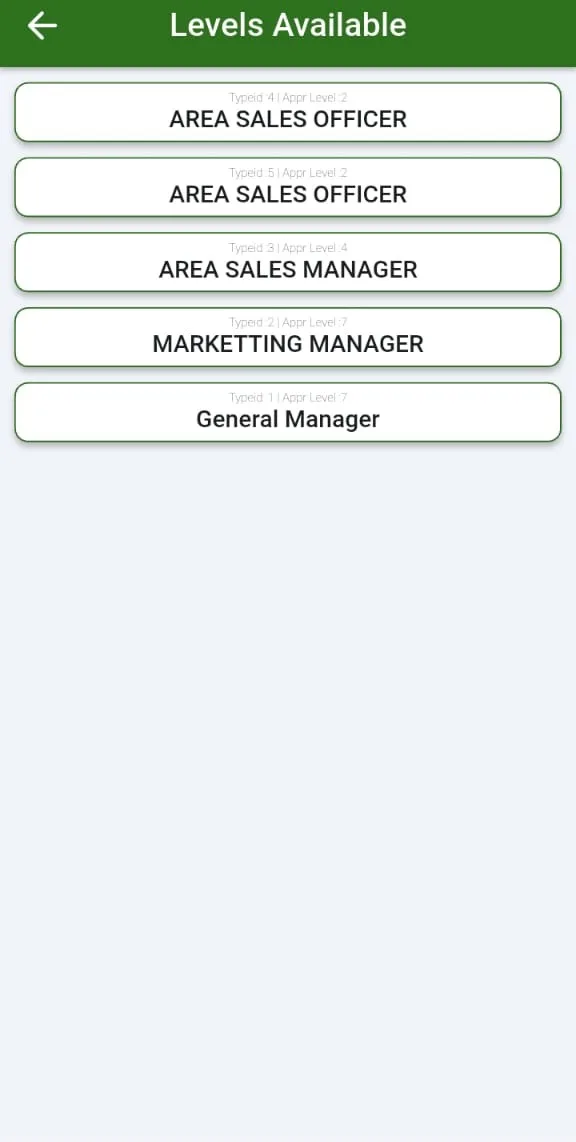
Isolation levels separate what an ASO, ASM, RSM, ZSM and management can see, and ASO or route-wise sales and transaction reports are on mobile. Customer orders can be approved by the ASO, with order deviation approvals, and distributor-to-dealer ordering, sub-billing and stocks run on mobile.
ASO DSR entries carry GPS tags. The full field-force story, GPS tracking, attendance, visits and claims, is on Sales and Marketing Mobile Application.
- Isolation levels for ASO / ASM / RSM / ZSM / management
- ASO / route-wise sales and transaction reports on mobile
- Distributors and dealers place orders on mobile and see live order status
- Customer order ASO approval; order deviation approvals
- Distributor-to-dealer ordering, sub-billing and stocks: Mobile-based distributor-to-dealer billing (2024)
- ASO DSR entry with GPS tags
AnalyseReports, trends, alerts and the day-close mail
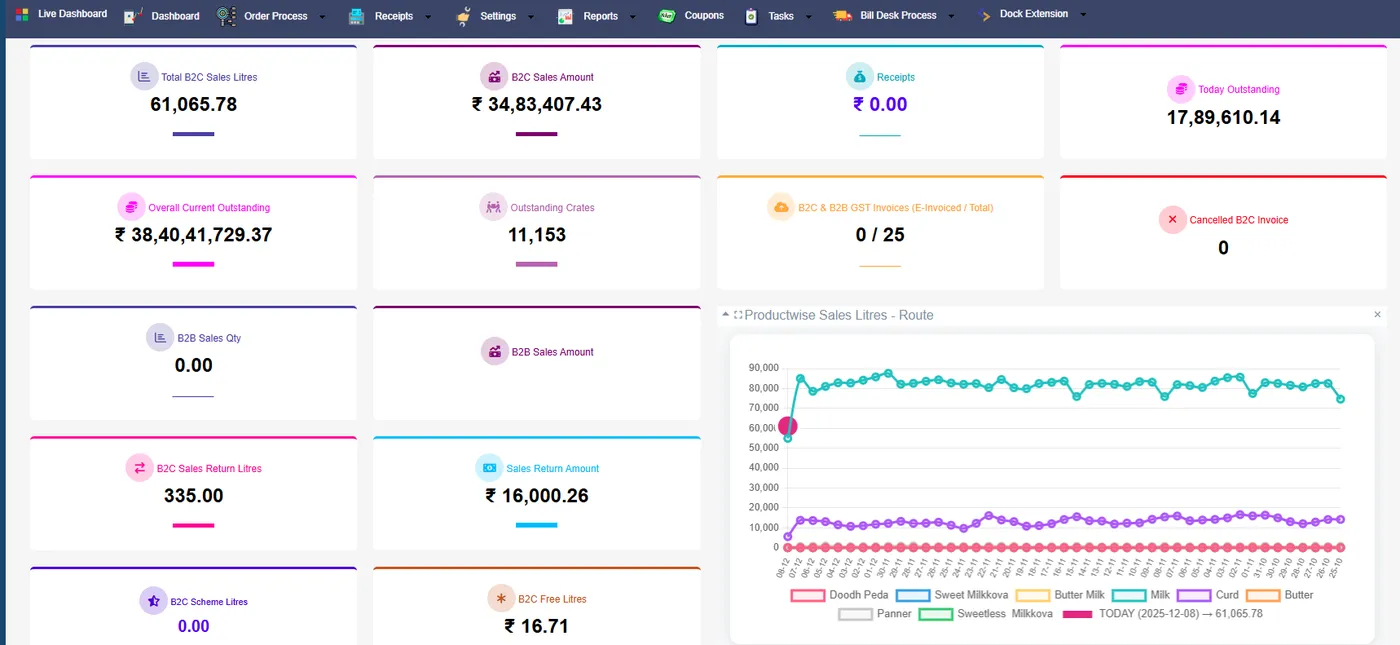
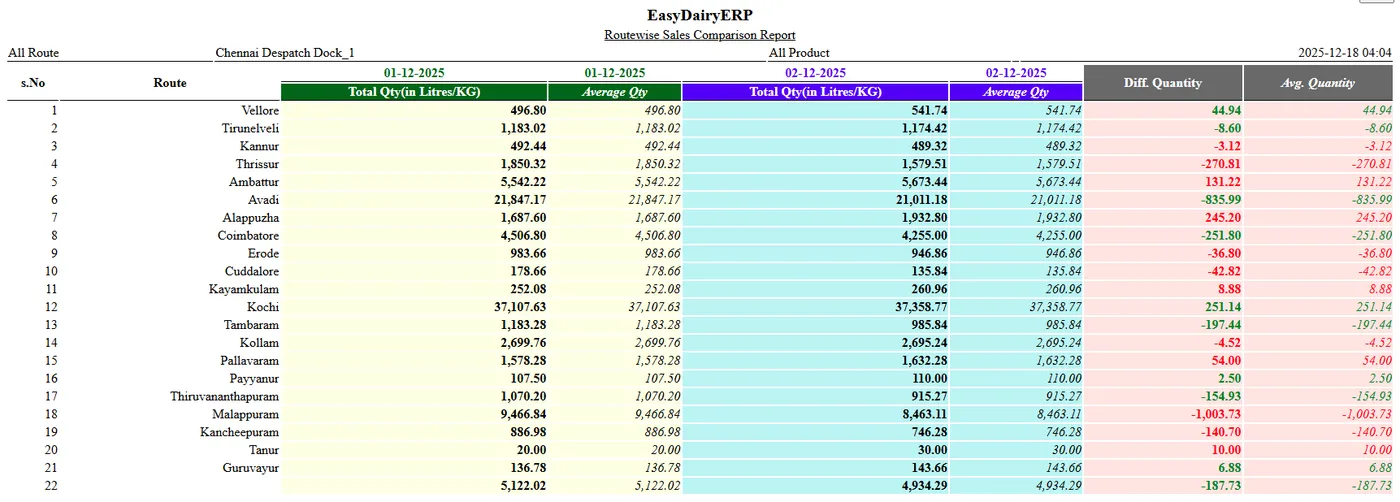
Ledger and transaction summary reports, realisation reports date-wise and route-wise, and trend reports sales-wise and route or ASO-wise cover the analysis. Overall trend alerts on sales, payments and crates are prioritised with drill-downs.
The day-closure report email, basic and advanced, reaches management at day close. The BI reports, Sales Trend Change, Daily Sales and Activity and Market Cost, are on BI Report on Sales.
- Ledger and transaction summary reports; several sales reports; advanced sales analysis
- Realisation reports date-wise; advanced route-wise realisation
- Trend reports sales-wise and route / ASO-wise
- Day closure report email basic and advanced (customer monitor); Day Closing Report; Day Close Mail Automation
- Overall trend alerts (sales / payments / crates) with prioritising and drill-downs
SpecificationsAt a glance
| Users and products | Unlimited users; all your products |
|---|---|
| Sales types | Route, retail, bulk (quote, proforma, invoice), special future-dated |
| Order screens | Crates, SKUs, litres with crates, litres |
| Pricing | Litre, crate, customer, route; price master with approval |
| Schemes and discounts | Free product schemes, free samples, trade discounts, slab incentives |
| GST | Inter and intra-state, e-invoice API, e-way bill, GSTR-1 |
| Receipts | Cash, online, DD, cheque; deposits; bank statement upload |
| Credit | Limits, automatic stop billing, dynamic approvals |
| Assets with customers | Crates and freezers |
| Exports | Tally |
FAQFrequently asked questions
Can one customer order in crates and another in litres?
Yes. There are four order screens: crates, SKUs, litres with crates and litres.
Is the e-invoice generated automatically?
Yes, through the automatic e-invoice API, with the e-way bill and automated GSTR-1.
What happens when a customer crosses the credit limit?
Billing stops automatically; exceptions go through dynamic approvals.
Can we close the day late at night?
Yes. The day can be closed at any time, and invoice dates can be forwarded.
Are crates and freezers tracked?
Yes: crate management, and freezer deposits and returns.
Can distributors order on mobile?
Yes. Distributors and dealers order on mobile, with ASO approval and live order status.
More features
- GSTR-1 report generation automated
- DC vehicle traceability
- Bank statement upload for amount receipt
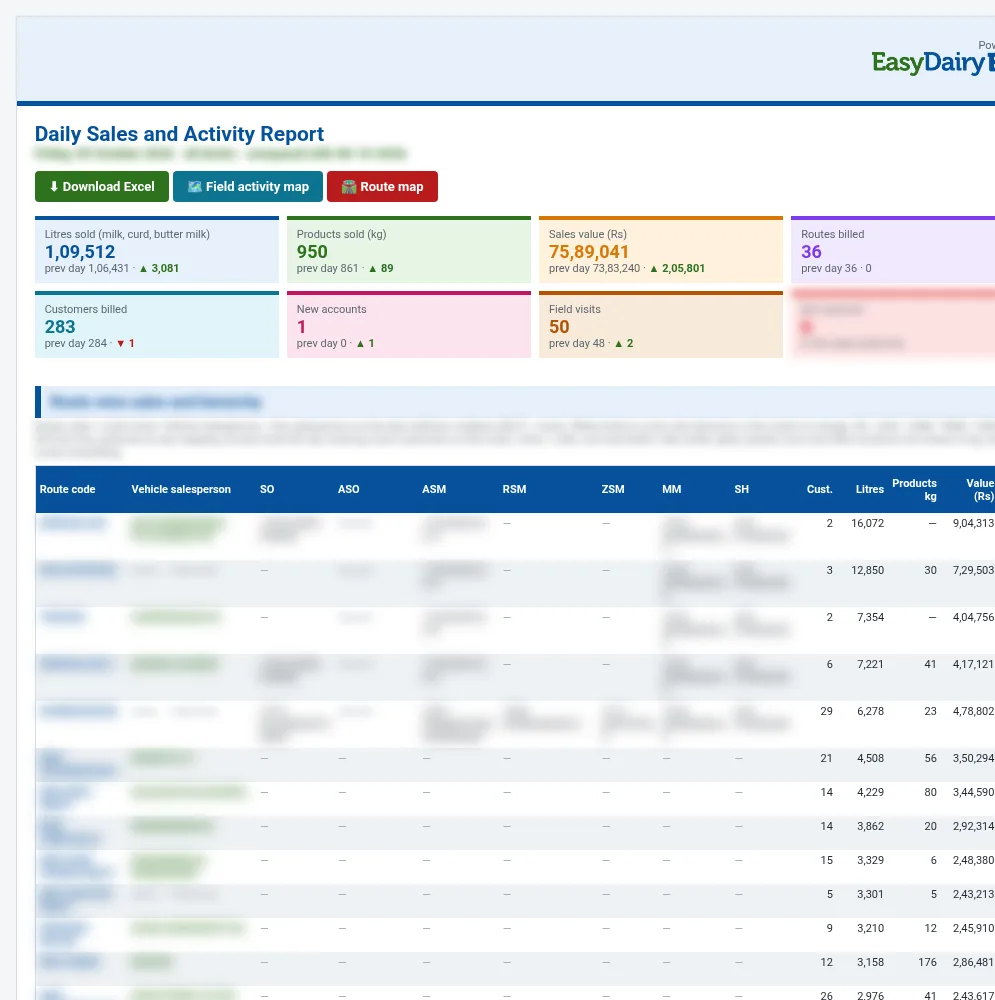
Daily Sales and Activity Report
Yesterday’s sales and yesterday’s field work in one report: volume, value, routes and customers against the day before, the full sales hierarchy for every route, route lengths and overlaps, and every visit the team made.
- Which routes to merge or re-plan where they overlap
- Which new outlets to follow up from yesterday’s first visits
- Who in the team is visiting the market and who is not reporting
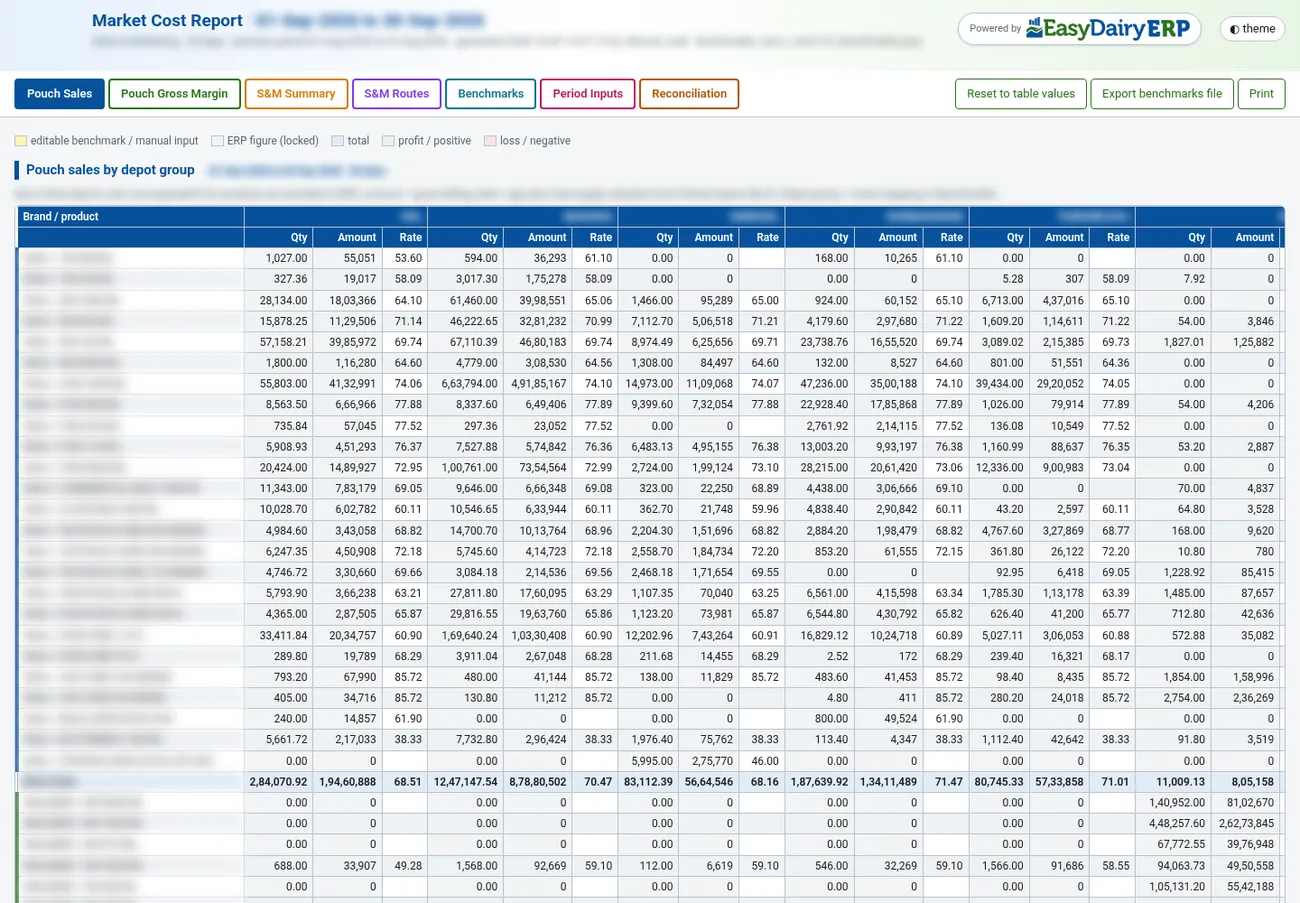
Market Cost Report
The monthly cost-to-serve view of the market: pouch sales by depot group, the gross margin of every pouch variant, and sales and marketing expenses route by route, built from ERP figures plus your own benchmarks.
- Which pouch variants and depot groups earn the most and the least margin
- Which routes cost too much to serve for the volume they carry
- Where to change pricing, discounts or route plans
Keep exploring at your own pace
Every module page walks through the screens, reports and mobile apps in the same way, so you can see exactly how EasyDairyERP fits your dairy.
When you have seen enough, we are happy to show it to you live on our sample data: book a demo or call +91 94880 59495.