What’s new · Business intelligence

New Features

Six business-intelligence reports for procurement, stores and sales: daily and weekly reports that show what changed, where and who needs to act, by email and on the web.

ProcurementStoresSales
Business intelligence

Six reports that run the dairy every day

These reports arrive by email and open on the web. Each compares today with the day before or with the last 30 days, so a change is seen the morning after it happens. The screenshots come from live reports with names, codes and phone numbers blurred.

Procurement

Milk procurement reports

Procurement · Daily, by email and on the web

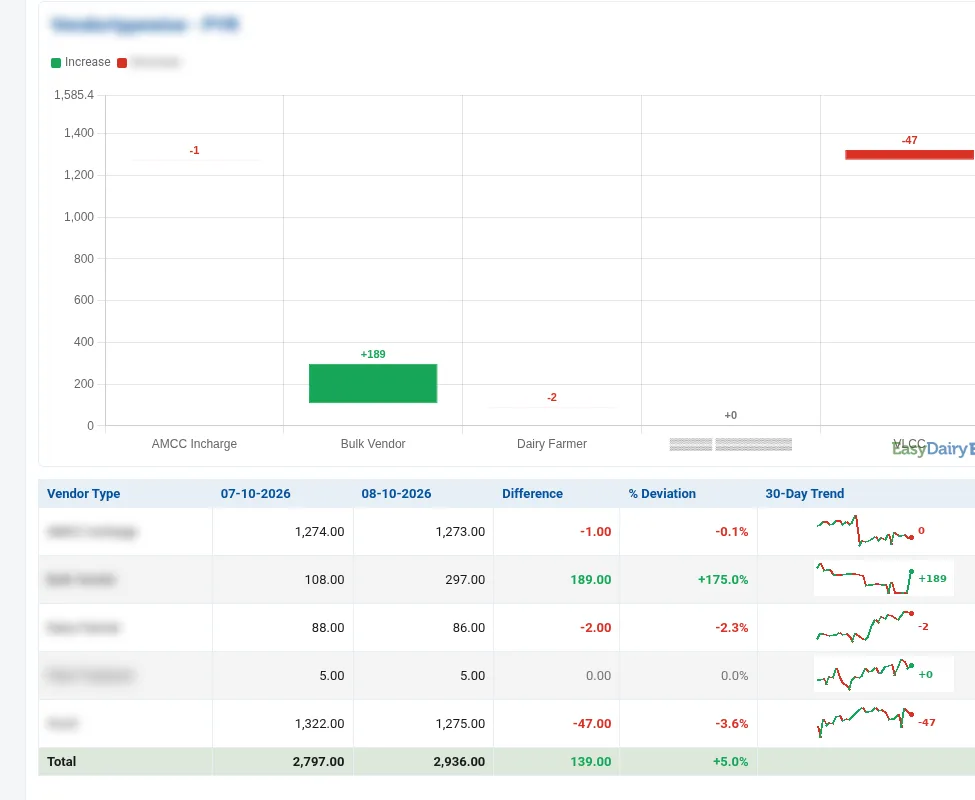
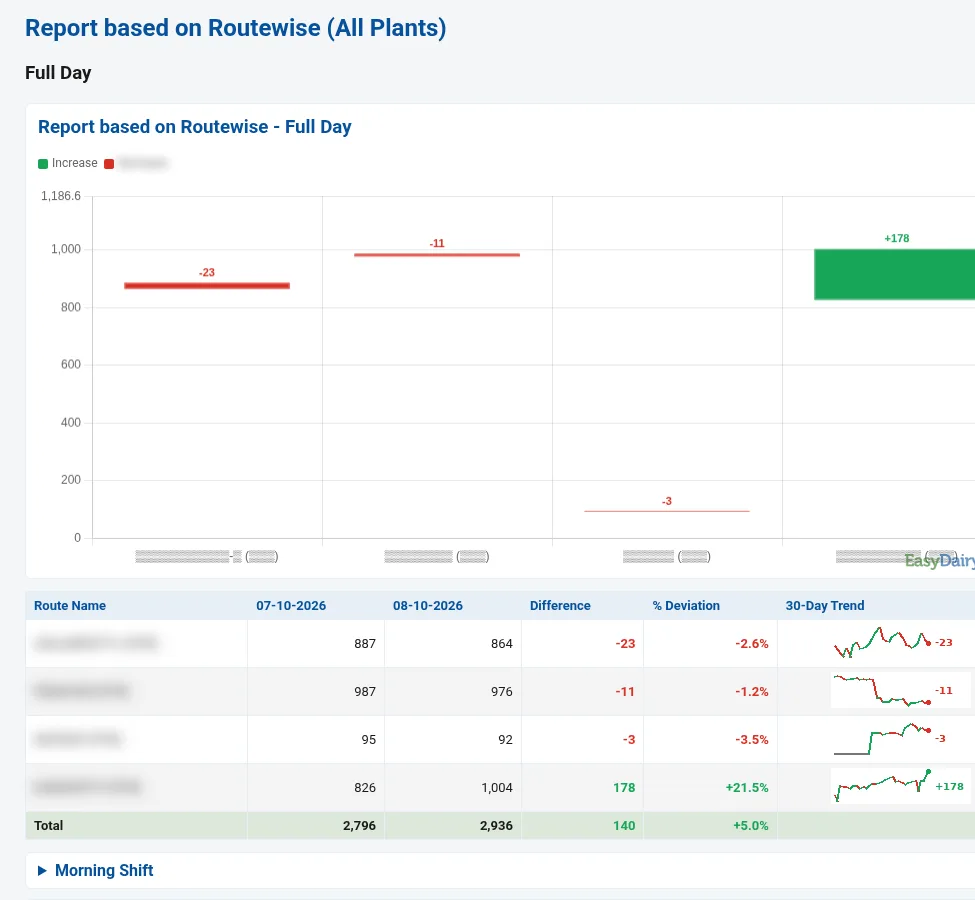
Procurement Trend Change Report

Compares any two days of milk procurement and shows exactly where volume rose or fell: by plant, route, shift, vendor type and centre, with a 30-day trend behind every line.

Who uses it: Procurement head, plant managers, route supervisors and the MD
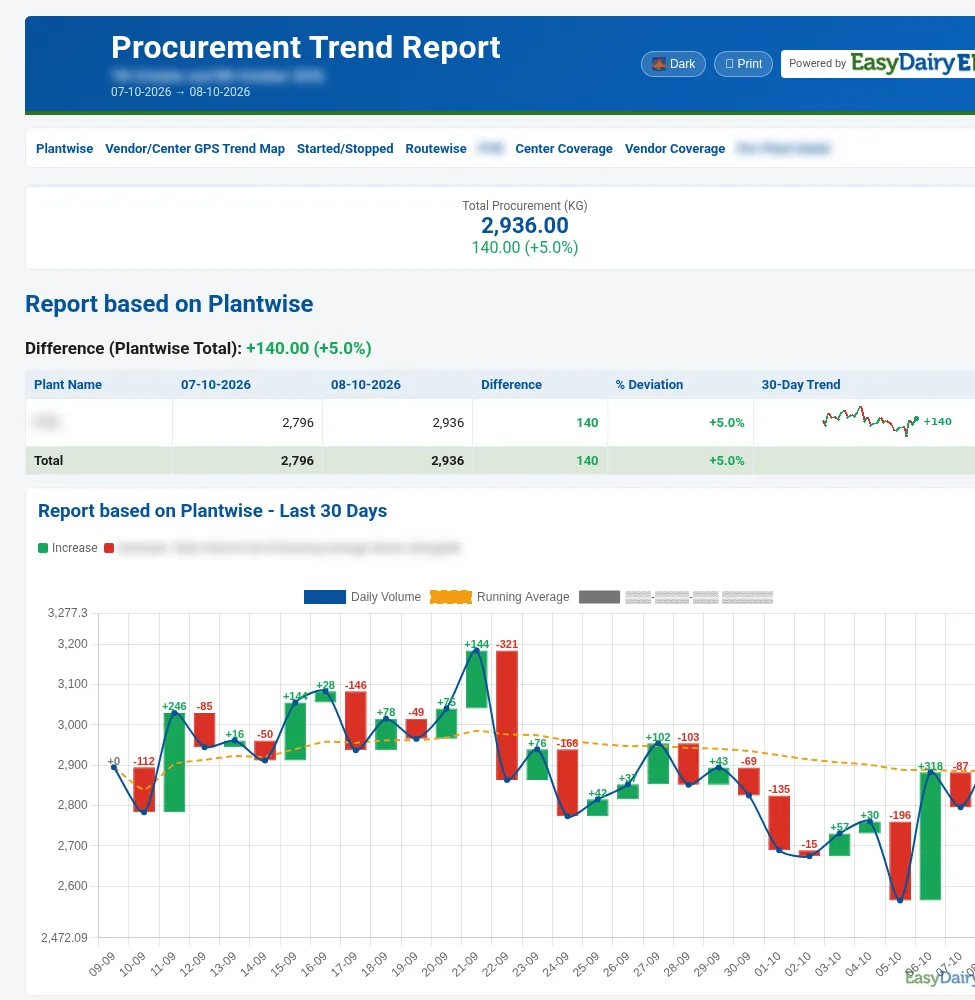
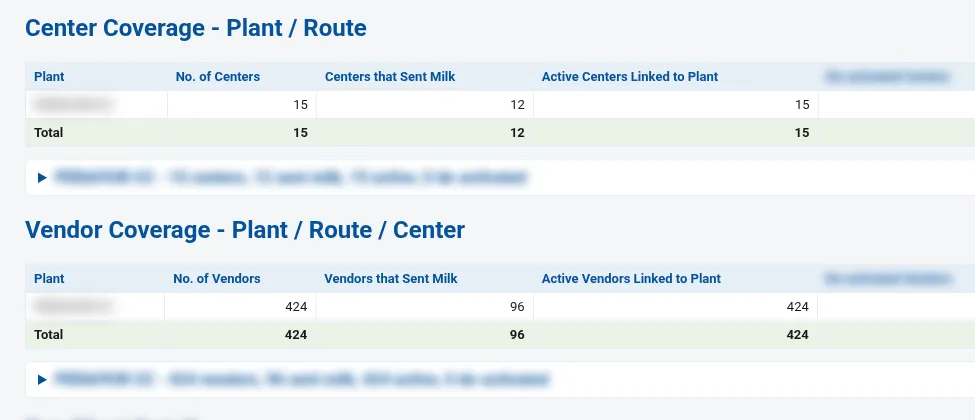
Procurement Trend Change Report: Plant-wise comparison and the 30-day volume chart
Plant-wise comparison and the 30-day volume chart

What it shows

  • Total procurement for the day with the change against the comparison day
  • Plant-wise comparison with a 30-day sparkline for every plant
  • Last-30-days chart: daily volume, running average and day-over-day change bars in one view
  • Last 10 days, day by day, with the change and deviation against the day before
  • Started / stopped vendors and centres: who began pouring and who stopped
  • Route-wise comparison for the full day, morning shift and evening shift
  • Vendor / centre GPS trend map: each centre with an approved GPS location, coloured by increase, decrease or no change
  • Centre coverage and vendor coverage by plant and route: how many sent milk and how many are linked but inactive
  • Per-plant detail: date-wise, vendor-type-wise (AMCC in-charge, bulk vendor, dairy farmer, VLCC) and route-wise

Decisions it supports

  • Which routes and centres to visit today, because their volume dropped
  • Whether a fall is one shift, one route or the whole plant
  • Which vendors and centres stopped pouring and need a call
  • Which vendor types are growing, so field effort goes where supply is
Procurement · Every morning, for the previous day

Daily Procurement and Activity Report

One report for the whole procurement day: litres, farmers and centres against the day before, re-pour checks on every milk test, centre-versus-plant differences, route kilometres and what the field staff actually did.

Who uses it: Procurement head, quality and audit team, transport in-charge and field supervisors

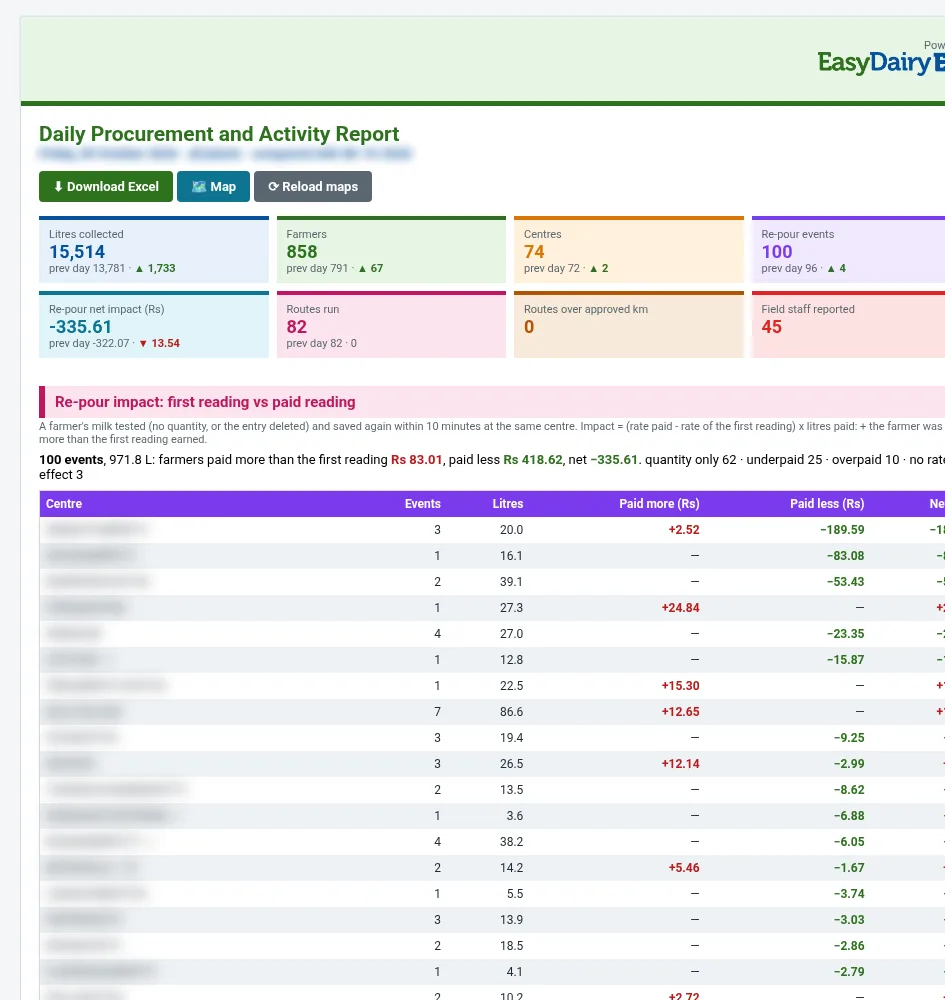
Daily Procurement and Activity Report: Daily tiles and the re-pour impact table
Daily tiles and the re-pour impact table

What it shows

  • Headline tiles: litres collected, farmers, centres, re-pour events, re-pour net impact, routes run, routes over approved km and field staff reported, each against the previous day
  • Re-pour impact: a farmer’s milk tested and saved again within 10 minutes at the same centre, comparing the first reading with the paid reading, centre by centre
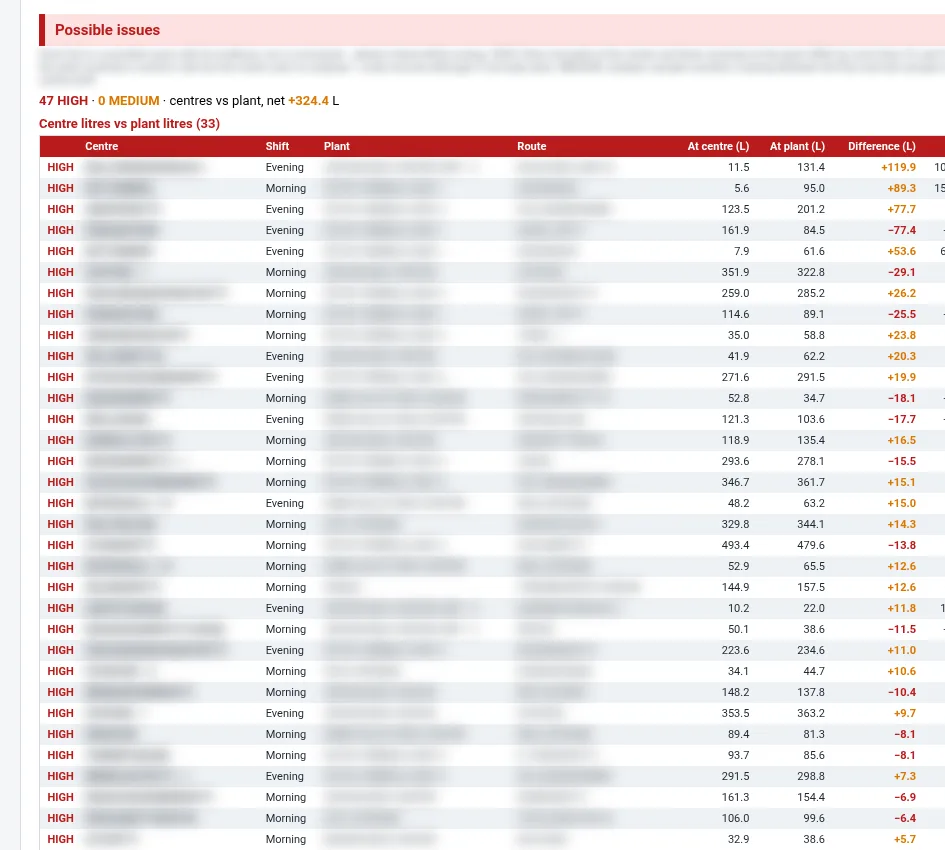
  • Possible issues: centre litres versus plant litres by shift and route, flagged high or medium, plus milk received at the plant with no centre record
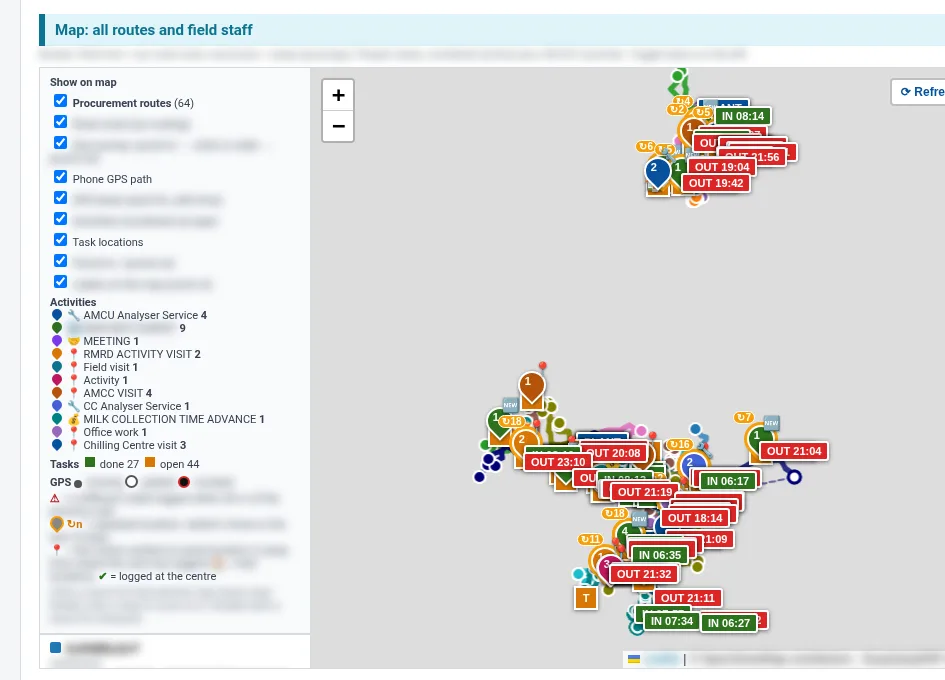
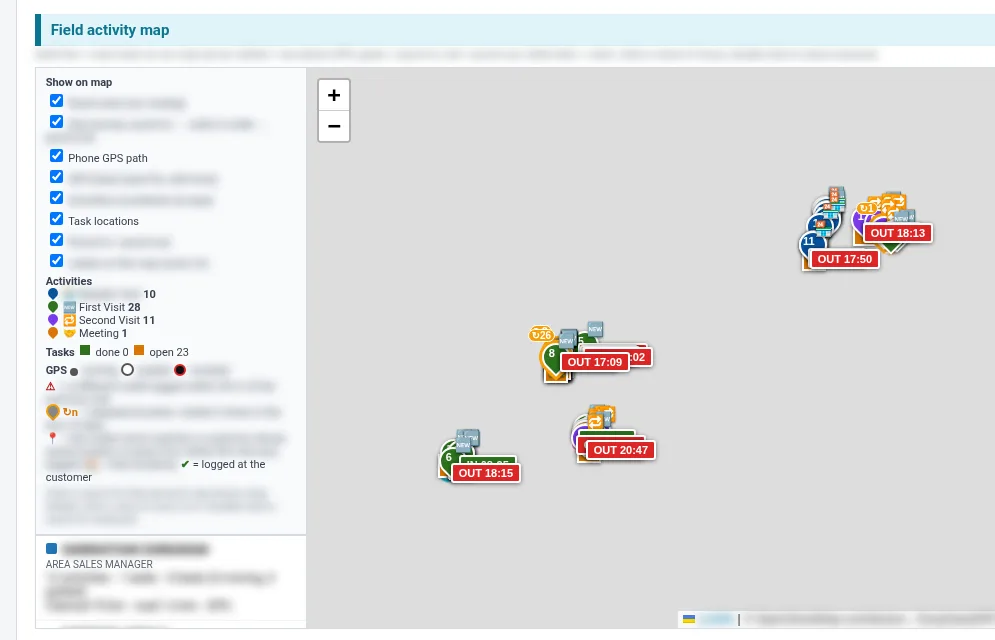
  • Maps: one plant at a time, route overlaps between plants, and all routes with field staff GPS paths, tasks and activities
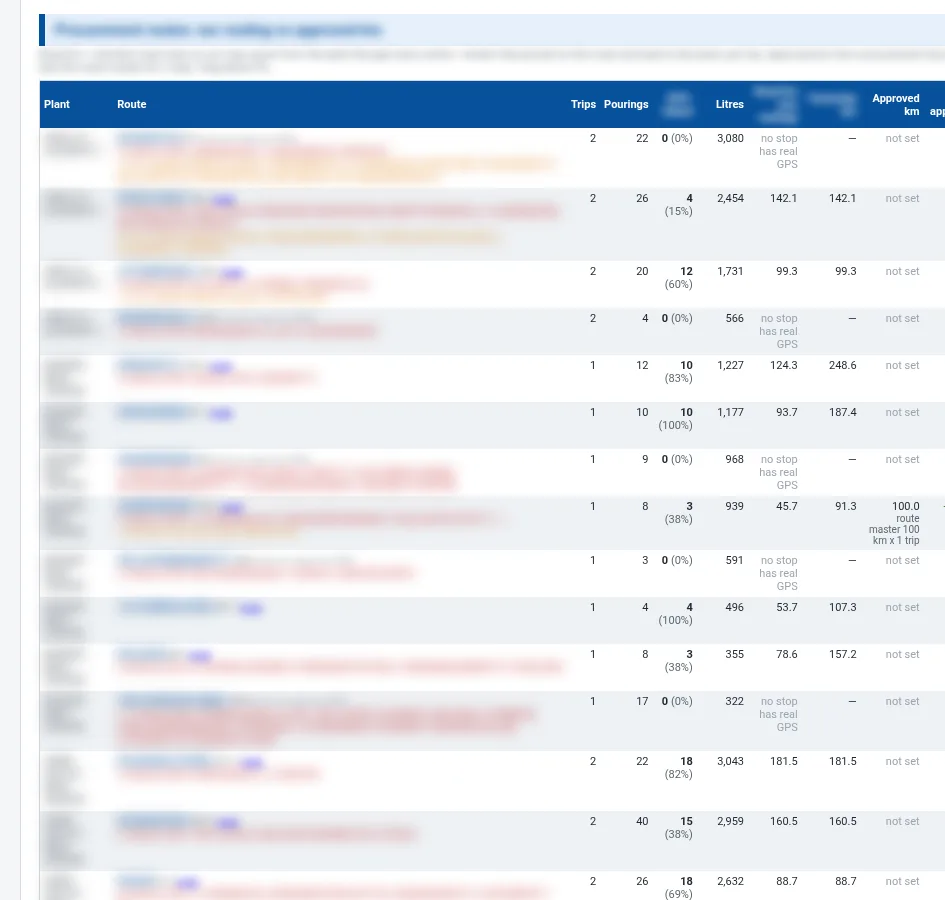
  • Procurement routes: the planned routing against the approved kilometres, trip by trip
  • Field activity by person: analyser service, centre visits, meetings and other activities, with in and out times
  • Procurement staff who did not report
  • One-click Excel download of the whole report

Decisions it supports

  • Which centres to audit for repeated re-testing of the same milk
  • Where the centre and plant quantities do not match, by shift and route
  • Which routes to shorten or merge, and which transport bills to question
  • Which field staff are on the ground and which have not reported
Stores

Stores and purchase reports

Stores · Weekly, company-wide

IMS Weekly MRM Report

The stores review for the weekly management meeting: what is being consumed and bought, what it costs now, what is running out, what is not moving and where the purchase orders stand.

Who uses it: Stores manager, purchase team, department heads, the CFO and management in the weekly MRM

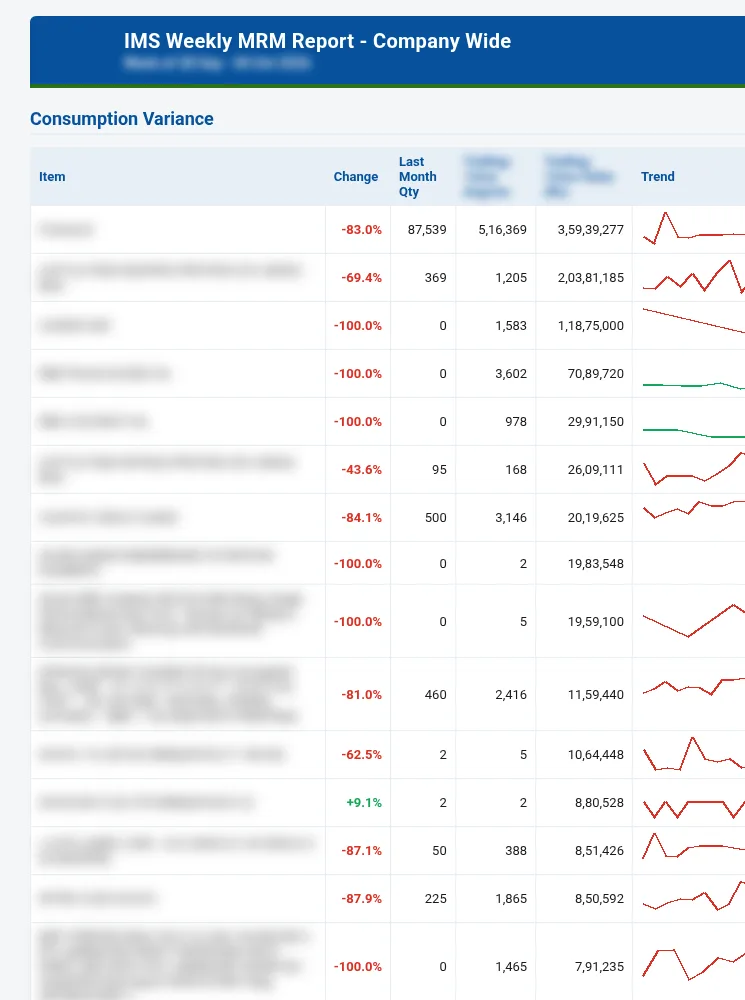
IMS Weekly MRM Report: Consumption variance with 12-month trends
Consumption variance with 12-month trends

What it shows

  • Consumption variance: last month against the trailing 12-month average, with value and a trend line per item
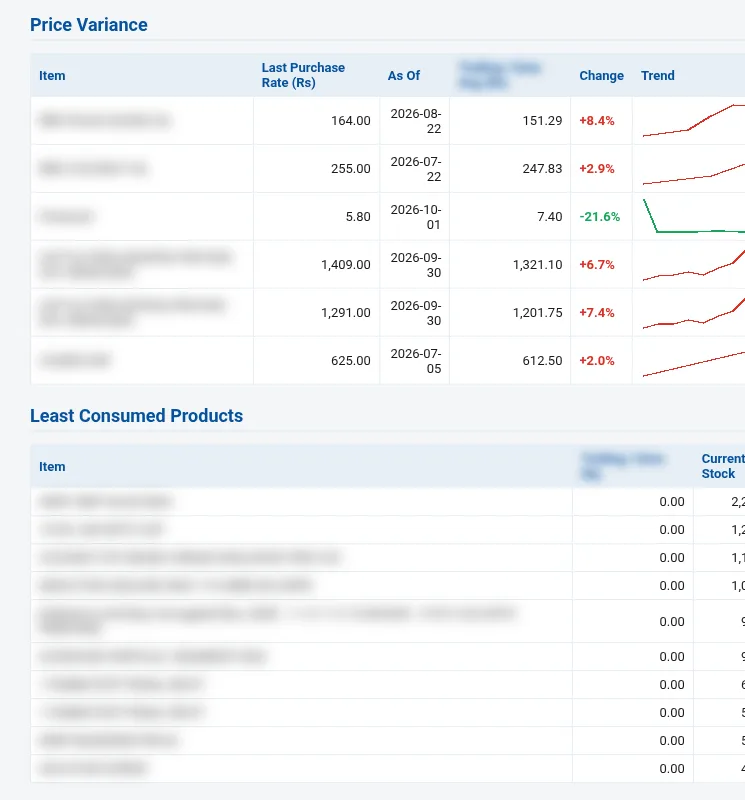
  • Price variance: last purchase rate against the trailing 12-month average rate
  • Least consumed products and their current stock
  • Net stock by category, grouped by HSN chapter, with stock value and item count
  • Top 20 most valuable stock items
  • Purchase versus consumption trend over the trailing 12 months
  • Consumption by department, with the top consumed items for each department
  • Value issued by department and sub-department
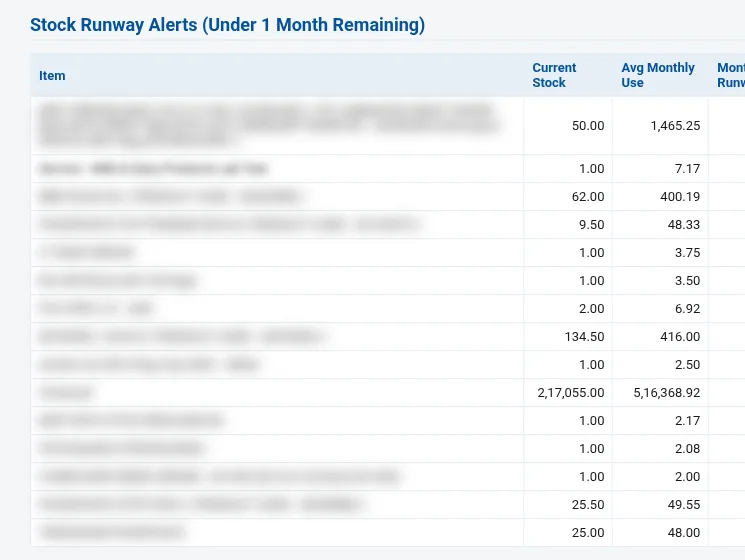
  • Stock runway alerts: items with under one month of stock left at the current rate of use
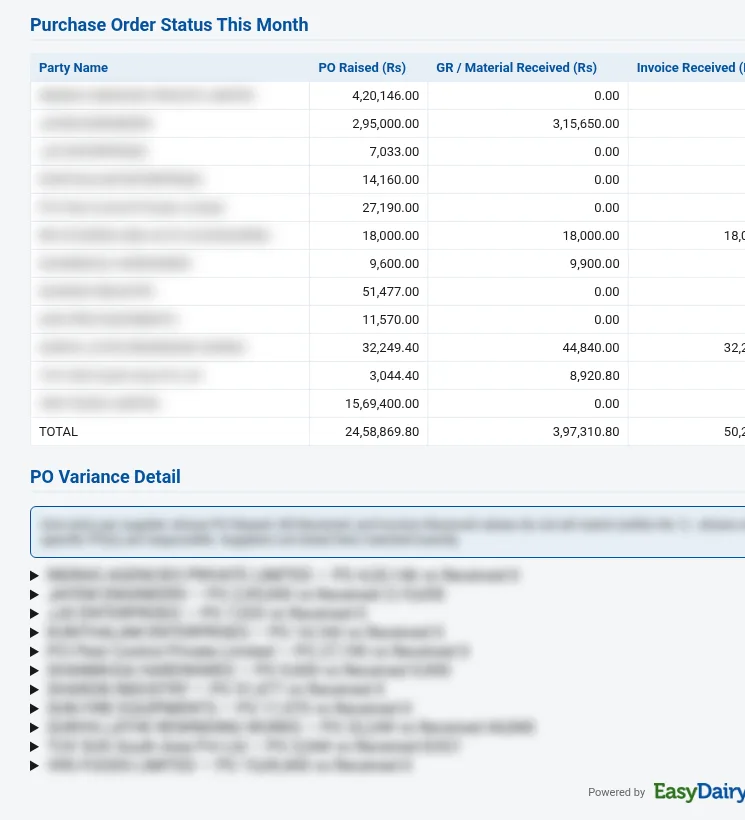
  • Top suppliers by spend, negative stock health, purchase order status this month and PO variance detail

Decisions it supports

  • What to reorder now, before it runs out
  • Which price increases to negotiate or re-quote
  • Which slow-moving stock to stop buying or use up
  • Which departments are consuming more than usual, and which purchase orders are still open
Sales

Sales and marketing reports

Sales · Daily, by email and on the web

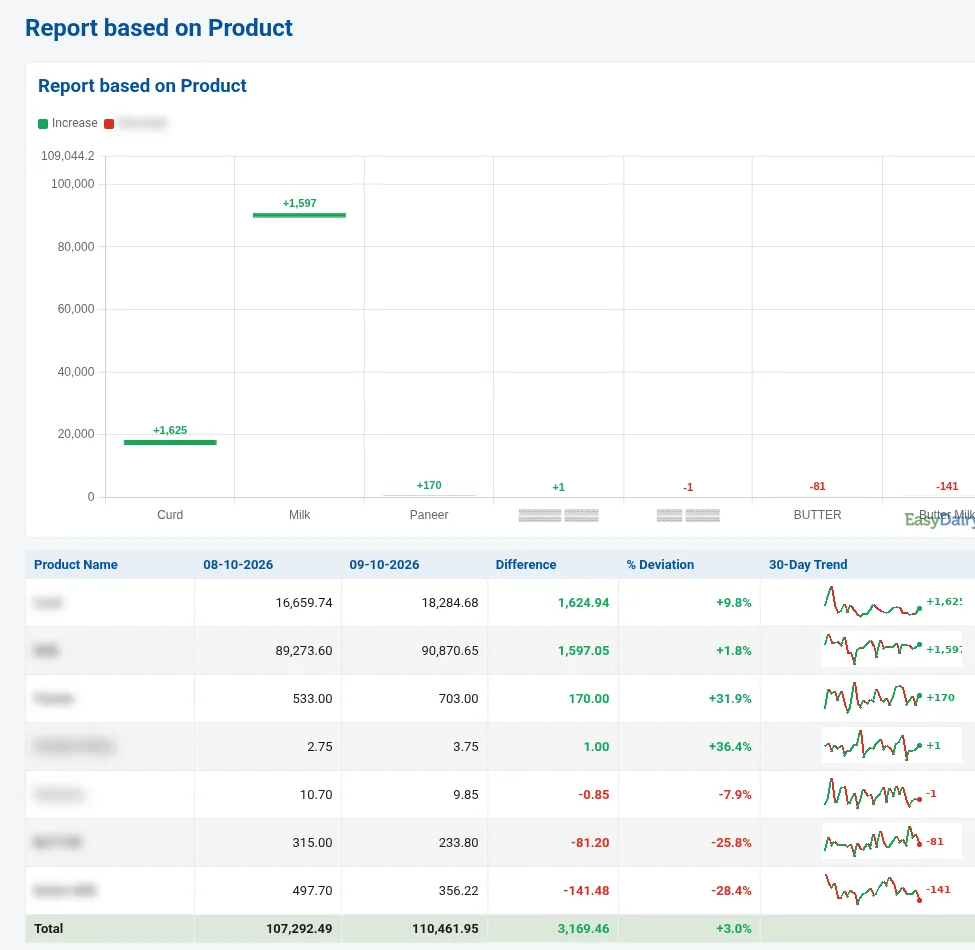
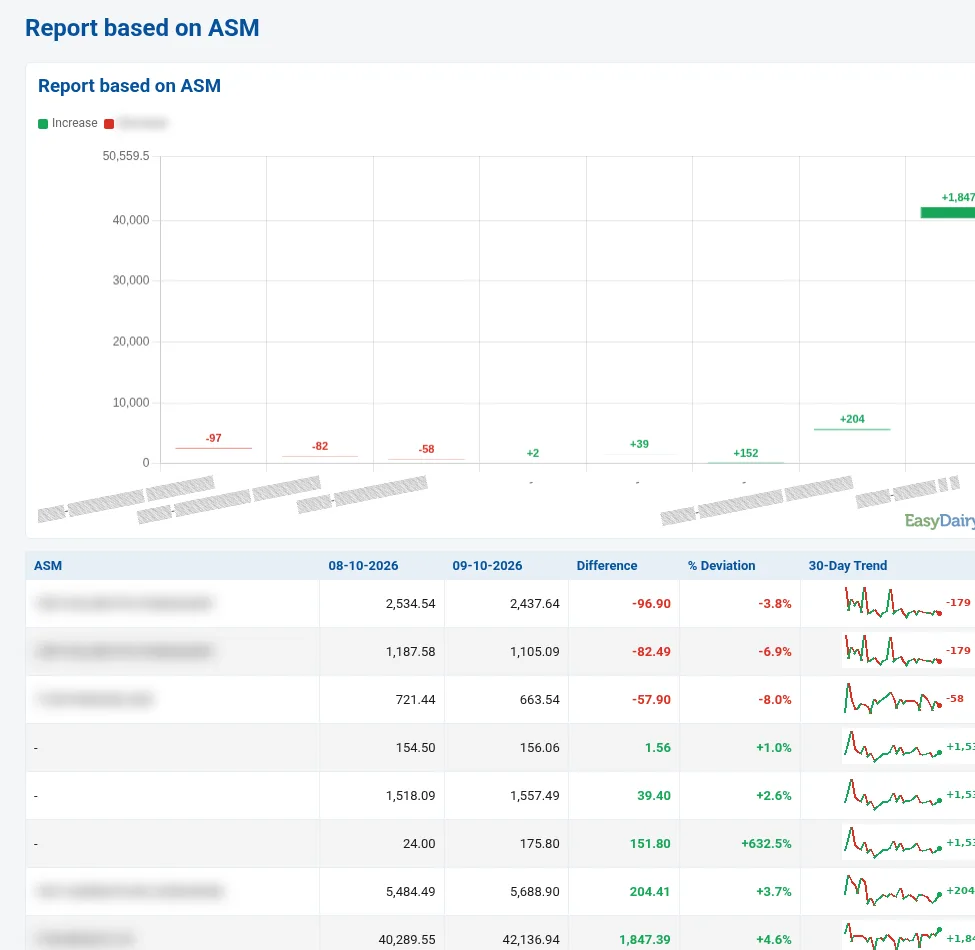
Sales Trend Change Report

Compares any two days of sales and drills from the dock down to the route, customer type, product, variety, variant and each level of the sales team, with a 30-day trend on every line.

Who uses it: Sales head, ZSM, RSM, ASM and ASO, the marketing team and the MD

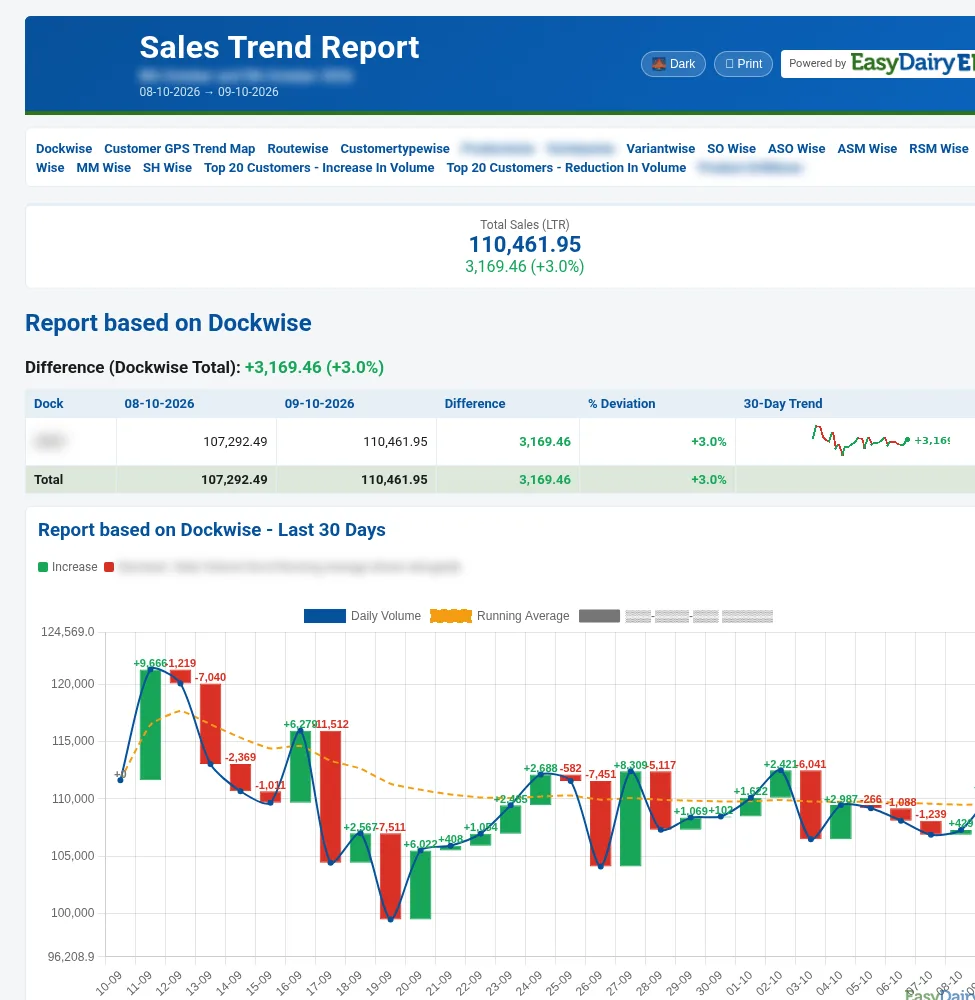
Sales Trend Change Report: Dock-wise comparison and the 30-day sales chart
Dock-wise comparison and the 30-day sales chart

What it shows

  • Total sales for the day with the change against the comparison day
  • Dock-wise comparison and the last-30-days chart: daily volume, running average and day-over-day change
  • Last 10 days, day by day
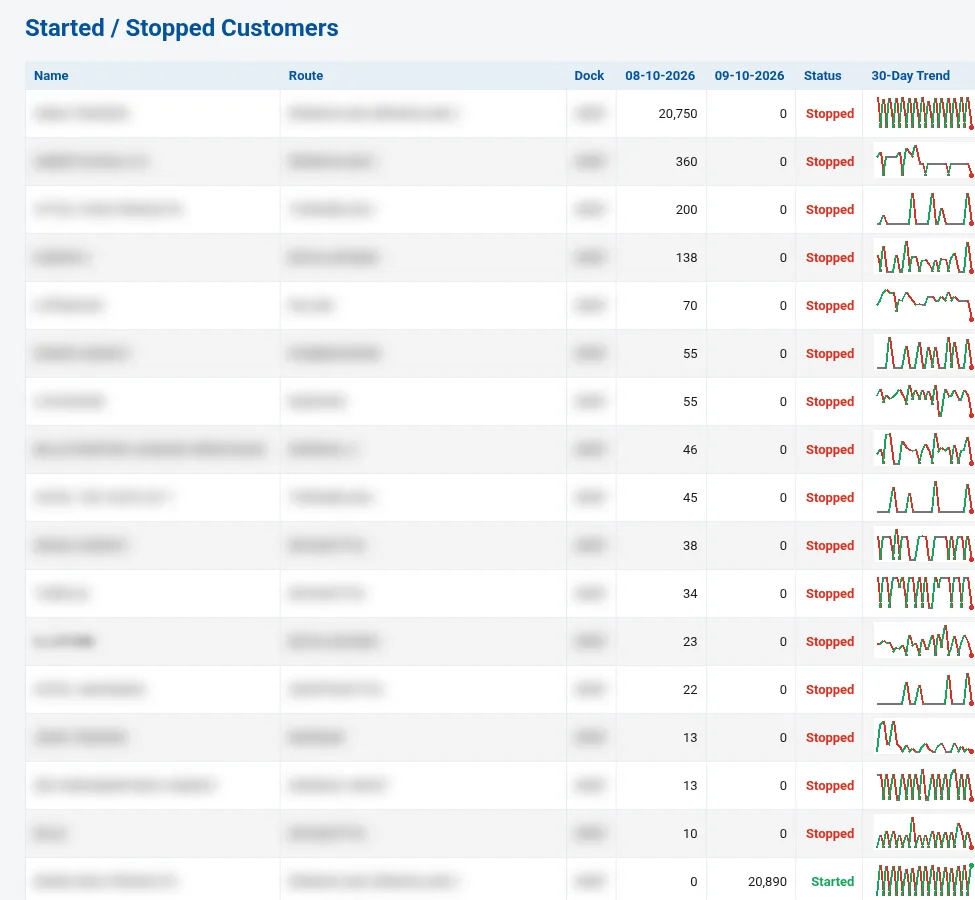
  • Started / stopped customers, with route, dock and a 30-day trend for each
  • Customer GPS trend map
  • Route-wise and customer-type-wise comparisons
  • Product, variety and variant comparisons, with the top 20 customers by increase and by reduction for each product
  • Sales team views: SO, ASO, ASM, RSM, ZSM, MM and SH, each with their own comparison and trend

Decisions it supports

  • Which customers stopped buying yesterday and need a call today
  • Which products and variants are losing volume, and on which routes
  • Which members of the sales team need support
  • Whether a change is a one-day blip or a 30-day trend
Sales · Every morning, for the previous day

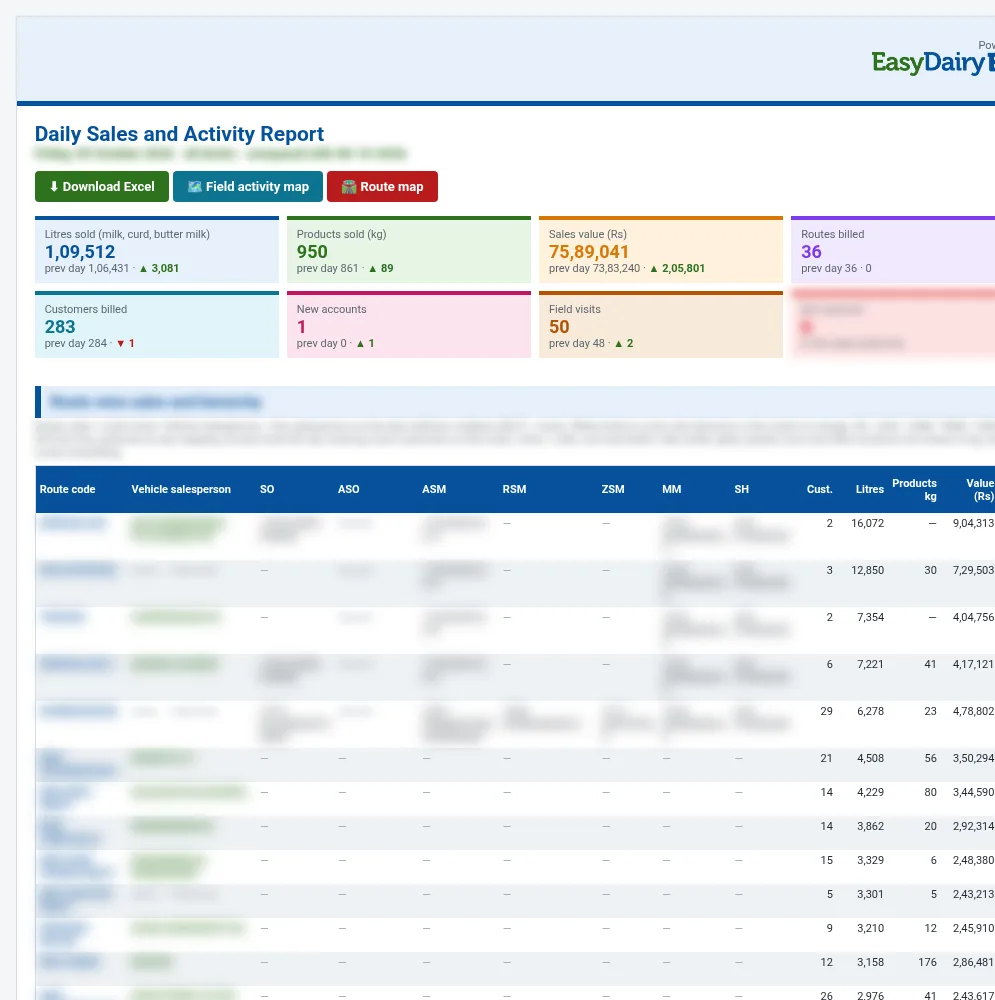
Daily Sales and Activity Report

Yesterday’s sales and yesterday’s field work in one report: volume, value, routes and customers against the day before, the full sales hierarchy for every route, route lengths and overlaps, and every visit the team made.

Who uses it: Sales head, regional and area managers, logistics and the MD

Daily Sales and Activity Report: Daily tiles and route-wise sales with the hierarchy
Daily tiles and route-wise sales with the hierarchy

What it shows

  • Headline tiles: litres sold, products sold in kg, sales value, routes billed, customers billed, new accounts, field visits and people not reported
  • Route-wise sales and hierarchy: the vehicle salesperson and the SO, ASO, ASM, RSM, ZSM, MM and SH for every route, with litres, kg and value
  • Route length from the dock to every invoiced customer and back
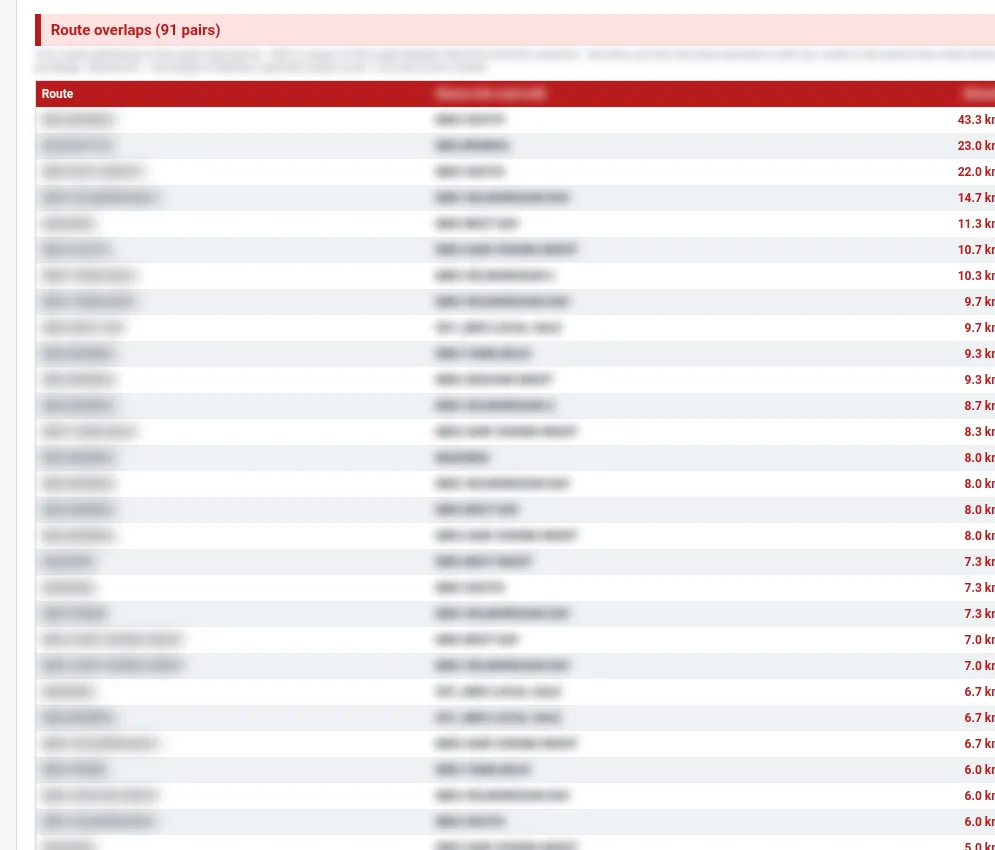
  • Route overlaps: pairs of routes that serve the same area
  • Route map, route trips and new accounts
  • Field activity map and field activity by person: first visits, second visits, meetings and tasks
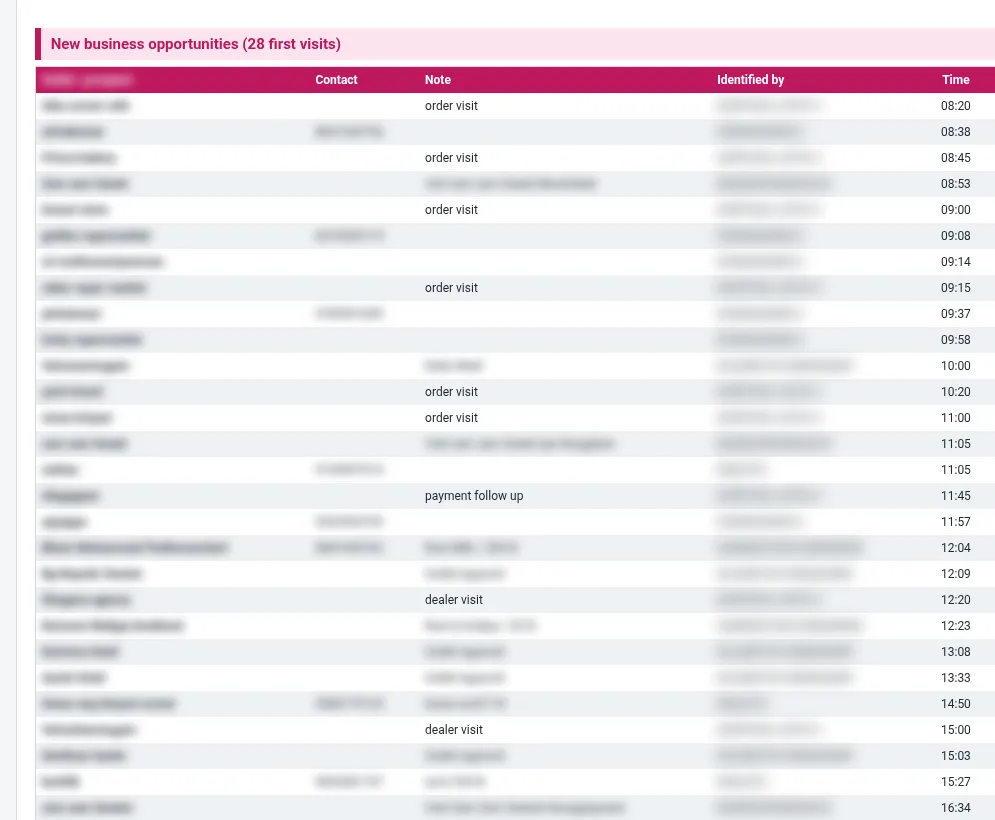
  • New business opportunities from first visits, with the note and who identified them
  • Members of the sales hierarchy who did not report
  • One-click Excel download

Decisions it supports

  • Which routes to merge or re-plan where they overlap
  • Which new outlets to follow up from yesterday’s first visits
  • Who in the team is visiting the market and who is not reporting
  • Which routes moved most against the day before
Sales · Monthly, with a 13-month trend

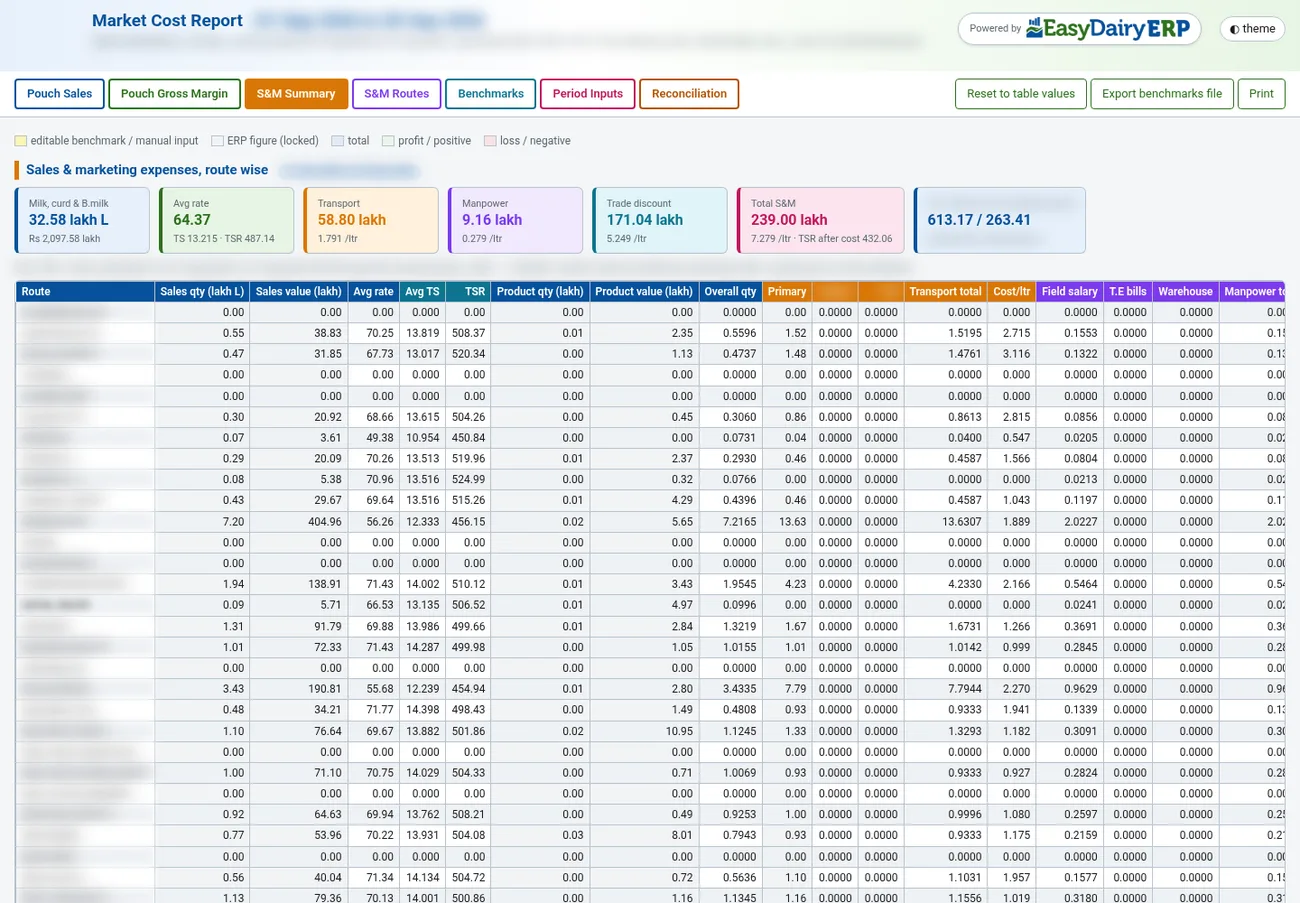
Market Cost Report

The monthly cost-to-serve view of the market: pouch sales by depot group, the gross margin of every pouch variant, and sales and marketing expenses route by route, built from ERP figures plus your own benchmarks.

Who uses it: The MD, the CFO, the sales head and the costing team

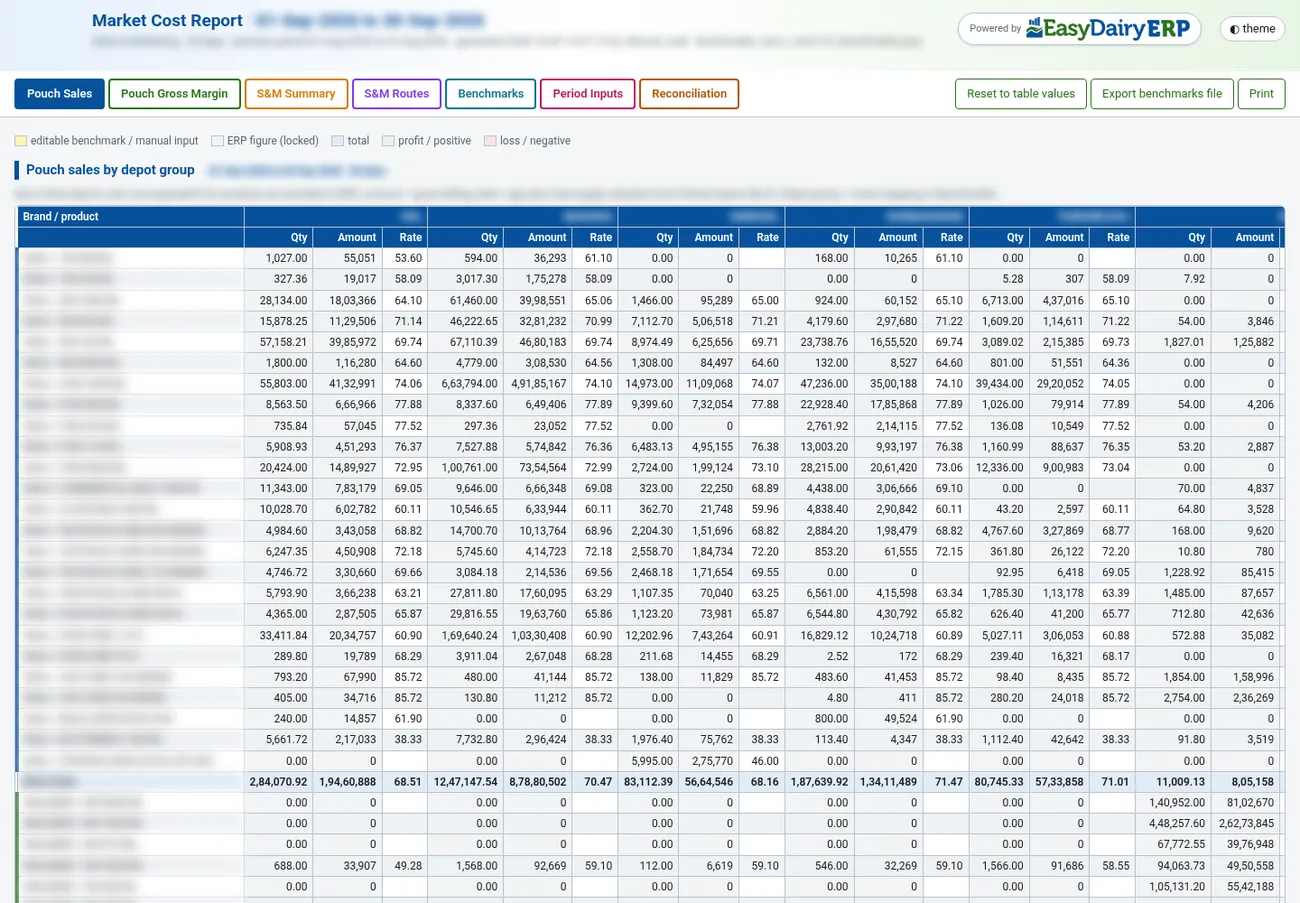
Market Cost Report: Pouch sales by depot group
Pouch sales by depot group

What it shows

  • Pouch sales by depot group: quantity, amount and rate for every brand and product
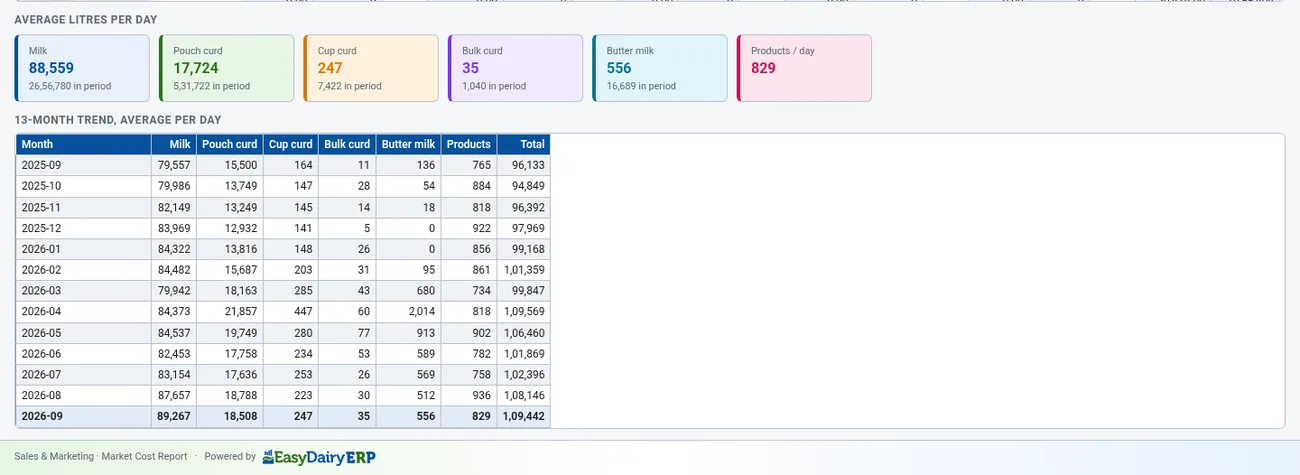
  • Average litres per day for milk, pouch curd, cup curd, bulk curd, butter milk and other products, with a 13-month trend
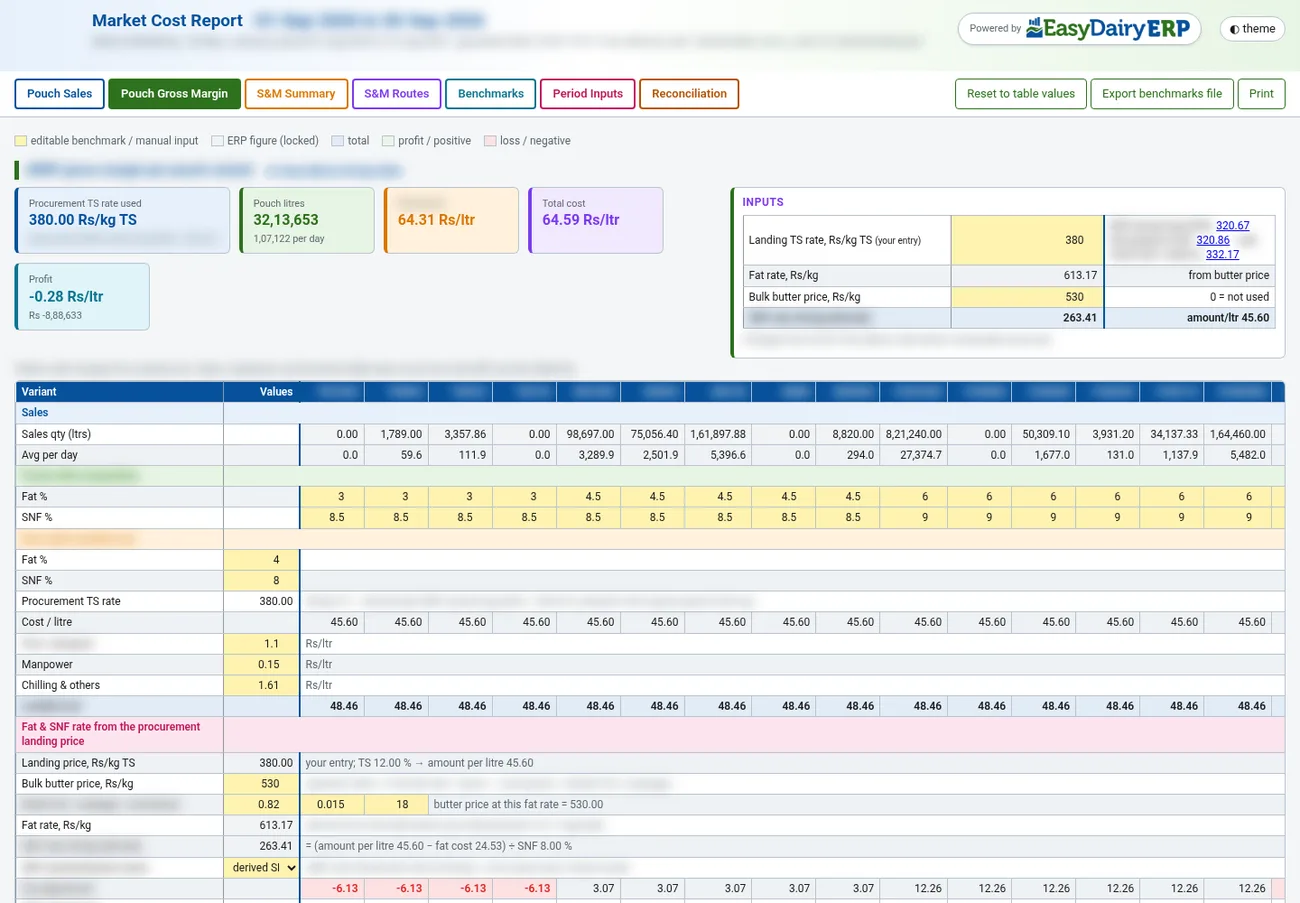
  • Pouch gross margin per variant, from the procurement TS rate, fat and SNF, landed cost, overheads and packing
  • S&M summary: sales and marketing cost per litre, with transport, manpower, trade discounts and other heads
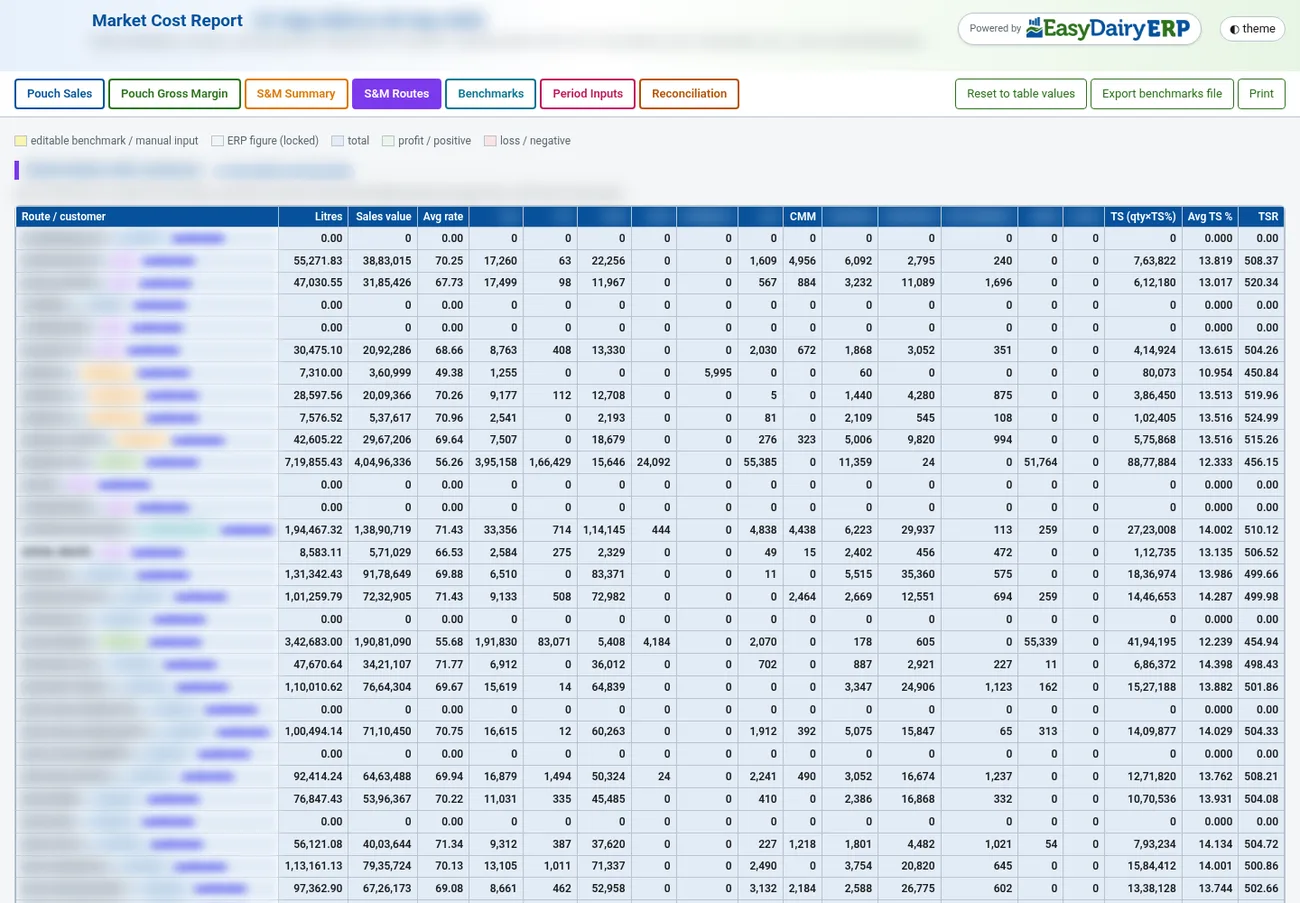
  • S&M routes: expenses route by route, and route blocks with their customers
  • Benchmarks and period inputs you can edit, with manpower taken from processed HRMS salaries
  • Reconciliation and sources: totals, discounts by type and variants sold but not yet mapped
  • Export the benchmarks file, reset to ERP values, print

Decisions it supports

  • Which pouch variants and depot groups earn the most and the least margin
  • Which routes cost too much to serve for the volume they carry
  • Where to change pricing, discounts or route plans
  • How this month compares with the last 13

The reports, in depth

These reports are what EasyDairyERP adds that a generic ERP does not: they compare, rank and map the dairy’s own data every day and mail it to the people who act on it. Company, route and customer names are blurred in the pictures; the figures are real.

On this page
Procurement

ProcurementProcurement Trend Change Report

Compares any two days of procurement from the plant down to the route, centre and vendor type, with a 30-day trend on each line and the routes and centres that changed most. It is mailed daily.

It shows where milk was gained or lost overnight, so the procurement team calls the right centres first.

Plant-level comparison
Route-wise
Route-wise
By vendor type
By vendor type

ProcurementDaily Procurement and Activity Report

Arrives before the day starts with the previous day’s procurement and the field team’s activity: route kilometres against approved kilometres, the field map and possible issues to look at.

Supervisors see both the milk and the effort behind it.

Daily procurement summary
Routes vs km
Routes vs km
Possible issues
Possible issues
Sales

SalesSales Trend Change Report

Compares any two days of sales by dock, route, ASM, customer type, product and variant, with a 30-day trend and started and stopped customers.

Lost and new customers are visible the next morning.

Dock-wise
Dock-wise
By ASM
By ASM
Started and stopped
Started and stopped

SalesDaily Sales and Activity Report

Sales and field activity together: the field map, route overlaps and new opportunities.

It shows where the sales team spent its time and where routes could be reorganised.

Daily sales
Daily sales
Route overlaps
Route overlaps
New opportunities
New opportunities

SalesMarket Cost Report

Sales and marketing cost by route, the summary and trend, and pouch sales against pouch gross margin.

Management sees which routes and products carry their cost.

Summary
Summary
By route
By route
Pouch gross margin
Pouch gross margin
Stores

StoresIMS Weekly MRM Report

The stores review for the weekly management meeting: consumption variance, price variance, least consumed items, stock runway alerts and PO status.

Stock-outs and price drift are caught a week at a time.

Consumption variance
Price variance
Price variance
Stock runway
Stock runway

Keep exploring at your own pace

Every module page walks through the screens, reports and mobile apps in the same way, so you can see exactly how EasyDairyERP fits your dairy.

When you have seen enough, we are happy to show it to you live on our sample data: book a demo or call +91 94880 59495.

Continue with the full module tourEasy Procurement | Milk Purchase SystemContinue the tour →